Quick answer
Most WhatsApp business bans are temporary, lasting 24 to 72 hours and sometimes up to 7 days, and clear on their own. Tap Request a review on the ban screen, or write once to WhatsApp support explaining what your business does and how the number is used. Do not buy a new SIM, reinstall repeatedly, or send outbound while the review runs.
- Most small business bans are temporary: 24 to 72 hours, sometimes up to 7 days.
- Submit one clear review request; repeat submissions and reinstall attempts add to the spam signal.
- Mass messaging and unsolicited outreach are the two most common triggers we see.
- Keep the number: a new SIM loses the history that protects you.
A WhatsApp Business number ban is one of the worst things that can happen to a small business whose customers live on WhatsApp. One day your inbox is full of customer enquiries; the next, "You can't use WhatsApp on this phone. The number is not allowed to use WhatsApp."
We've seen this happen to people running everything from artisan-food brands to dental clinics to fashion DTC. Here's a practical playbook for what to do — and what won't help.
First, understand which kind of ban you have
There are two:
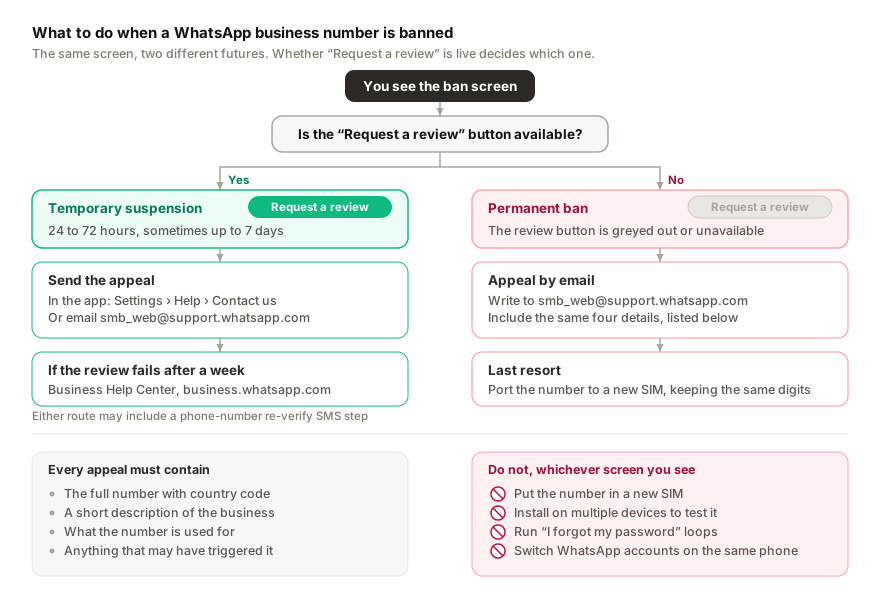
1. Temporary suspension (24-72 hours, sometimes up to 7 days). You see "Your phone number is banned from using WhatsApp" with a "Request a review" button. Often triggered by mass messaging, unsolicited outreach, or being reported by recipients.
2. Permanent ban. Same message, but the review button is greyed out or unavailable. Usually only happens after multiple violations or for using clearly abusive automation (mass spam, fake-number rings).
Most SMB bans are temporary — even if it doesn't feel like it on day one. Don't panic-buy a new SIM.
What should you do in the first hour after a ban?
Open WhatsApp Business → Settings → Help → Contact us. Briefly describe what happened and ask for the ban to be reviewed. Be specific about what your business does. Avoid blaming the algorithm — write in normal human English. "I run a small dental clinic in KL. My WhatsApp Business number was suspended this morning. I use it to answer patient enquiries about appointments. Please can you review and reinstate access."
If you can't access the "Contact us" form, email smb_web@support.whatsapp.com with:
- Your full WhatsApp Business number (with country code)
- A short description of your business
- A short description of what you use the number for
- Anything specific that may have triggered the ban (a single bulk send, a new automation tool, getting reported)
Don't repeat-submit. One clear email beats five panicked ones.
What NOT to do
- Don't buy a new SIM and start over. You'll lose your reputation, customer threads, broadcast lists, and Business Profile. Try the review first.
- Don't install WhatsApp on multiple devices to "test" if it's banned. Each install attempt against a banned number gets flagged.
- Don't try to log in via "I forgot my password" loops. This burns goodwill with the appeals system.
- Don't switch to a different WhatsApp account on the same phone in a panic. This compounds the signal that your phone is associated with abuse.
What usually gets the ban reversed
- A specific, business-focused appeal email (see above)
- Demonstrating that you're a real business — easy if you have a verified Business Profile, harder if you don't
- Time. Most temporary suspensions auto-clear in 24-72 hours regardless of your appeal
- Cooperating with any verification step they ask for (usually a phone-number re-verify SMS)
What triggers a WhatsApp business number ban?
Honest list, ranked by how often we see it:
- Mass messaging. Sending the same message to >50 contacts in a short window. The threshold is fuzzy and gets stricter for new numbers.
- Unsolicited outreach. Messaging people who didn't opt in or whose number you scraped from a list. Even one report can trigger.
- Abusing the unofficial WhatsApp API. Running scripts that connect via WhatsApp Web's underlying protocol to send bulk messages. Easy to detect, gets banned fast.
- Multiple device pairs on suspicious patterns. Pairing the same number to many devices in a short window, especially across geographies.
- Repeated user reports. If many recipients tag your messages as spam, the ban accumulates.
Preventing it next time
Don't send bulk messages from a single number. WhatsApp is fundamentally a 1:1 conversation channel. If you need to reach a list, use email or SMS with proper opt-in flows.
Don't message people who didn't opt in. Even if their number is public, even if they "should be interested" — they'll report you.
Use the WhatsApp Business API for bulk if you genuinely need it. The Business API exists exactly for this: Meta charges per delivered template message and you stay compliant. It's expensive, but it doesn't get you banned.
For 1:1 automation, use a tool that runs as a linked device. Tools like Replai pair to your existing WhatsApp Business number as a linked device (the same way WhatsApp Web does). Customer messages get auto-answered, but you're not sending unsolicited outreach — you're responding to inbound. This pattern doesn't typically trigger bans because it mirrors normal WhatsApp use.
What if the ban sticks?
If review fails after a week and you genuinely think it was wrong:
- Escalate via the Business Help Center at business.whatsapp.com — submit a formal ticket with your business info.
- If you've published your WhatsApp number on social media + your website, include those public links as evidence you're a legitimate business.
- As a last resort, port your number to a new SIM (keeping the same digits) — sometimes a fresh device-pair sequence helps.
If none of that works, you're likely looking at a new number. Communicate the change clearly to your customer base via every other channel you have (Instagram, email, signage if you have a physical location). Document the new number in your Google Business profile and on your website.
The boring truth
The fastest way to never deal with this is to use WhatsApp the way it's designed: 1:1 conversations with people who reached out to you. The minute you treat it like a broadcast channel, you're inviting the ban-hammer.
If you want WhatsApp automation that respects this pattern — auto-answer inbound questions, capture leads, flag urgent issues for humans — that's what Replai is built for. No bulk messaging surface, no scraped lists, no unsolicited outreach. Just better handling of the customers who already messaged you.
Related
- WhatsApp Business API vs WhatsApp Business App
- Why we built Replai because of our own inbox problem
- Will WhatsApp ban your number for using a chatbot?
- WhatsApp broadcast limits per hour and per day
- How to send a WhatsApp broadcast with a photo
Frequently asked questions
How do I appeal a WhatsApp ban on my business number?
- Open WhatsApp on the phone, tap 'Request a review' on the ban screen, and write a short, honest explanation of how you use the number and that you will comply with the terms. Reviews are answered in the app, usually within a few days. Do not create a new account on the same number while a review is pending.
How long does a WhatsApp temporary ban last?
- Usually between a few hours and a few days, shown as a countdown on the ban screen. Repeated temporary restrictions escalate, so treat the first one as a signal to change behaviour: stop bulk sends, slow the bot down and keep it to inbound.
Should I switch the chatbot off after a restriction?
- Yes, until the restriction lifts and for a day or two afterwards. When you reconnect, switch the bot to new conversations only, let it answer inbound at a normal pace, and hold off on broadcasts for at least a week. That is the pattern that keeps a recovered number healthy.
Can I move my business to a new number to avoid the ban?
- You can, but a fresh number that immediately runs a bot at volume is the exact pattern WhatsApp flags. If you must, warm the new number up with ordinary manual use for one to two weeks before pairing anything, and keep the old number's appeal running in parallel.
Sources
- WhatsApp Business Platform pricing, Meta for Developers, 2025-07-01
- WhatsApp Business app, Meta, 2026-09-08
Keep reading
Article
WhatsApp Business account restricted: what it means, what still works and what to do
Article
WhatsApp Business account under review: what it means and how long it takes
Article
WhatsApp Coexistence: can the app and the Cloud API share one number?
Tutorial
How to run more than one WhatsApp number from one workspace
See it answer your own customers.
Pair your number, paste in what you know, and message it from another phone. Ten minutes, no card.