Quick answer
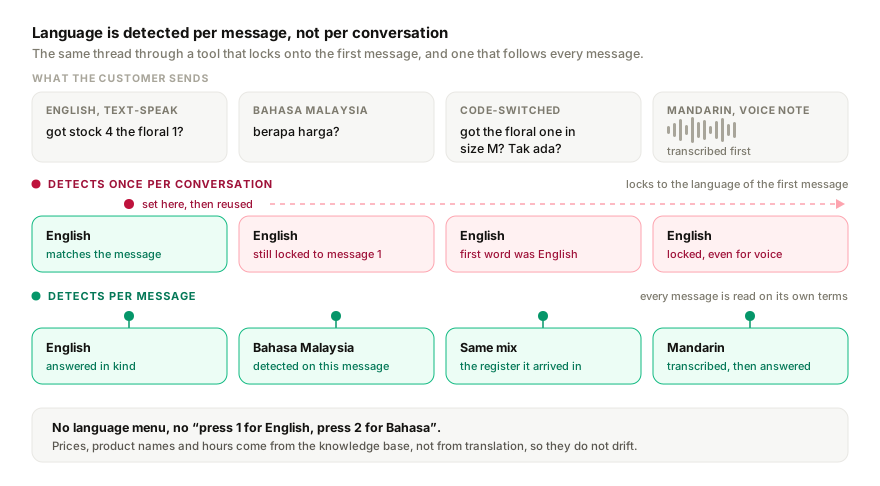
A multilingual WhatsApp bot has to detect language per message, not per conversation, so a customer who switches mid-thread is still answered in kind. It should reply to mixed-language messages in the register they arrive in, transcribe voice notes in each language, and ask again rather than guess. Write the knowledge base once and let the bot translate at reply time.
- Detect language per message, not per conversation; customers switch mid-thread.
- Write the knowledge base once, in your strongest language, and let replies translate.
- Test with ten real messages, including a voice note and one mixed-language line.
- Keep product names, prices and hours in the knowledge base so translation cannot drift.
If you run an SMB in Malaysia, Singapore, Indonesia, or the Philippines, your WhatsApp customer messages don't come in one language. They come in all the languages, mixed inside the same message. "Hi do you have stock for the ungu one? berapa harga?" is a real customer message from a Malaysian fashion brand. Half English, half Bahasa, one product question, sent at 11pm.
Most chatbot tools handle this badly. They either pick a language at the start and stick with it, or auto-translate every message and lose the casual register that customers actually use. Here's how to set up a multilingual WhatsApp chatbot that handles SEA-style messaging well — what to look for, what to avoid, and how to test it.
What does multilingual actually mean for a WhatsApp bot?
There are three different problems hidden inside "multilingual":
- Language detection — figuring out what language a message is in
- Code-switching — handling messages that mix languages mid-sentence
- Cultural register — answering in the right level of formality / casualness for that language
Most tools handle (1) okay, struggle with (2), and ignore (3) entirely.
A bot that auto-translates "berapa harga" to "what price" and replies in formal English misses the entire vibe of a Malaysian Whatsapp conversation. The customer wrote casually in mixed languages — they're not expecting a translated AT&T-style reply.
What should you look for in a multilingual WhatsApp bot?
Voice is not a niche input to test last. WhatsApp users send about 7 billion voice messages a day on average (WhatsApp, 2022), and they arrive in whichever language the customer is most fluent in, which is rarely the one your knowledge base is written in. Transcription that only works in English quietly drops a large part of the inbox, so make it the second thing you check.
1. Per-message language detection (not session-level)
Most tools detect language once per session and lock to that for the rest of the conversation. That breaks SEA messaging because customers freely switch. A customer might message in English at first, then switch to Bahasa when they're frustrated, then back to English with a question.
What to ask: "Does your tool detect language per message, or per conversation?" If it's per conversation, ask if there's a way to reset detection mid-thread.
2. Native handling of mixed-language input
A message like "got the floral one in size M? Tak ada?" should not be:
- (Bad) auto-translated to "do you have the floral one in size M? Don't have?" (loses register)
- (Bad) replied to entirely in English just because the first word was English
- (Bad) refused to answer because "language could not be confidently detected"
It should be: answered in the same mixed register, or in whichever language carries the actual question. The reply could be "yes the floral one in M is in stock! RM 89, can ship today if you order before 3pm."
What to ask: "Show me an example of how your bot answers a mixed-language message — copy/paste a real SEA customer message and show me the reply."
3. Voice-note transcription in non-English languages
A surprisingly large chunk of SEA WhatsApp messages are voice notes. Especially from older customers, customers who type slowly, or anyone driving / cooking / multitasking. The voice notes are usually in the customer's most fluent language — typically Bahasa, Tamil, or Mandarin for Malaysian customers; Bahasa Indonesia for Indonesian; Tagalog for Filipino.
A chatbot that can transcribe English voice notes but not Bahasa ones loses 30%+ of the value.
What to ask: "Does your transcription work for Bahasa Malaysia voice notes? Mandarin? Tagalog?" If they say "we support voice notes" without naming languages, push for specifics.
4. Honest fallback when uncertain
The worst thing a multilingual chatbot can do is hallucinate confidently in the wrong language. Better: "sorry, can you tell me again — were you asking about the floral M or another colour?"
What to ask: "What does your bot do when it's not 100% sure what the customer asked? Show me an example."
Setting it up: a 10-minute playbook
If you're using a tool that handles all four things above (Replai is built around this, but other tools may also work), here's how to set it up for a typical Malaysian SMB.
Step 1: Decide your supported languages
Don't try to cover everything. Pick 3-4 you actually have customers in. For most Malaysian SMBs: English, Bahasa Malaysia, Mandarin (simplified). Add Tamil if you have a Tamil customer base; add Cantonese if you're in KL or Penang.
For Singaporean SMBs: English, Mandarin, Malay, Tamil. For Indonesian: Bahasa Indonesia, English, Mandarin. For Filipino: Filipino (Tagalog), English, Cebuano.
Step 2: Add your business knowledge in your primary language
Drop your menu, services, pricing, hours, location into a Google Doc — in whichever language you'd describe them most naturally. You don't need to translate your knowledge into every supported language. A good multilingual bot reads English-only source material and answers in whatever language the customer asked in.
This is counter-intuitive — many tools require you to maintain parallel versions of every doc. Don't go down that path; it's a maintenance nightmare.
Step 3: Add language-specific phrasing tweaks where it matters
Where you DO want language-specific control is in politeness markers and common cultural phrases. Examples:
- For Bahasa Malaysia replies, the bot should know to use "boleh" / "ok" casually, not always default to formal "silahkan"
- For Mandarin replies, the bot should default to traditional or simplified depending on your audience (most KL audiences read both; Singapore tends simplified; older customers may prefer traditional)
- For mixed-language replies, the bot should pick up local terms like "tapau" (Malaysian for takeaway) and respond appropriately
Most tools let you add a "tone + style" instruction in the system prompt. Use it.
Step 4: Test with real messages
This is the most important step and the one most people skip. Take 10 real customer messages from your inbox (anonymise them if you want), paste them into the bot, and read the replies.
Specifically test:
- A pure English message
- A pure Bahasa / Mandarin / Tagalog message
- A code-switched message
- A voice note in the non-English language
- A message with a typo / abbreviated text-speak ("got stock 4 the floral 1?")
- A photo of a product with "ada yang ini?"
If 2/10 replies are wrong, that's normal — fix the source material and retest. If 5/10 are wrong, the tool's multilingual handling isn't ready for SEA traffic.
Step 5: Watch the first week of real traffic
Even after testing, watch your first week of real customer interactions actively. Reply to anything the bot gets wrong, and update your source docs based on the patterns. Most multilingual issues surface in the first 50-100 real conversations.
Common multilingual mistakes (avoid these)
Translating every product description. Wastes time, creates maintenance debt. A good bot reads English source material and answers in the customer's language.
Hard-coding language detection by phone number prefix. A Malaysian number can message in any language. Don't assume.
Using Google Translate as a fallback layer. It's better than nothing but loses register badly. Modern LLMs do this natively much better.
Forcing customers to "press 1 for English, press 2 for Bahasa". Adds friction, defeats the point of WhatsApp's conversational UX.
Treating "we support 50+ languages" as a quality signal. What matters is whether the tool handles your specific languages well — including code-switching and voice. Quantity is irrelevant.
A quick reality check
Test any tool's multilingual handling with this exact message — paste it into their demo or trial:
Hi, got time today ah? Mau check what time you open. Saya nak datang around 3pm with my mom, she sit on wheelchair, can or not? Got parking ke?
A good multilingual bot replies with something like:
Hi! Yes we're open today till 7pm. 3pm is fine — we have wheelchair-accessible parking right at the front entrance, and our shop is on the ground floor so no stairs. See you and your mom then 🙂
A bad multilingual bot replies in stilted full English, ignores the wheelchair question, or asks the customer to "please write in one language".
Try this message on your current bot (or any one you're evaluating). The reply tells you more than any pricing page.
Which languages a WhatsApp AI bot should handle in 2026
The test is not "how many languages does the marketing page list" but whether the bot switches per message and understands voice notes in each. Replai's coverage, all detected automatically:
| Region | Languages handled per message, text and voice |
|---|---|
| Southeast Asia | English, Bahasa Malaysia, Bahasa Indonesia, Mandarin, Tamil, Thai, Vietnamese, Tagalog |
| South Asia | Hindi, Urdu, Bengali, Tamil, English |
| Middle East and North Africa | Arabic including Darija and Gulf dialects in voice notes, French, English |
| Europe and Latin America | Spanish, Portuguese, French, Italian, German |
Mixed-language messages ("do you have stock for the ungu one? berapa harga?") are answered in the mix the customer used. Prices, product names and hours come from your knowledge base, not from translation, so they do not drift.
Related
- WhatsApp Business API vs WhatsApp Business App
- What does WhatsApp Business API actually cost in 2026?
- WhatsApp for restaurants in Malaysia
- WhatsApp for clinics in Malaysia
- WhatsApp customer service in Arabic and French: Darija voice notes
- Running a health helpline on WhatsApp
Frequently asked questions
Can a WhatsApp chatbot reply in the customer's language automatically?
- Yes, if it detects language per message rather than per conversation. A good multilingual bot answers 'berapa harga?' in Bahasa, the next message in English in English, and a Mandarin voice note in Mandarin, without a language menu. Replai auto-detects per message, voice notes included.
Which languages does Replai support on WhatsApp?
- Any major language: English, Bahasa Malaysia, Bahasa Indonesia, Mandarin, Tamil, Hindi, Arabic, French, Spanish, Portuguese, Vietnamese, Thai, Tagalog and more. Detection is per message and covers voice notes, and customers can switch language mid-conversation.
How do I test a multilingual WhatsApp bot?
- Send it the ten messages you actually receive, including mixed-language ones like 'do you have stock for the ungu one? berapa harga?', a voice note in each language, and a message that switches language halfway. Check that answers match the language of each message and that prices and hours come from your knowledge base, not translation.
Does the knowledge base need to be written in every language?
- No. Write it once in the language you are most accurate in and let the bot translate at reply time. Keep proper nouns, product names and prices exactly as customers see them so they survive translation. Add a few local phrases in the system prompt if the register matters.
Sources
- Making voice messages better, WhatsApp, 2022-03-30
- About WhatsApp, WhatsApp, 2026-09-07
Keep reading
See it answer your own customers.
Pair your number, paste in what you know, and message it from another phone. Ten minutes, no card.