Quick answer
Open the conversation and press Take over, and the bot stops answering that thread. You can also just reply from your phone: the bot notices a human reply and stands down on its own for as long as your auto-reply rules say. Give it back with the button on the thread.
- Replying from your phone is enough. You do not have to remember to press anything.
- Take over is for stepping in from the dashboard before the bot answers.
- Notes are for the team and never reach the customer.
- Resolve a flag when you have dealt with it, so the list stays meaningful.
About 10 minutes
Before you start
- A connected number with live conversations
Most conversations do not need you. The ones that do are usually obvious, and Replai is built so that stepping in costs nothing and needs no ceremony.
The easiest way is to just reply
If you or a colleague answers a customer from the phone, the bot notices and stops answering that conversation. You do not have to open the dashboard, press anything or remember a rule.
This is the path most handovers actually take, and it is the reason the feature is worth trusting: it works when somebody grabs a phone in a hurry, which is when handovers really happen.
How long the bot stays out is the first setting under Settings, Auto-reply rules. The default is two hours, and the clock restarts every time a person replies.
Taking over from the dashboard
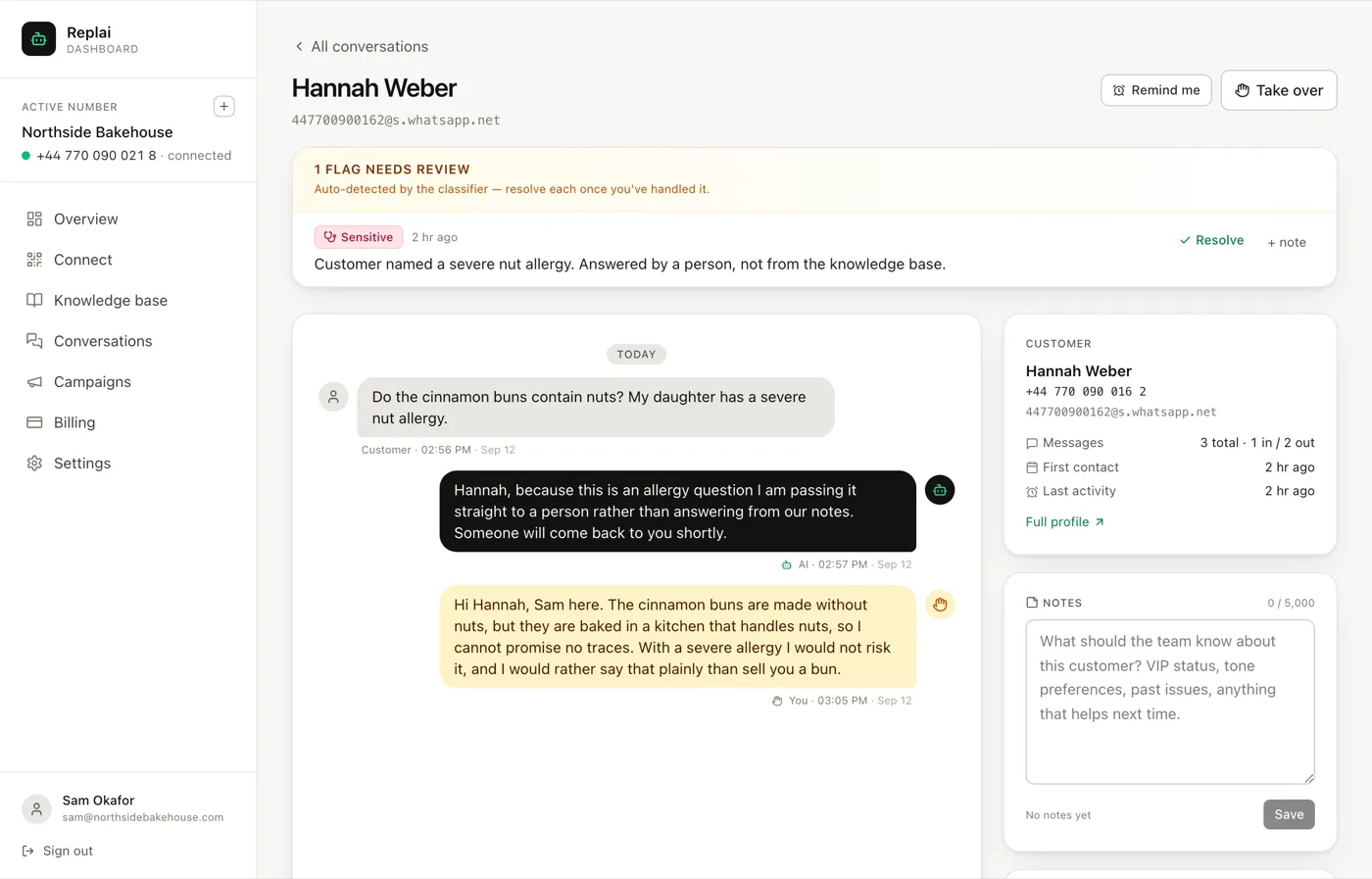
Take over stops the bot on that thread immediately. Use it when you can see a conversation going somewhere the bot should not follow, and you want to get in front of it rather than correct it afterwards.
The bubbles are colour coded, which matters more than it sounds. You can tell at a glance whether a reply came from the bot or from a colleague, which is the first question you have when you open a thread somebody else touched.
Notes are for the team
The notes panel sits beside the thread and attaches to the customer, not the conversation. Nothing there is ever sent.
This is the right place for the things that are obvious to whoever handled it and invisible to whoever handles it next: that they always collect on Saturdays, that last month's order went wrong, that they prefer a call.
Remind me
Snoozes the thread and brings it back later.
The use case is a conversation where the next move is not yours yet: you are waiting on a supplier, or a delivery, or somebody else's answer. Without it the thread sits in the list looking unhandled, and the cost of that is that the list stops meaning anything.
Flags, and resolving them
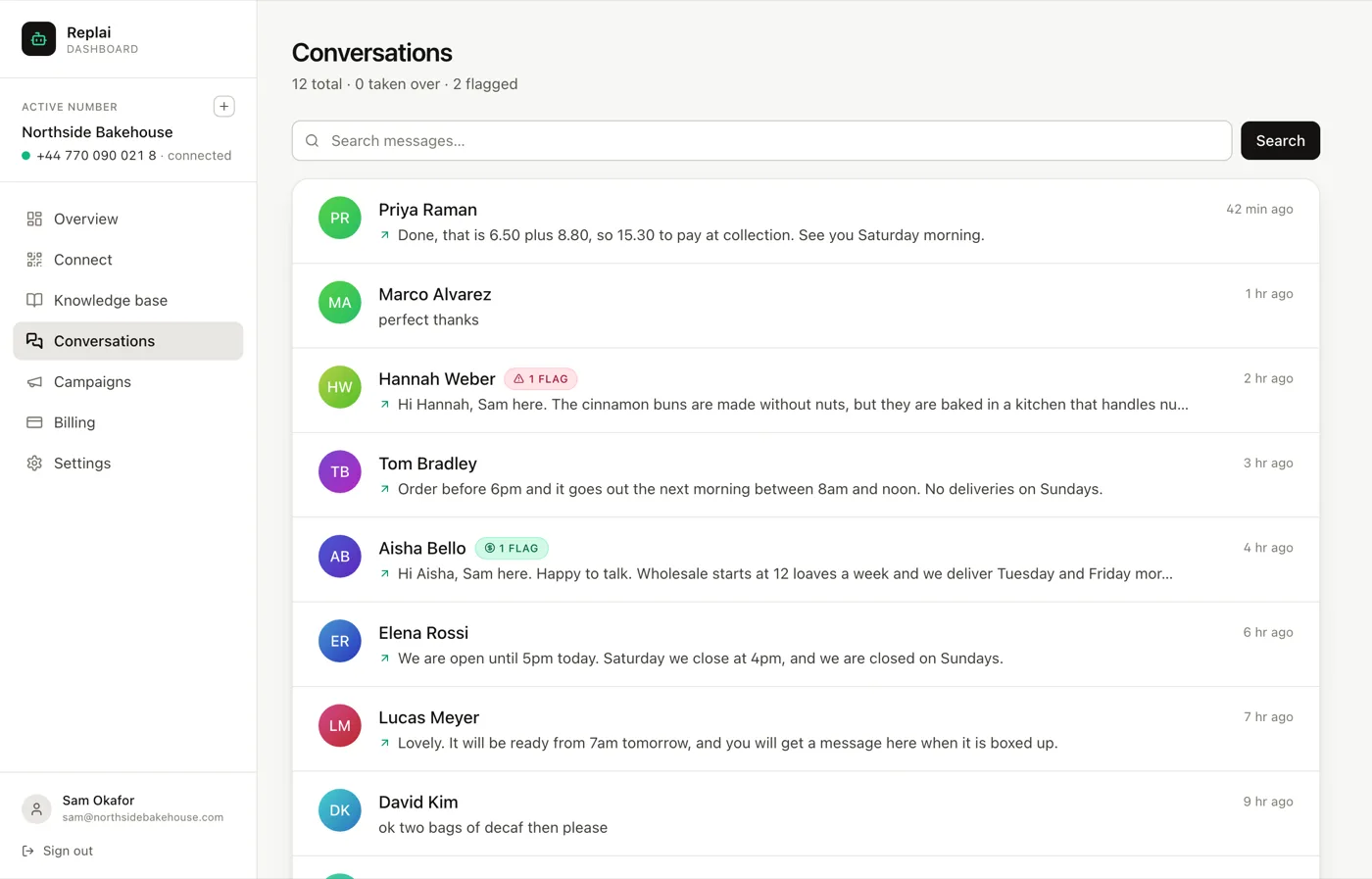
A flag is the classifier saying this one needs a person: a complaint, something sensitive, a real buying signal. The banner on the thread says which category and why.
Resolve it once you have dealt with it. This is the small discipline that keeps the feature working. An unresolved pile of old flags makes the count meaningless, and the count is the thing that tells you in one glance whether anything needs you right now.
If you disagree with a flag, resolving it is still the right move. It is a classifier, it will occasionally flag something harmless, and leaving those open to make a point only costs you the usefulness of the list.
The customer profile
The Full profile link beside the thread opens everything Replai knows about that person: their conversations, their orders if a store is connected, and your notes.
It is the view worth opening before replying to someone who sounds annoyed, because the reason is usually in there.
What to do next
The last piece is knowing what all this is costing: how conversations are counted, what happens at the cap, and when a top-up is the right answer.
Frequently asked questions
Do I have to press Take over before replying?
- No. Replying from your own phone is enough: the bot notices a human reply on the thread and stops answering it. Take over exists for the case where you are in the dashboard and want to stop the bot before it says anything, rather than after.
How long does the bot stay out?
- Whatever you set under Settings, Auto-reply rules. The default is two hours, with the clock restarting each time somebody replies, so a conversation you are actively working stays yours. The other options are a day, or never until you hand it back explicitly.
Can customers see my notes?
- No. Notes are internal, attached to the customer rather than the thread, and never sent. They are the right place for context that helps next time: a preference, a past problem, the fact that this is a regular.
What does Remind me do?
- Snoozes the thread and brings it back to your attention later. It is for conversations where the next step is not yours yet, like waiting on a supplier, and the alternative is leaving it looking unhandled in the list.
Should I resolve every flag?
- Resolve the ones you have handled. A flag left open after the work is done makes the count meaningless, and the count is the thing that tells you at a glance whether anything needs a person right now.
Keep reading
See it answer your own customers.
Pair your number, paste in what you know, and message it from another phone. Ten minutes, no card.