Quick answer
Open Settings, WhatsApp numbers, give the new line a name and its phone number, then press Add number and scan the QR with that phone. A line for the same business copies the first bot's prompt, model, office hours and reply setting; a line for a different business starts with standard instructions in its own name and no office hours. Plans allow a different number of lines.
- A line for the same business copies the prompt, model and office hours of the bot you added it from. A different business gets standard instructions in its own name and no office hours.
- Knowledge base and conversations are not shared. Each line has its own.
- Change number keeps a bot's history and settings and only swaps the phone behind it.
- Use separate lines for genuinely separate audiences, not to split one audience by topic.
About 10 minutes
Before you start
- A plan that allows more than one number
- The phone that owns the second number
One workspace can answer on several WhatsApp numbers. Whether it should is a different question, and worth asking before you add one.
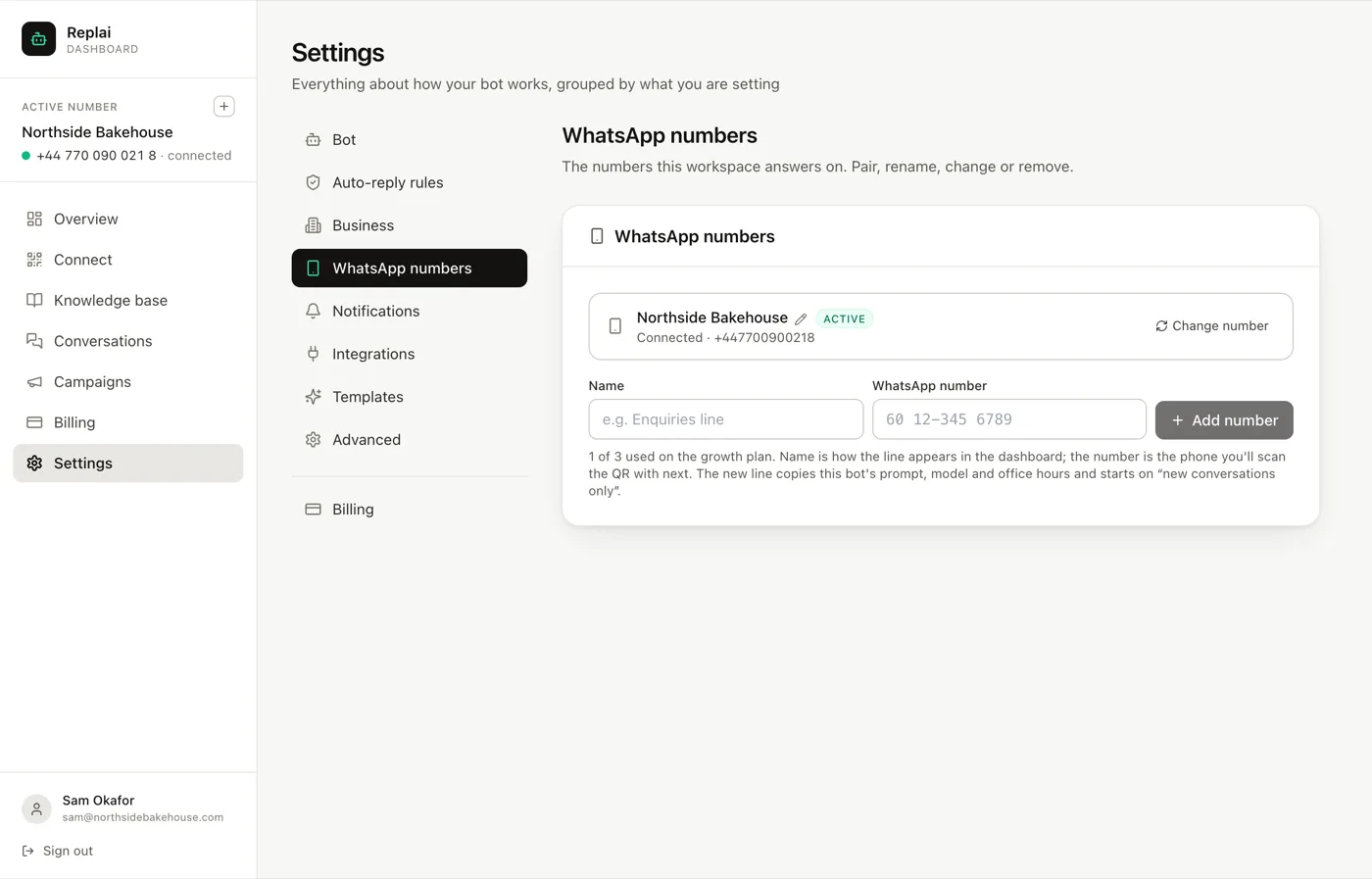
Adding a line
Settings, WhatsApp numbers.
The name is how the line appears in your dashboard, so name it after the job it does rather than after the number. The number is the phone you will scan the QR with next.
Above the fields, say who the line is for. The same business copies the instructions of the line you are on, so its assistant introduces itself the same way. A different business asks for that business's name and starts the line with standard instructions in it, rather than a copy that names the first business. It also starts without office hours, because the away message inside them speaks for the first business. The new line is the active one as soon as you add it, so you can edit its instructions under Bot, Instructions and model and set its hours under Business straight away.
Press Add number, and the new line goes into pairing exactly like the first one did. Scan its QR with that phone.
What it copies, and what it does not
A new line starts with the model and the reply setting of the bot you added it from. A line for the same business also gets its system prompt and office hours; a different business starts with standard instructions in its own name and no office hours.
It does not copy the knowledge base and it does not copy conversations.
For the same business, that combination surprises people. The new line sounds exactly like the first one and knows nothing, so its first few replies are confidently in your voice saying it will check with the team. Give it sources before pointing customers at it.
Separate knowledge bases are right when the lines are genuinely separate businesses. They are a maintenance cost when the lines are one business with two numbers, because every price change now happens twice. Worth weighing before you add the line.
Changing the number behind an existing bot
This is a different operation and the one people reach for the wrong tool to do.
Change number swaps the phone a line pairs with while keeping everything attached to it: the knowledge base, the conversations, the settings, the history. Use it when you are moving to a new SIM, or when the number changes hands internally.
Adding a new line and deleting the old one looks like the same thing and is not. It throws away everything the old line accumulated.
After a change, the line goes back into pairing and you scan with the new phone. Replai will warn you on the Connect page if the phone that scanned is not the number you said you were changing to, which catches the case where somebody grabs the wrong handset.
When more than one line is actually right
Genuinely separate audiences. A wholesale line and a retail line answer different questions, in a different register, with different prices. Two knowledge bases is correct there rather than a nuisance.
Separate brands under one owner, for the same reason.
Separate countries, where the language, the opening hours and the delivery terms all differ.
When it is usually wrong: splitting one audience by department. Customers do not know which number is for sales and which is for support, they pick the one they have, and the result is that both lines answer everything anyway while you maintain two of everything.
What to do next
That is the settings tour. The remaining guides cover running the thing day to day, starting with taking a conversation over from the bot.
Frequently asked questions
What does a new line inherit from the first?
- For the same business: the system prompt, the model setting, the office hours and the reply setting. For a different business: the model and reply settings only, with standard instructions in that business's name and no office hours, so neither its replies nor its away message speak for the first business. Neither kind inherits the knowledge base or any conversations, so a new line knows nothing until you give it sources.
Is the knowledge base shared between numbers?
- No. Each line has its own. That is right when the lines are genuinely different businesses and annoying when they are the same business with two numbers, because it means maintaining prices twice. It is worth thinking about before adding a line rather than after.
How do I swap the phone behind an existing bot?
- Use Change number on the line rather than adding a new one. That keeps the bot's history, knowledge base and settings and only swaps the phone it pairs with. Adding a new line and deleting the old one loses everything attached to it.
How many numbers can I have?
- It depends on the plan, and the tab shows your allowance as a count of used against allowed. If you need more than the top plan offers, that is a conversation rather than a setting.
Should I split by department?
- Usually not. Two numbers means customers have to know which one to use, and they get it wrong. Separate lines make sense for separate audiences, like a wholesale line and a retail line, or genuinely separate brands. Splitting one audience by topic mostly moves confusion onto the customer.
Keep reading
See it answer your own customers.
Pair your number, paste in what you know, and message it from another phone. Ten minutes, no card.