Orders
WhatsApp order updates for WooCommerce and Shopify, from your own number
Send order confirmations, shipping updates with tracking, pickup and refund messages on WhatsApp from the number your shop already uses. Follow up unpaid orders with a pay link and abandoned carts with a link that rebuilds the cart. No Meta API, no template approval, no per-message fees.
Growth plan and above. 7-day trial, no card. Test mode on until you switch it off.
Harbour Lane Bakery
Order update, sent from the shop's own number
In one paragraph
Connect a WooCommerce or Shopify store and Replai sends every customer a WhatsApp update from the shop's own number the moment an order is placed, paid, shipped or refunded, with tracking numbers filled in. Unpaid orders and abandoned checkouts get a follow-up with a link that brings the customer straight back to pay, and the same assistant that answers support questions handles the replies with the order already known. Nothing to approve with Meta, no per-message fees, and every message goes out at a human pace.
What it does, in your words
Six things shop owners say about their WhatsApp inbox, and what happens to each once the store is connected.
"Customers WhatsApp us asking where their order is"
The update goes out before they ask: order received, paid, shipped with the tracking number, ready for pickup, refunded. Replies land in the same inbox and the assistant answers them with the order already known.
"People choose bank transfer, then never pay"
A follow-up after a delay you choose, with a pay link that opens the order's own payment page on any device. It cancels itself the moment the order is paid.
"People add to cart and vanish"
The WooCommerce plugin remembers the cart once a phone number is typed at checkout and sends a link that rebuilds the exact cart on any device. Shopify sends its own abandoned checkouts.
"I sell on a marketplace too"
Orders that live only in a Google Sheet (Shopee, Lazada, TikTok Shop exports) are still looked up in chat. Automatic updates need the store connection.
"I am scared of getting my number banned"
Every message from a number goes out 5 to 10 seconds apart, shares an hourly and daily cap with campaigns, and waits instead of dropping when a cap is hit. Customers can reply STOP.
"I do not want to learn another dashboard"
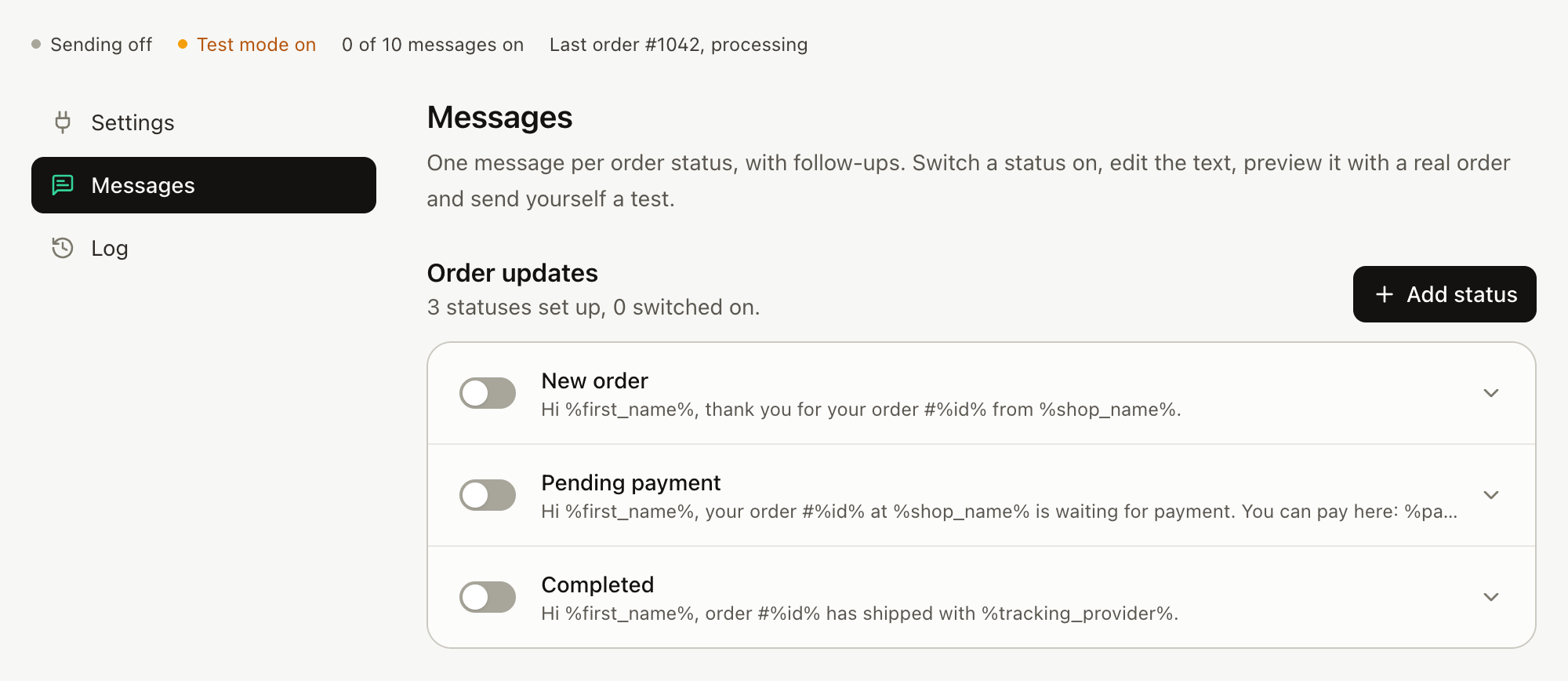
One page called Orders: pick the statuses you care about, edit the ready-made message, preview it on a real order, send yourself a test, switch it on.
How does it connect to the store?
- ReplaiPM plugin, free on WordPress.org. In WordPress, go to Plugins, Add Plugin and search for ReplaiPM, then paste the delivery URL and secret from the dashboard into WooCommerce, Settings, Replai. No API keys. Orders arrive the moment they are placed, and updates appear on the WordPress Plugins page like any other plugin.
- API key and webhooks. A read-only REST key adds order lookup in chat and previews on real orders with tracking numbers; two WooCommerce webhooks (Order created, Order updated) deliver the events. Both methods can be on at once.
- Shopify. The store address, the webhook signing secret from Settings, Notifications, and an optional Admin API token for lookup. Webhooks for orders and checkouts.
 ReplaiPM Order Messaging for WooCommerceFree on WordPress.org. In WordPress: Plugins, Add Plugin, search for ReplaiPM.
What goes in a message?
One message per order status, using the names your store uses, with ready-made text you can edit freely. Click a field to insert it at the cursor:
- Order number
- Date and status
- Items, one per line
- First item
- Totals and currency
- Order link
- Pay link
- Customer note
- First name
- Billing and shipping details
- Shipping method and cost
- Tracking number, courier, tracking link
- Payment method
- Shop name and WhatsApp number
- Cart items, cart total, cart link
Optional picture with any message. Ready-made wording for every status; the templates guide has 14 you can copy.
Follow-ups that bring money back
Any number of "after N hours" messages per status, sent only if the order is still in that status, checked live against the store, and cancelled within seconds of a change.
Unpaid, on hold, failed
A follow-up with the store's own pay link for that order. It opens the payment page on any device and cancels itself the moment the order is paid.
Abandoned carts
Captured once a phone number is typed at checkout. After 60 minutes by default, a link that rebuilds the exact cart on any device and opens checkout with the phone prefilled. Consent is a note under the phone field or a checkbox; you choose. How the rebuild link works.
Quiet hours and results
Follow-ups wait until morning (22:00 to 08:00 store time by default); immediate updates go at once. The Orders page shows recovered revenue: orders paid within 7 days of a follow-up and the money they brought back.
Will it get my number banned?
The connection is a linked device, which is unofficial, so the pacing is built in rather than left to you. Every outbound message from a number goes out 5 to 10 seconds apart and shares one hourly and daily cap with campaigns: 30 an hour by default, 500 a day on Growth, 1,000 on Pro. A bulk status change on fifty orders trickles out over several minutes. When a cap is hit, order messages wait instead of being dropped. One customer message per order and status, ever, and a reply of STOP ends them.
Test mode is on for every new connection: every message goes to the shop's own number with a [TEST] tag until you turn it off, and every status card has Send me a test and Preview with a real order.
Compared with the official API route
- No Meta Business API application and no dedicated number: the number stays on your phone.
- No template approval: the wording is yours and you change it any time.
- No per-message fee. Since 1 July 2025 the Business Platform charges per delivered template message outside a customer's 24-hour service window.
- Replies land in the inbox you already use, and the assistant answers "when will it arrive?" without asking for the order number.
Source: Meta for Developers, WhatsApp Business Platform pricing, 2025.
Plans
Order updates are included on Growth ($49 a month) and above, for WooCommerce and Shopify alike. They do not use the conversation quota; customer replies count as conversations the normal way. A trial can use it on real orders within the trial's send allowance, one trial per store.
Frequently asked questions
Does it need the WhatsApp Business API?
- No. Replai pairs to the WhatsApp number your shop already uses, as a linked device, the way WhatsApp Web does. There is no Meta application, no template approval and no per-message fee. The connection is unofficial, so every message is paced and capped to keep the number safe.
Which stores does it work with?
- WooCommerce, through the free ReplaiPM plugin from WordPress.org or a read-only API key plus two webhooks, and Shopify, through its notification webhooks. Each WhatsApp number owns its own store connection, and order updates for a store are sent by exactly one number so a customer never gets the same update twice.
Can I use my store's own order statuses?
- Yes. Messages are set per status using the names your store uses, including custom statuses such as Transporting or Ready for pickup. A shop that renamed Completed to Shipped sees Shipped. New statuses are read from the store or learnt from the orders it sends.
What happens when I change fifty orders to shipped at once?
- The messages trickle out 5 to 10 seconds apart rather than landing as a burst, and they share the number's hourly and daily caps (30 an hour by default, 500 a day on Growth, 1,000 on Pro). When a cap is hit, order messages wait; they are not dropped.
How does the abandoned cart link work?
- Once a phone number is typed at checkout the plugin remembers the cart. After a delay you choose, 60 minutes by default, the customer gets a message with a link that rebuilds the items, variations, quantities and coupons on any device and opens checkout with the phone prefilled. Links stay valid for 7 days, and the message is cancelled if an order is placed.
Which plan includes order updates?
- Growth at $49 a month and above, for WooCommerce and Shopify alike. Order updates do not use the conversation quota; customer replies count as conversations in the normal way. A trial can use it on real orders within the trial's send allowance.
Send yourself the first order update tonight.
Pair your number, connect the store, press Send me a test. Ten minutes, no card.