Quick answer
On the official WhatsApp Business API, Meta caps business-initiated conversations at 250 unique customers a day for an unverified business, rising to 1,000, 10,000 and 100,000 as your quality rating holds. On a linked device nothing is published, so Replai ships defaults of 30 messages an hour and 200 a day per number, and under 20 a day for the first 14 days. Those are settings you can change, not a promise of safety.
- Meta's API tiers cap business-initiated chats at 250, 1,000, 10,000 or 100,000 customers daily.
- Replies to customers who messaged first never count against an API messaging tier.
- On a linked device, 30 an hour and 200 a day per number is the shipped default; each plan has its own higher daily ceiling.
- A new number should stay under 20 outbound messages a day for 14 days.
Nowhere in WhatsApp is there a number that says "send this many and you're fine". What exists is an anti-spam system that watches how a number behaves, plus a set of published tiers that only apply if you're on the official Business API. Everyone else is working from observed practice, and a lot of the figures floating around forums are guesses.
This post gives you the figures that are actually known, the limits we use ourselves, and a schedule you can follow for a new number. It also covers what an early warning looks like, because the numbers are only half of staying un-banned.
Why the limits exist at all
The reason the rules bite is the size of the room. More than 3 billion people in over 180 countries use WhatsApp (WhatsApp, About page), so a spam pattern that would be a rounding error on a smaller network is a policing problem here, and the anti-spam system is tuned to act early rather than accurately. A number with no history gets far less benefit of the doubt than one with months of two-way conversations behind it.
WhatsApp's anti-spam isn't a simple counter. It's a reputation model, and from what operators have pieced together it weighs three things:
- Sending velocity. How many messages leave the number, how fast, and how many go to people who have never messaged you.
- Block and report rate. What share of recipients tap Block or Report after hearing from you. A few reports on a small send hurt more than a few on a large one.
- Age and history of the number. A number with months of two-way conversations is trusted more than one registered last week. A new number sending 200 identical messages on day one looks like exactly what it looks like.
Bursts, cold lists and fresh numbers: those are the three things that get numbers suspended. Every limit below exists to avoid at least one of them.
How many messages can the WhatsApp Business API send a day?
If you're on the WhatsApp Business API through a BSP, Meta publishes messaging limits. They cap the number of unique customers you can start a business-initiated conversation with in a rolling 24-hour period:
| Tier | Unique customers per rolling 24 h |
|---|---|
| Unverified business | 250 |
| Tier 1 | 1,000 |
| Tier 2 | 10,000 |
| Tier 3 | 100,000 |
| Tier 4 | Unlimited |
You move up automatically as long as your quality rating stays high and you're using a meaningful share of the current tier. It can move down if the quality rating drops. Replies to customers who messaged you first don't count against the tier at all.
If you searched "WhatsApp broadcast limit per day" and you're on the API, that table is your answer. Meta charges for the privilege and marketing templates go through an approval step; the full cost picture is in What WhatsApp Business API actually costs in 2026.
How many WhatsApp messages can you send from a linked device?
Most small businesses aren't on the API. They run WhatsApp Business on a phone, sometimes with a tool paired as a linked device, the same way WhatsApp Web pairs. For this path WhatsApp publishes no hourly or daily figure at all.
Two things are known:
- The app's own broadcast lists are capped at 256 recipients each, and a broadcast only reaches people who have saved your number. That's a list-size limit, not a daily one.
- Everything else is observed practice from operators who have been suspended and operators who haven't. The consistent pattern in the first group: sustained sends to people who never wrote in, at a pace faster than a person could type, from a number without history.
So the honest answer to "how many WhatsApp messages can I send per hour" is "fewer than you'd like, and it depends on the number". The rest of this post turns that into figures you can run.
The guardrails we enforce
Replai sends outbound campaigns from your existing number as a linked device, so we live inside the same reality you do. These limits are built in and not optional:
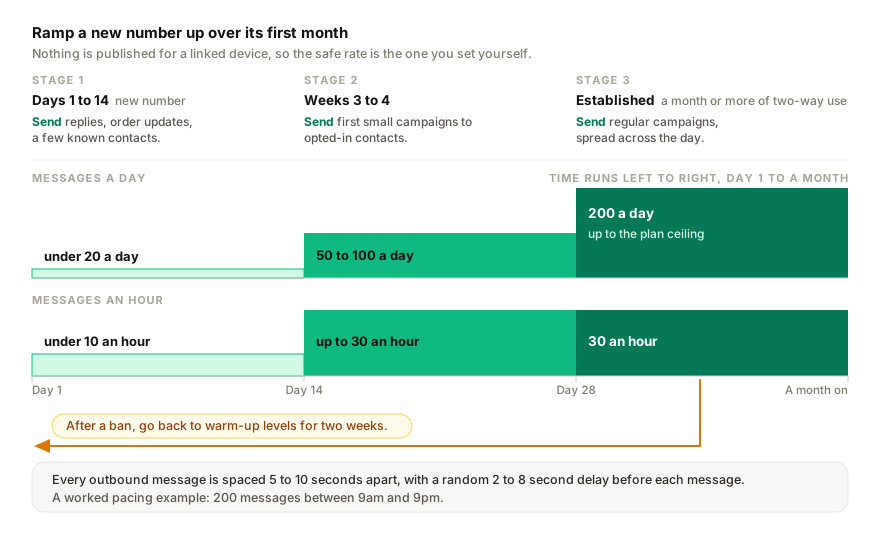
- Warm-up for new numbers. For the first 14 days, stay under roughly 20 outbound messages a day. A number with no history needs to look like a person using WhatsApp before it looks like a business running campaigns.
- Defaults of 30 per hour and 200 per day, per number. These are the values a new number starts with in Settings, Auto-reply rules. You can lower them, or raise them up to your plan's ceiling in the table below. No number here makes an account safe; they lower the risk.
- A random 2 to 8 second delay before each message goes out, plus jittered scheduling across the campaign window, so a 200-message campaign never lands as a burst.
- A typing indicator ahead of each message, so the pattern matches how the app behaves.
- Only contacts who opted in. You declare the consent source when you create the campaign. Scraped or purchased lists are the fastest path to a ban whatever tool sends them.
- STOP handled automatically. A reply of "stop" or "unsubscribe" records the opt-out, and that contact is never messaged again from that number.
The ceilings per number, per day:
| Plan | Outbound ceiling per number per day |
|---|---|
| Trial | 50 |
| Starter | 200 |
| Growth | 500 |
| Pro | 1,000 |
| Managed | 5,000 |
Campaigns to an imported list are a Growth-and-above feature. The ceiling is the most a number can send in a day on that plan; the defaults are where we'd suggest most businesses stay.
One counter, not two. Campaign messages and order updates share the same hourly and daily budget on a number, because WhatsApp sees one number sending, and every outbound message is spaced 5 to 10 seconds apart from the last one. If a bulk status change in your store fills the hour, the remaining order updates wait for the next window rather than being dropped, and campaign sends queue behind them.
A practical schedule
The 20-a-day warm-up is enforced for new numbers. The rest of this table is what we'd recommend, not something the platform forces.
| Stage | Per hour | Per day | What to send |
|---|---|---|---|
| Days 1 to 14 (new number) | Under 10 | Under 20 | Replies, order updates, a few known contacts |
| Weeks 3 to 4 | Up to 30 | 50 to 100 | First small campaigns to opted-in contacts |
| Established (a month or more of two-way use) | 30 | 200, up to the plan ceiling | Regular campaigns, spread across the day |
Three habits make the schedule work:
- Spread sends across the day. 200 messages between 9 am and 9 pm is one every few minutes. 200 messages at 9 am is a burst.
- Keep two-way traffic flowing. A number that only ever sends looks like a broadcaster. A number that also answers questions looks like a business.
- Watch the reply rate. Campaigns to a genuinely opted-in list get replies. A campaign with zero replies and a handful of blocks is telling you something about the list, not the limit.
Early warning signs
Suspensions rarely arrive out of nowhere. Watch for these, and pause outbound the moment you see one:
- Single grey ticks piling up. One tick means sent, not delivered. If a growing share of a campaign sits on one tick, recipients have blocked you or the number is being throttled.
- "This business can't receive messages" errors. If customers tell you they're seeing this when they try to reach you, the number is already restricted.
- Temporary "you can't send messages" notices. WhatsApp often rate-limits before it suspends. Treat this as a final warning, not a glitch.
- A spike in blocks. If the opted-out and failed counts jump on a single campaign, stop that campaign and look at the list before sending the next one.
If a temporary ban lands
Most bans on small business numbers are temporary: 24 to 72 hours, sometimes up to 7 days, with a "Request a review" button. When it happens:
- Stop all outbound. Don't reinstall the app or pair new devices to test whether it's really banned; each attempt adds to the signal.
- Request the review once, in plain language, saying what your business does and what the number is used for. If the app then shows the account as under review, here is what each kind of WhatsApp review means and how long it takes.
- Don't buy a new SIM in a panic. You'd lose the number's history, which is the thing that protects you.
- When access returns, go back to warm-up levels for two weeks and rebuild from there.
The full playbook, including the appeal email and what to do if the review fails, is in What to do if WhatsApp bans your business number.
An honest note
No tool can promise zero risk. Not Replai, not any other linked-device tool, and not the official API either, which suspends numbers whose quality rating falls. What the limits above do is keep you inside the band where the vast majority of numbers never see a problem, and give you a warning system for when something drifts. We've written more about what we can and can't promise in Will WhatsApp ban your number?.
If your business depends on a single number with no fallback and you need thousands of marketing messages a day, the official API is the right path, tiers and fees included. If you're a small operator with a few hundred opted-in customers, the schedule above is what we'd run. The 7-day free trial at replai.pm pairs to your existing number in minutes with no card, and campaigns open up on Growth and above.
Related
- Will WhatsApp ban your number? An honest answer
- What to do if WhatsApp bans your business number
- How to send a WhatsApp broadcast with a photo without getting your number flagged
- WhatsApp Business API vs WhatsApp Business App
- Replai vs WAHA
Frequently asked questions
How many people can a WhatsApp broadcast list reach?
- A broadcast list in the WhatsApp Business app holds up to 256 recipients, and the message only arrives for people who have saved your number in their contacts. That is a list-size limit rather than a daily one, so sending to several lists back to back still counts as one burst against the number.
Do replies to customers count towards the broadcast limit?
- No. On the official API, conversations a customer starts do not count against your messaging tier, and on a linked device answering inbound messages is the safest thing a number can do. The limits in this guide apply to outbound sending: campaigns, promotions and any message to somebody who has not written to you first.
How do you warm up a new WhatsApp number for broadcasts?
- Keep it under roughly 20 outbound messages a day for the first 14 days, mixed with ordinary two-way conversations. In weeks three and four, move to 30 an hour and 50 to 100 a day for small campaigns to opted-in contacts. After a month of genuine two-way use, 200 a day spread across the day is reasonable.
What are the warning signs before a number is restricted?
- Watch for single grey ticks piling up on a campaign, which means messages are sent but not delivered, customers reporting that your business cannot receive messages, and temporary notices telling you that you cannot send right now. A jump in blocks or opt-outs on one campaign is the same signal. Pause outbound immediately.
Sources
- About WhatsApp, WhatsApp, 2026-09-08
- WhatsApp Business Platform pricing, Meta for Developers, 2025-07-01
Keep reading
Article
Why do WhatsApp linked devices keep logging out? The causes, and how to tell which one it is
Article
WhatsApp Coexistence: can the app and the Cloud API share one number?
Article
WhatsApp Business account restricted: what it means, what still works and what to do
Tutorial
How to send a WhatsApp blast campaign in Replai
See it answer your own customers.
Pair your number, paste in what you know, and message it from another phone. Ten minutes, no card.