Quick answer
Open Settings, Notifications, and put a monitored address in Send escalations to. Then tick only the categories you will act on the same day. Complaint, abuse and sensitive request are the three most businesses should start with, because each one costs something real if it sits unread.
- Categories are detected automatically as conversations happen, not on a schedule.
- Ticking all seven produces a stream nobody reads, which is worse than ticking three.
- Payment received is the one to enable if customers ever say they have paid.
- Escalation email is separate from your prompt's handover rule, and you need both.
About 10 minutes
Before you start
- A connected number
- An email address somebody actually reads during working hours
The system prompt can tell the bot to hand a conversation over. This tab is what makes sure somebody finds out.
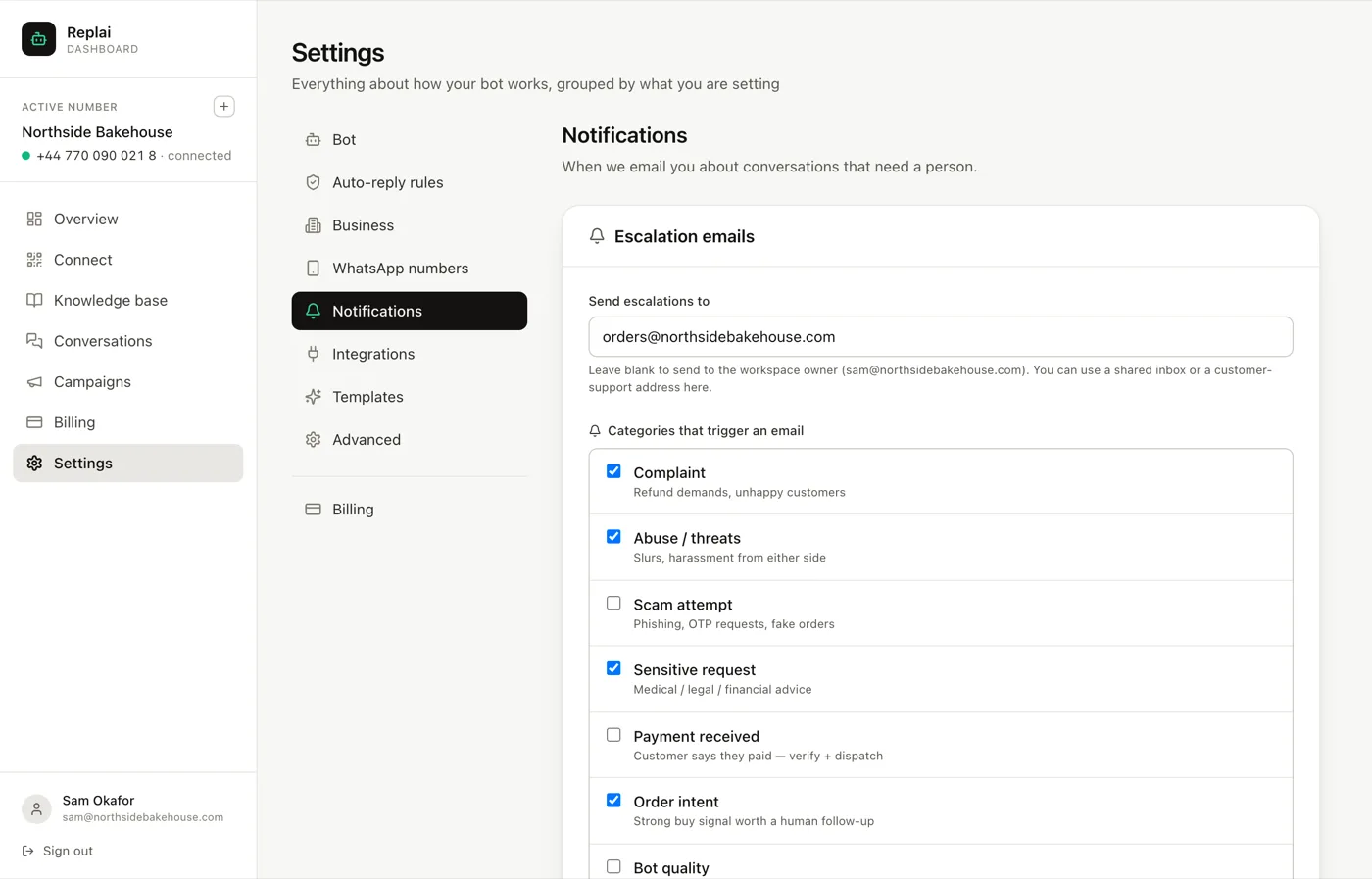
Where the emails go
Send escalations to takes one address. Left blank, escalations go to the workspace owner.
Owner-only works while one person runs everything and fails the first time that person is driving. A shared inbox or a support address is the safer choice, because it survives someone being away.
The seven categories
Each is detected automatically as messages arrive. Ticking one means an email when it fires.
Complaint. Refund demands and unhappy customers. Worth switching on for almost everyone: a complaint that sits unanswered for a day is the one that turns into a public review.
Abuse or threats. Slurs and harassment, in either direction. That second part matters more than it sounds. It also catches a member of your own team losing patience on the business number, which is something you want to know about quickly and will otherwise learn about late.
Scam attempt. Phishing, one-time-code requests, fake orders. The code request is the important one. "Send me the code you just received" is the standard account-takeover script, and it arrives looking like a confused customer.
Sensitive request. Medical, legal or financial advice. Switch this on if there is any question in your trade that should never be answered by software. For a clinic that is obvious. For a bakery it is allergies, which is the same shape of problem.
Payment received. The customer says they have paid. This is the category most often left off and most often regretted, because the cost of getting it wrong is goods leaving the building against a payment that never arrived. Turn it on if anyone ever dispatches on the strength of a message.
Order intent. A strong buying signal worth a human follow-up. Not a problem, an opportunity: the wholesale enquiry, the bulk order, the customer asking whether you can do fifty of something. These are worth a person precisely because a bot answering well is still not the same as a person closing it.
Bot quality. The customer is telling you the bot is not working. Useful while you are still tuning prompts and knowledge base, and reasonable to switch off once replies have settled.
Do not tick everything
The temptation is to enable all seven and feel thorough. What happens next is predictable: the volume goes up, the signal goes down, and within a fortnight the emails are being archived unread. At that point a real complaint is indistinguishable from a routine order-intent notice.
Pick the ones you will act on the same day. Three you read beats seven you filter.
You can add more later, and adding one because you missed something real is a better way to decide than guessing up front.
The flags are the backstop
Every category that fires also puts a flag on the conversation, and that happens whether or not the email is switched on.
That means the Conversations page is a complete record even when your inbox is not. If email fails, gets filtered, or goes to somebody on holiday, the flags are still sitting there. Resolving each flag once it is handled is what keeps that list useful rather than a growing pile.
What to do next
With escalation working, the last piece of day-to-day setup is connecting your store so that orders and unpaid checkouts reach WhatsApp without anyone typing them.
Frequently asked questions
Where do escalation emails go if I leave the field blank?
- To the workspace owner. That is fine for one person running everything and wrong as soon as there are two of you, because the owner becomes a single point of failure on a day they are not at a desk. A shared inbox or a support address is the better answer.
Is this the same as the handover rule in my system prompt?
- No, and you need both. The prompt tells the bot to stop answering and say a person will help. This tells a person that it happened. With only the prompt, the customer is told help is coming and nobody knows. With only this, you get an email about a conversation the bot is still cheerfully answering.
How quickly do the emails arrive?
- Within seconds of the message being classified, which happens as the conversation goes rather than in a batch. An abuse or scam flag typically reaches you while the customer is still typing.
Will it catch everything?
- No. It is a classifier, so it will miss some and occasionally flag something harmless. Treat it as a net that catches most of what matters, not as a guarantee. The flags on the Conversations page are the backstop, because those are visible whether or not anyone read the email.
Which categories should a small shop start with?
- Complaint, abuse and sensitive request. Add payment received if customers ever claim to have paid before you dispatch, and order intent if a missed buying signal is expensive for you. Leave bot quality on while you are still tuning, then turn it off once replies have settled.
Keep reading
See it answer your own customers.
Pair your number, paste in what you know, and message it from another phone. Ten minutes, no card.