Quick answer
The Business tab holds three things. The account name is your Replai account's name, used in emails we send you; the bot calls you whatever each number's instructions say. Opening hours decide when the bot answers and when an away message goes out instead, in the timezone you pick. The payment QR is a saved image the bot can send when a customer asks how to pay.
- Outside opening hours the bot sends an away message once per hour per conversation, not once per message.
- The timezone is the setting that actually breaks things when it is wrong.
- Leave office hours off if you want the bot answering around the clock.
- A payment QR saves the message you would otherwise retype twenty times a week.
About 10 minutes
Before you start
- A connected number
The Business tab is the shortest in Settings and one setting on it causes more confusion than everything else combined. That one is the timezone.
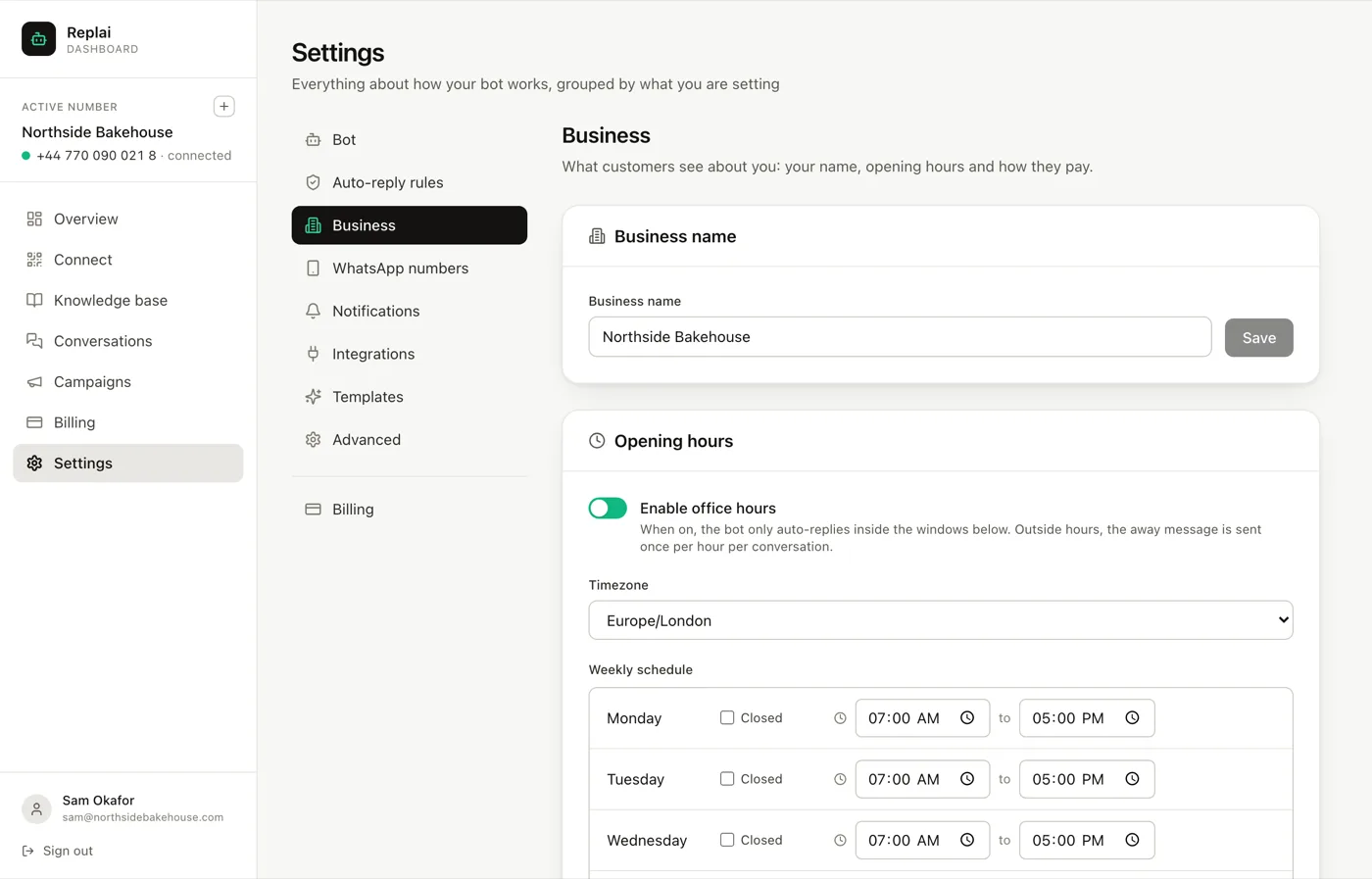
Account name
The name of your Replai account, used in emails we send you. Your customers never see it, and it is not what the bot calls you.
The bot introduces itself the way each number's instructions say, so that is where to change the name it uses: Bot → Instructions and model. Use the name customers actually say rather than the one on the invoice. The name at the top of the chat is different again: it comes from your WhatsApp Business profile and is set on the phone.
Opening hours
Off by default, and staying off is a legitimate choice.
When it is off, the bot answers whenever a message arrives. For a business whose common questions are prices, stock and hours, that is often right: the customer is awake, the answer costs nothing, and nobody has to be.
When it is on, the bot only auto-replies inside the windows you set. Outside them it sends your away message instead.
Two details about the away message are worth knowing, because both surprise people:
It goes out once per hour per conversation. Somebody firing off five messages at eleven at night gets one notice, not five. The alternative reads like a fault.
Messages still arrive. Office hours change whether the bot replies, not whether anything is received. Everything is in Conversations in the morning.
The timezone is the setting that breaks
The schedule is meaningless without it, and it defaults to the timezone Replai was built in rather than yours.
Get it wrong and the symptom is confusing rather than obvious: the bot appears to work, but it goes quiet in the middle of your afternoon, or cheerfully answers at three in the morning and stops at breakfast. If hours behave strangely, check this before anything else.
Set the windows in your own local time once the timezone is right. A day can be marked Closed outright, which is what Sunday should be for most shops rather than a window nobody works.
Writing the away message
The useful away message says three things: that you are closed, when you are back, and what happens next.
Thanks for messaging Northside Bakehouse. We are closed right now and will reply when the bakery opens at 7am.
What to avoid is the apologetic non-answer that gives no time and no expectation. "We will get back to you as soon as possible" tells the customer nothing they did not already assume.
Payment QR
An image the bot can send when a customer asks how to pay, with a caption you write once.
Worth setting up if you take payment by transfer or by scanning a code, which is most of the world outside card-first markets. It replaces the small daily task of finding the same image and retyping the same instructions.
Put anything the image cannot carry into the caption. The account name to check against is the usual one, because a customer who scans a code and sees an unfamiliar name will stop, and rightly so.
What to do next
Notifications is the tab that decides whether anyone hears about the conversations the bot could not finish, which is the other half of the handover rules in your system prompt.
Frequently asked questions
Does the away message go out every time someone messages after hours?
- No. Once per hour per conversation. Somebody sending five messages in a row at eleven at night gets one away message, not five. That distinction is the difference between a helpful notice and something that reads like a malfunction.
Should I turn office hours on at all?
- Only if you want the bot silent outside them. Plenty of businesses leave it off deliberately, because answering a price question at midnight costs nothing and the customer is awake. Turn it on when the honest answer outside hours is that nobody can act on the message until morning.
What happens to messages that arrive out of hours?
- They arrive normally and sit in Conversations waiting for you. Office hours change whether the bot replies, not whether messages are received. Nothing is lost and nothing is bounced.
Does the account name change what customers see in WhatsApp?
- No. The name at the top of the chat comes from your WhatsApp Business profile, which is set on the phone, and the name the bot uses in its replies comes from each number's instructions. The account name only appears in emails we send you.
What should the payment QR be?
- Whatever your customers already use to pay: a bank transfer QR, a payment-link code, a wallet code. The bot sends the image with your caption when someone asks how to pay, so the caption should carry anything the picture does not, such as the account name to check against.
Keep reading
See it answer your own customers.
Pair your number, paste in what you know, and message it from another phone. Ten minutes, no card.