Quick answer
Auto-reply rules holds five settings. When you reply yourself decides how long the bot stays out of a thread a person has answered. Who the bot answers sets how it treats chats already on the phone: by default it gives you 5 minutes to reply first, and the other options keep it out of them or answer them at once. Voice replies is Pro only. Pause the bot stops it for a set time. Sending limits cap how much the number sends per hour and per day.
- The bot notices when a person replies from the phone and stands down automatically.
- By default new customers get an answer at once and existing chats wait 5 minutes for you first.
- Sending limits are the ceiling across everything, including campaigns.
- Pausing is the right move during an incident. Disconnecting is not.
About 10 minutes
Before you start
- A connected number
This tab is about when the bot speaks, as opposed to what it says. Five settings, and the first two matter far more than most people expect.
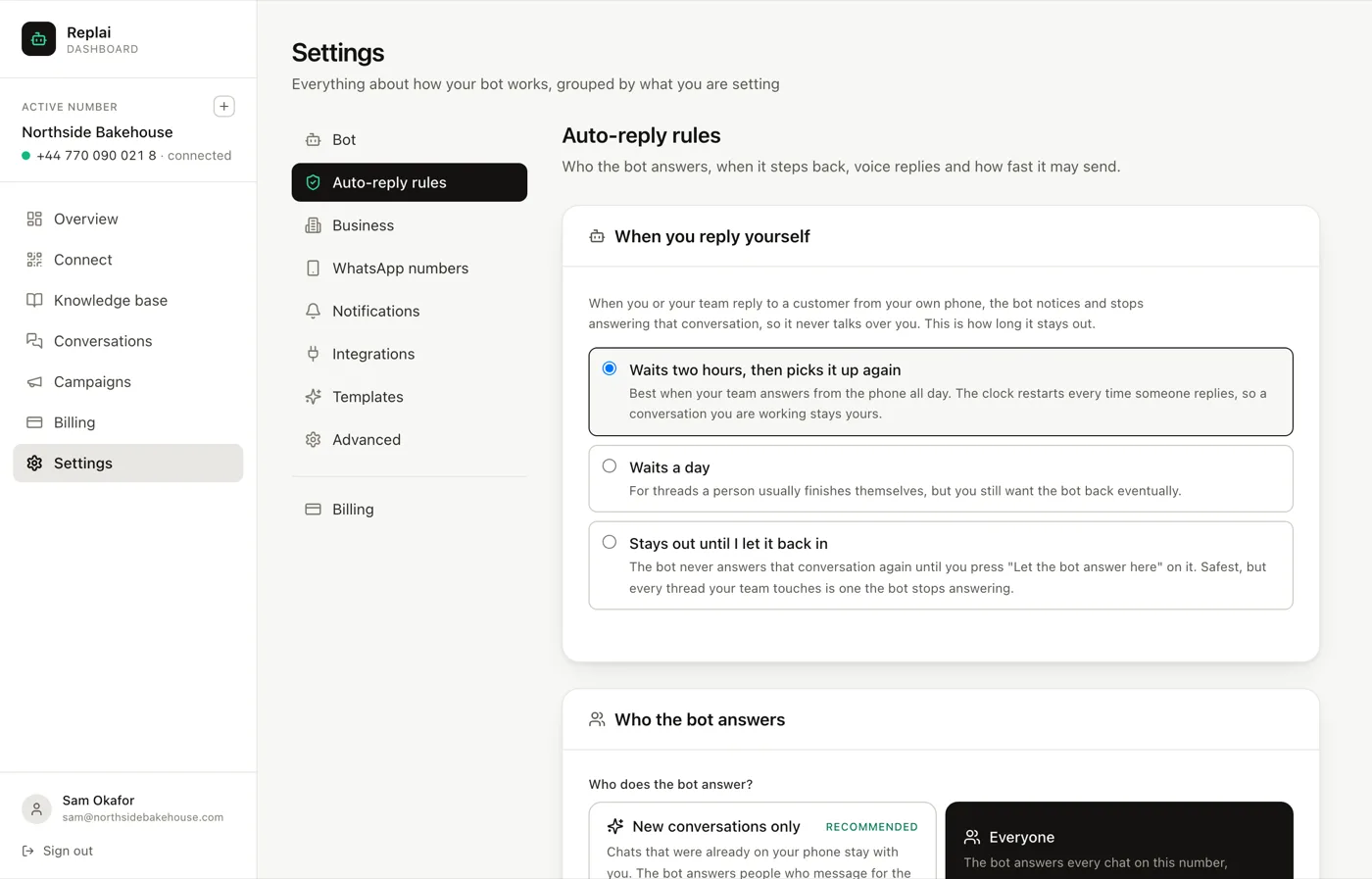
When you reply yourself
If you or a colleague answers a customer from the phone, the bot notices and stops answering that conversation. This setting decides how long it stays out.
Waits two hours, then picks it up again is the default, and it fits a team that answers from the phone through the day. The clock restarts every time somebody replies, so a conversation you are actively working stays yours for as long as you are working it. Two hours after the last human message, the bot resumes.
Waits a day suits threads a person normally finishes, where you still want the bot back eventually if the customer returns the next week.
Stays out until I let it back in never answers that conversation again until you press the button on the thread. It is the safest option and it has a cost: every thread anyone touches becomes a thread the bot has permanently stopped handling. On a busy number that quietly turns the bot off, one conversation at a time.
The reason this exists at all is that the alternative is worse than either extreme. A bot replying two seconds after a human reply, contradicting them, is the failure customers remember.
Who the bot answers
Everyone, after you is the recommended setting and the default. People who message for the first time after you connect get an answer straight away. Chats that were already on the phone when you connected wait 5 minutes: the bot answers only if nobody from your team has replied by then, and once someone on the team replies in a chat, it steps back from that conversation.
New conversations only keeps chats that were already on the phone with you entirely. The bot answers people who message for the first time after connection.
Everyone hands the bot every chat on the number at once.
Do not jump straight to Everyone. The reason is not that the bot is bad at old threads, it is that you cannot predict what is in them. Long-running conversations with suppliers, staff and regulars all live on a business number, and none of them benefit from an assistant joining halfway through. Mark those contacts Never answer this contact and the bot leaves them alone for good.
Widen it once you have read twenty or so conversations and stopped being surprised.
Voice replies
Whether the bot answers with a voice note instead of text. This is a Pro feature and it is off by default even there.
Worth separating two things that sound alike: understanding voice notes that customers send is included from Starter upward, because transcription is part of reading the message. Sending voice notes back is the Pro part.
Off is the right default for most businesses. A synthetic voice note is more noticeable than synthetic text, and the customers who send voice notes are usually happy to read a reply.
Pause the bot
Stops the bot replying for a set period while the number stays connected. Messages keep arriving and you answer them yourself.
This is the correct response to almost any incident: a price went out wrong, a campaign misfired, something is being discussed that you want a person on. Pausing is instant and reversible.
Disconnecting is not the same thing and is usually the wrong instinct. It unlinks the device, which means a rescan to come back and, on some accounts, the history sync running again.
Sending limits
Two caps: per hour and per day, across everything the number sends.
This is the setting that protects the number, and it is deliberately separate from the pace setting inside a campaign. A campaign's pace controls that campaign. This controls the number: campaign messages, ordinary replies and order notifications added together.
Defaults are 30 an hour and 200 a day, which is the range a linked device sustains without drawing attention. Raise them only after a number has been sending at the default for several weeks without trouble, and raise them a little at a time.
The failure mode worth understanding: a campaign running at its own safe pace, plus a busy afternoon of replies, plus order notifications from a promotion, can add up to a volume none of the three would have produced alone. This cap is what notices.
What to do next
Once the bot's timing is right, the next tab worth a visit is Business, which holds the opening hours that decide when an away message answers instead of the bot.
Frequently asked questions
What happens if I reply from my phone while the bot is handling a thread?
- The bot notices and stops answering that conversation, so it never talks over you. How long it stays out is the first setting on this tab, and the default is two hours with the clock restarting each time someone replies. A thread you are actively working stays yours for as long as you are working it.
Should I set the bot to answer everyone?
- Not on day one. The default, "Everyone, after you", answers new customers at once and gives every thread that existed before you connected 5 minutes for a person to reply first. Mark suppliers, friends or family "Never answer this contact" and it leaves them alone for good, or choose "New conversations only" to keep it out of old threads entirely. Widen it to Everyone once you have watched twenty or so conversations and trust the answers.
Do the sending limits apply to campaigns as well?
- Yes, and that is the point. A campaign has its own pace setting, but this one is the ceiling across everything the number sends: campaign messages, ordinary replies and order notifications combined. If a campaign and a busy afternoon collide, this is the limit that stops the number sending far more than usual.
What is the difference between pausing and disconnecting?
- Pausing stops the bot replying while the number stays linked, so messages still arrive and you answer them yourself. Disconnecting unlinks the device, which means a rescan to come back and, on some accounts, the history sync running again. During an incident you want pause.
Why is voice replies greyed out?
- Outbound voice notes are a Pro feature. Understanding inbound voice notes is not: transcription is included from Starter upward, so the bot can already hear what customers send even on a plan where it cannot answer with audio.
Keep reading
See it answer your own customers.
Pair your number, paste in what you know, and message it from another phone. Ten minutes, no card.