Quick answer
Message the bot from a different phone and run eight questions through it: your most common question, a price, hours, something deliberately not in the knowledge base, an allergy or complaint, a vague message, one in another language, and a voice note. Then read the thread in Conversations and check what it flagged.
- Test from a different phone. A number cannot have a WhatsApp conversation with itself.
- The most important test is a question you know is not in the knowledge base.
- Flagged threads are the bot telling you which questions it was not comfortable with.
- Read the replies on a phone, not in the dashboard. Length reads differently there.
About 15 minutes
Before you start
- A connected number with a knowledge base and a system prompt
- A second phone, or a friend willing to send a few messages
A bot that has been configured is not a bot that has been tested. This is the hour that decides whether the first real customer gets a good experience or becomes the person who found the bug.
Test from a different phone. WhatsApp will not let a number message itself, so your own line is not an option.
The eight questions
Run all eight. They are chosen because each fails differently.
1. The question you answer most. Whatever that is for you. If the bot cannot do this one well, nothing else matters.
2. A price. Check the number against reality, not against whether the answer sounds right. This is where a stale source shows up.
3. Opening hours, asked on the day you are closed. A surprising number of bots answer with the general hours and never mention that today is the exception.
4. Something you know is not in the knowledge base. This is the most important test on the list. The bot should say it will check with the team. If it produces a confident answer instead, stop and fix the system prompt before going any further, because everything else it says is now suspect.
5. A sensitive question. An allergy, a complaint, a refund. It should hand over and stop, not attempt an answer.
6. A vague message. Just "hi", or "how much?" with no subject. A good reply asks what they are after. A bad one guesses at a product.
7. A message in another language, if any of your customers use one. Replies should come back in the language the customer wrote in.
8. A voice note. If your customers send them, test one. Transcription is where accents and background noise show up, and it is better to find that out yourself.
Read what actually happened
Answering in the chat is only half the picture. Open Conversations in Replai and read the thread from the inside.
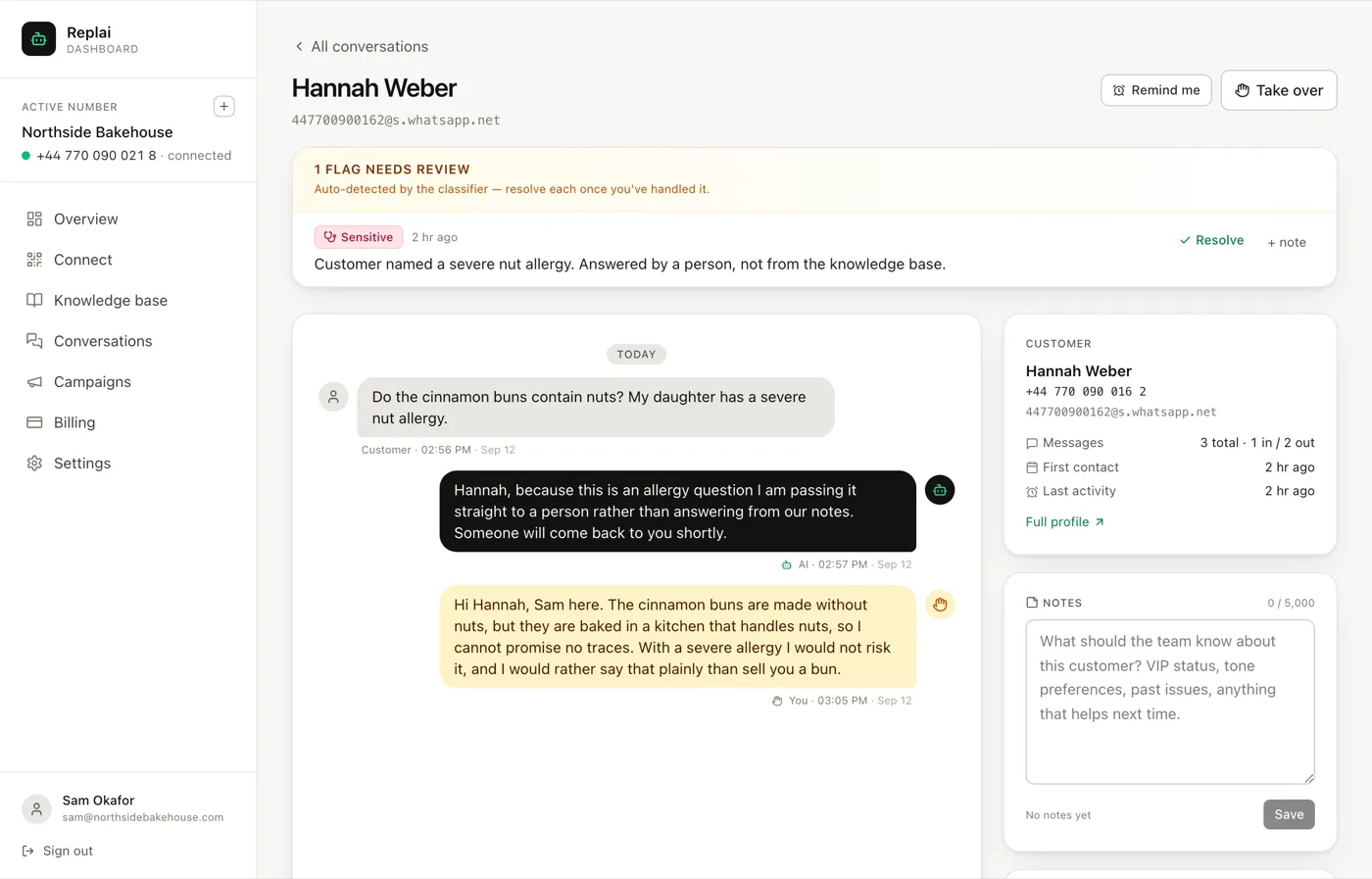
The colour coding is the useful part. You can see at a glance which replies came from the bot and which came from a person, which matters when you are trying to work out whether the bot handled something or whether a colleague quietly rescued it.
Flags are the bot telling you where it struggled
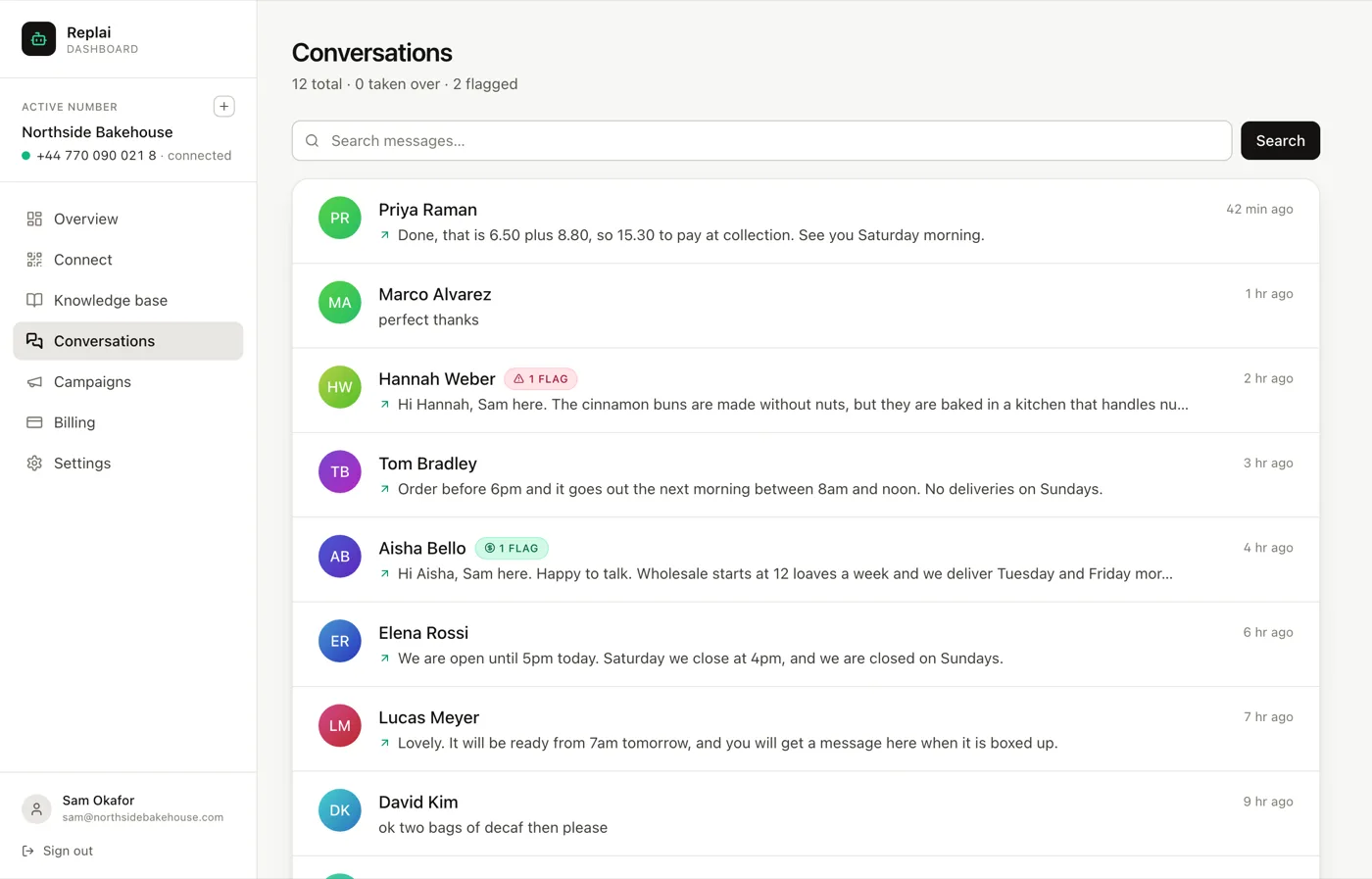
Replai classifies conversations and flags the ones that need a person: sensitive topics, complaints, anything that reads like a real order being placed. The count sits at the top of the Conversations page.
During testing, the flags are a scorecard. The allergy question should be flagged. If it is not, your handover rules are not working, and you would rather learn that from your own test message than from a customer.
Resolve each flag once you have handled it, so the list stays a list of things that need attention rather than a history of everything that ever happened.
Read it on a phone
Finally, look at the replies on an actual phone rather than in the dashboard.
Length reads completely differently there. Four lines that look concise in a browser can fill a phone screen, and a reply that needs scrolling gets skimmed. This is the check that most often sends people back to the system prompt to shorten the voice instruction, and it is invisible from a laptop.
Fixing what you find
Sort every problem into one of two buckets before you touch anything:
Wrong or missing fact goes to the knowledge base. Add the source, or fix the one that is out of date. Look for duplicates while you are there.
Wrong behaviour goes to the system prompt. Too long, too formal, guessed when it should have deferred, kept talking after handing over.
Almost every problem is the first kind, and almost every instinct is to edit the second. Changing the prompt to fix a missing price produces a bot with a confusing personality and the same wrong price.
What to do next
Once it holds up, the work becomes running it: taking threads over when you need to, reading what got flagged, and connecting your store so orders arrive without anyone typing them.
Frequently asked questions
Can I test by messaging my own number?
- No. WhatsApp will not let a number hold a conversation with itself, so you need a second phone or a colleague. This catches people out because everything looks configured and nothing happens, which reads like a broken bot rather than a WhatsApp rule.
The bot answered nothing. What is wrong?
- Check three things in order. Is the number still connected on the Connect page. Are you testing from a number that already had a thread with you, because by default the bot gives that chat 5 minutes for a person to reply first, and on New conversations only it stays out of it entirely. And is the message inside your opening hours, because outside them the away message may answer instead of the bot.
It gave a wrong price. Is the prompt broken?
- Almost certainly not. A wrong fact is a knowledge base problem: either the price is missing, or it is in there twice with different values. Two sources disagreeing is the one thing that reliably produces confident wrong answers, because nothing tells the bot which is current.
How many conversations should I watch before trusting it?
- Twenty real ones, roughly, and specifically the flagged ones. Twenty covers the common questions and the first few surprises. Trusting it after three is how a bot ends up quoting a discontinued product for a fortnight.
Should I tell customers it is a bot?
- Most businesses do not say it outright and most customers work it out from the speed. What matters more is that the handover is real: if someone asks for a person and never gets one, the fact that it was a bot becomes the complaint. Set the escalation emails up before you go live rather than after.
Keep reading
See it answer your own customers.
Pair your number, paste in what you know, and message it from another phone. Ten minutes, no card.