Quick answer
Open Settings, Bot, and write four things in the system prompt: who the bot is, that it answers only from the knowledge base, how long and how formal replies should be, and which topics it must hand to a person. Keep prices and facts out of it, because those belong in the knowledge base and change far more often.
- The prompt is behaviour. The knowledge base is facts. Each is unusable in the other's place.
- The single most valuable line tells the bot to say it will check rather than guess.
- Name the handover topics explicitly, because a bot cannot infer which questions carry risk for you.
- There is a template library if you would rather start from something than from nothing.
About 15 minutes
Before you start
- A knowledge base with at least your prices and hours in it
- A clear idea of which questions you never want a bot answering
The knowledge base decides what your bot knows. The system prompt decides how it behaves with what it knows. They fail in different ways, and confusing them is the most common reason a bot that has all the right information still embarrasses you.
Where to find it
Settings opens on the Bot tab, and the system prompt is the first field.
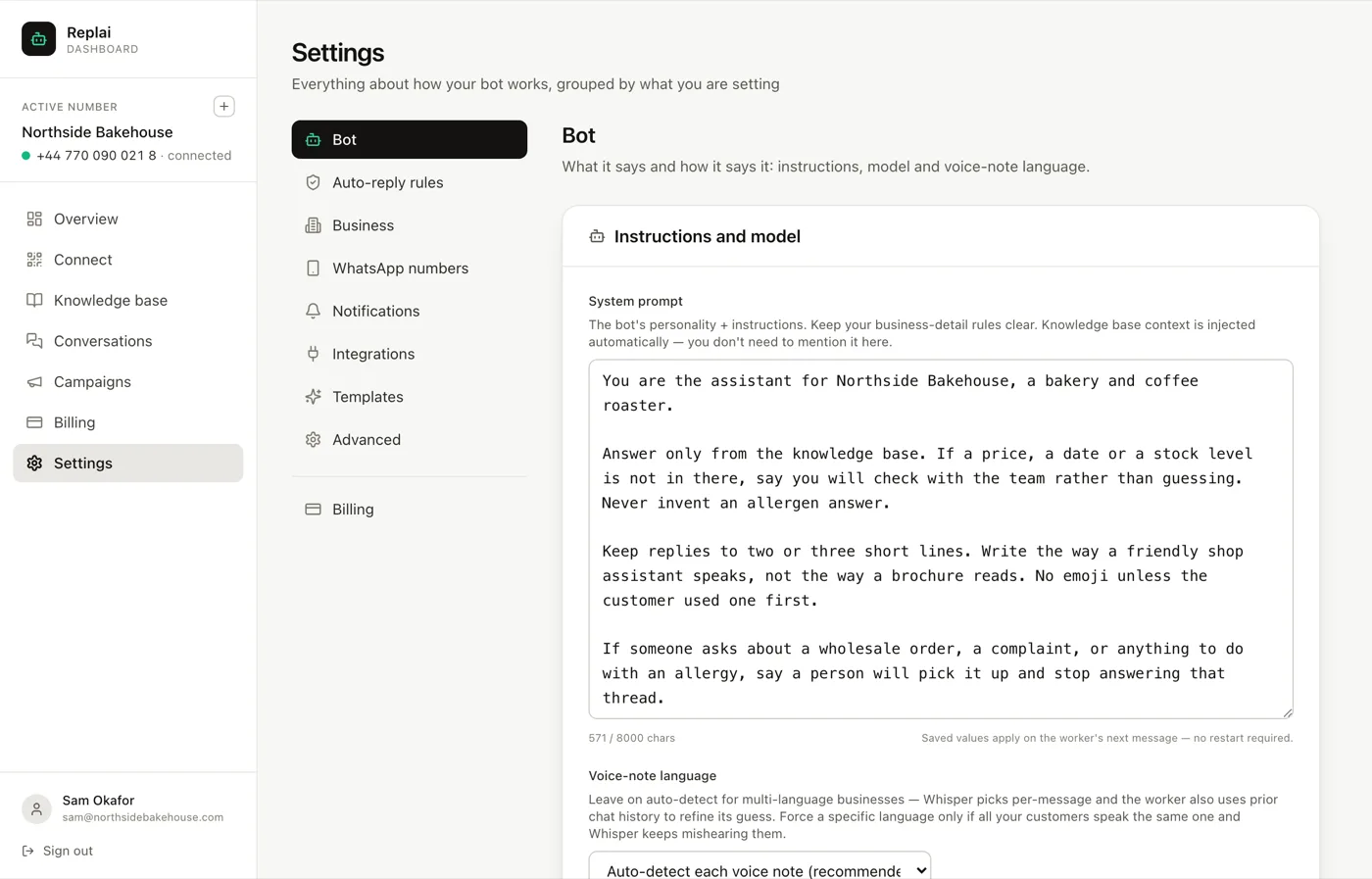
There is a character budget, and most businesses use a small fraction of it. A long prompt is not a better prompt.
Four things, in this order
1. Say what it is
One line. Who the bot is and which business it works for.
You are the assistant for Northside Bakehouse, a bakery and coffee roaster.
Without this the bot behaves like a generic assistant, which shows up as replies that are technically correct and sound like nobody who works for you.
2. Say where answers come from
This is the most valuable instruction in the whole prompt, and it needs to be explicit:
Answer only from the knowledge base. If a price, a date or a stock level is
not in there, say you will check with the team rather than guessing.
A language model's instinct is to be helpful, and helpfulness looks like producing an answer. Left alone it will produce a plausible price. Plausible and wrong, sent confidently to a customer, is the worst outcome this product can have, and one sentence prevents it.
If there is a category where a guess would be genuinely harmful, name it separately:
Never invent an allergen answer.
3. Set the voice
WhatsApp is not email. Long paragraphs read badly on a phone and make an automated reply obvious.
Keep replies to two or three short lines. Write the way a friendly shop
assistant speaks, not the way a brochure reads. No emoji unless the customer
used one first.
That last clause is worth stealing. A bot that opens with emoji at a customer who wrote one terse line reads as tone deaf; one that mirrors gets it right by default.
4. Say when to stop
A bot cannot work out which questions carry risk for your business. You have to name them.
If someone asks about a wholesale order, a complaint, or anything to do with
an allergy, say a person will pick it up and stop answering that thread.
The phrase and stop answering that thread matters. Without it the bot announces that a person will help and then keeps answering anyway, which is worse than either behaviour on its own.
Pair this with the escalation emails under Settings, Notifications, so that handing over actually reaches somebody.
What does not belong here
Prices. Opening hours. Delivery areas. Stock. Anything that is a fact about your business goes in the knowledge base, for two reasons.
Facts change weekly and personality does not, so mixing them means every price change is an edit to the bot's character. And the knowledge base is searched per question, while the prompt is sent with every single message, so facts in the prompt cost you on every reply and are consulted less reliably than facts in a source.
If you would rather not start from a blank box
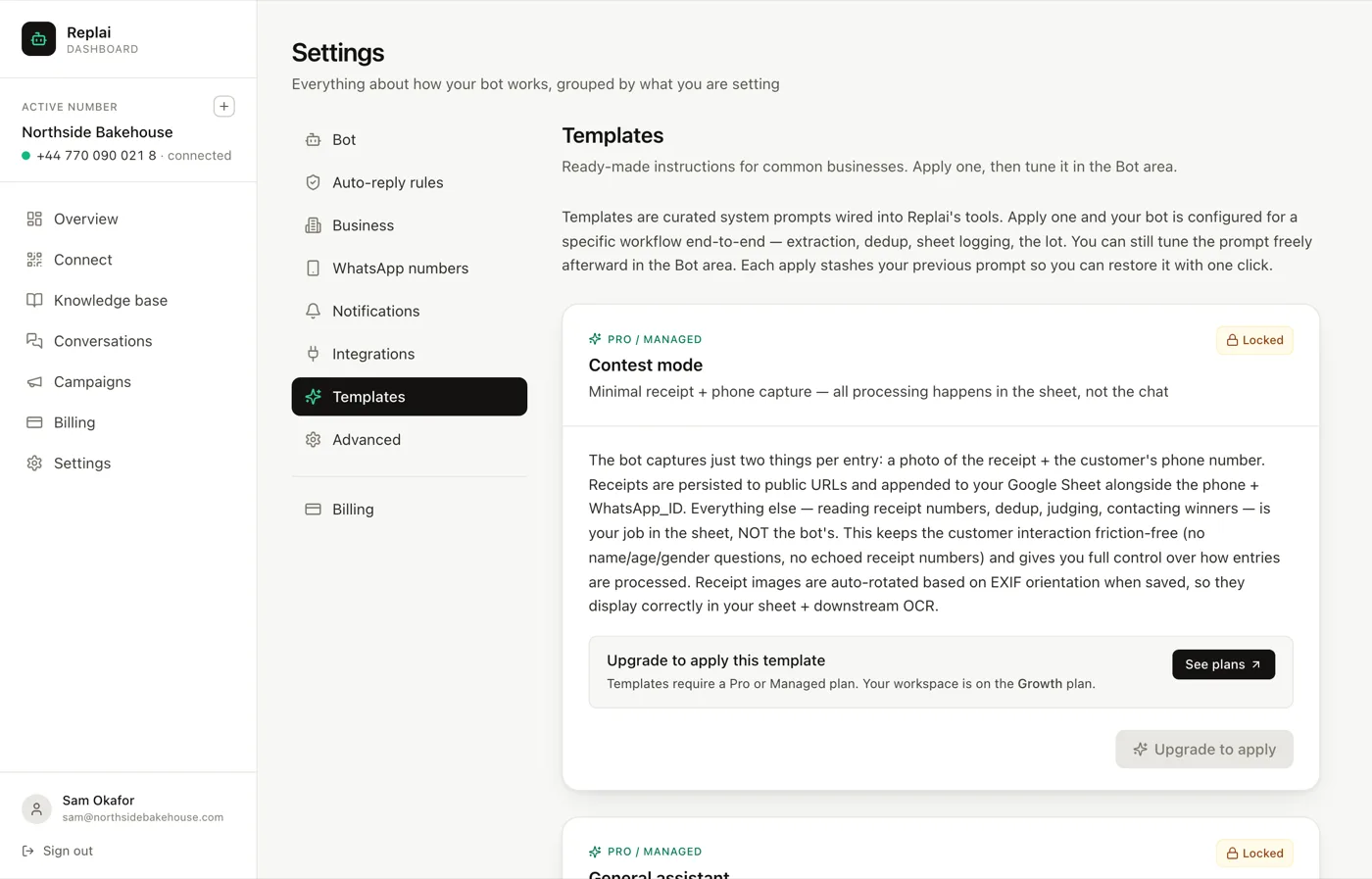
The Templates tab has ready-made prompts for common business types. They are a reasonable starting point, and they are generic by definition: the parts most worth rewriting are the handover topics and anything about tone.
Another way to get a first draft is to let ChatGPT interview you about your business and write the prompt from your answers. The same rule applies: move any prices, hours or policies it puts in the prompt into a source.
Changing it safely
The honest way to improve a prompt is to change one thing, watch real conversations for a day, and keep or revert. Changing five things at once tells you only that something moved.
Replai keeps your previous prompt, so reverting is cheap. Use that. A prompt that got worse and cannot be put back is how people end up afraid to touch it.
What to do next
You now have a bot that knows your business and has been told how to behave. The remaining question is whether any of it actually works, which is a testing job rather than a configuration one.
Frequently asked questions
How long should the system prompt be?
- Shorter than most people expect. Four short paragraphs covering role, answering rules, voice and handover is enough for almost every business. A very long prompt tends to contradict itself, and when two instructions conflict you cannot predict which one wins. If you are past a page, some of it is probably facts that belong in the knowledge base.
Why does the bot still guess sometimes?
- Usually because the prompt never told it not to. A language model's default is to be helpful, and being helpful looks like producing an answer. The instruction to say it will check with the team rather than inventing a price has to be explicit, and it is worth putting in its own sentence rather than buried in a list.
Can I change the prompt while customers are messaging?
- Yes. Saved changes apply to the next message the bot handles, with no restart and no interruption. A conversation in flight will simply use the new instructions from its next reply onward.
What if I make it worse?
- Replai keeps the previous version of your prompt, so you can put back what you had. That is worth knowing before you experiment, because the honest way to improve a prompt is to change one thing and watch, and that only works if reverting is cheap.
Should I write the prompt in my customers' language?
- Write it in English even when your customers write in another language. The instructions are for the model, not the customer, and models follow English instructions most reliably. Replies still come back in whatever language the customer used.
Keep reading
See it answer your own customers.
Pair your number, paste in what you know, and message it from another phone. Ten minutes, no card.