Quick answer
Replai captures a WooCommerce cart once the shopper types a phone number at checkout, then sends one WhatsApp reminder from your own number after a delay you choose, 60 minutes by default. The link rebuilds the exact cart on any device or browser and opens checkout with the phone already filled. It cancels itself the moment an order is placed.
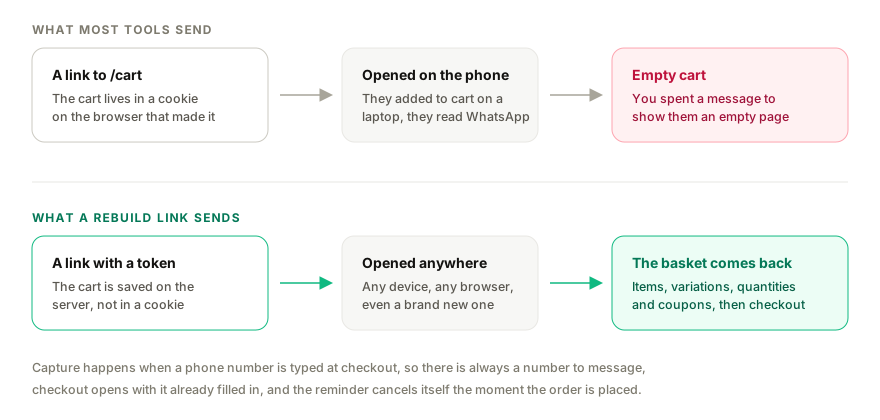
- A link to /cart is empty on another device. A token link rebuilds items, variations, quantities and coupons wherever it is opened.
- Capture happens when a phone number is typed at checkout, not when the shopper first adds to cart, so you always have a number to message.
- You choose consent: a note under the phone field, or an explicit checkbox.
- The reminder cancels automatically when the order is placed, so nobody is chased for something they already bought.
- No Meta application, no template approval and no per-message fee, because the message comes from your own number.
Most WhatsApp cart-recovery tools do the same thing, and it quietly does not work. They send the shopper a link to /cart on your shop.
A cart is not a thing that lives on your server waiting for its owner. In WooCommerce it lives in a cookie and a session tied to the browser that made it. So the link works perfectly when you test it, because you are testing in the browser that built the cart. It then fails for a large share of the people who receive it, because they added to cart on a laptop at work and opened WhatsApp on a phone. They tap the link, land on an empty cart, and you have spent a message to show someone an empty page.
This guide covers the version that survives the device change: what has to happen for the cart to come back, when the reminder should fire, how to ask for consent, and what to write.
Why the reminder has to rebuild, not redirect
There are two ways to bring a shopper back.
Redirect. Send them to /cart or /checkout. Costs nothing to build. Works only in the original browser.
Rebuild. Send them a link carrying a token. The token identifies a saved copy of the cart on the server. Opening it puts the items back into a fresh session, whatever device or browser is doing the opening, then sends them to checkout.
Replai does the second. The link restores the items, the chosen variations, the quantities and any coupon that was applied, then opens checkout with the phone number already filled in. Nothing depends on the shopper's original cookie surviving.
Your shop
What the customer receives, sent from your number
One caveat worth stating plainly. The rebuild is built for standard products, variations and coupons. If your store uses add-on plugins for custom text or uploaded images, those fields belong to the add-on rather than to the cart, so test with a real cart before you switch the reminder on.
When the cart is captured
The capture happens when the shopper types a phone number at checkout, not when they first add something to the basket.
That timing is deliberate. A shopper who has added to cart but never identified themselves cannot be messaged, so capturing earlier would only fill a table with rows you can never act on. The moment a phone number exists, there is both a cart worth saving and a way to reach its owner.
In practice this means the reminder covers people who started checkout and stopped, which is the group worth recovering anyway. Someone who browsed and left without entering anything is a job for advertising, not for WhatsApp.
Consent, and how to ask for it
You are about to message someone who has not messaged you. Handle it properly.
The plugin gives you two options at the phone field, and you pick one:
- A note under the phone field. Plain text saying you may send order updates and a reminder to this number on WhatsApp. Lower friction, and appropriate where order-related messaging is a reasonable expectation of buying.
- An explicit checkbox. The shopper actively opts in. Higher friction, and the safer choice if you operate somewhere with strict prior-consent rules, or if you plan to send anything that reads as marketing rather than a service message.
Whichever you choose, a reply of STOP ends messages to that number, permanently and without you doing anything. Treat that as non-negotiable rather than a feature. The fastest way to get a number restricted is to keep messaging people who asked you to stop.
If you are unsure which applies to your market, take the checkbox. One recovered cart is not worth a complaint.
Timing: the delay and quiet hours
The default delay is 60 minutes after the cart goes quiet. That is late enough that you are not interrupting someone who stepped away mid-purchase, and early enough that the decision is still live.
Two things protect the timing from itself:
Quiet hours. Follow-up messages wait until morning, 22:00 to 08:00 in the store's own timezone by default. A cart abandoned at 23:40 produces a message after eight the next morning, not a buzz at midnight. Immediate order updates are exempt, because a customer who just paid expects the confirmation now.
Cancellation. The reminder is checked against the live store before sending, and cancelled within seconds if an order has been placed for that cart. Someone who finished paying on a second device never hears from you about the basket they already bought.
How many reminders to send
One is the right number to start with.
Each additional reminder is a separate step with its own delay, so a second message the next day is something you choose deliberately. Before you add it, be honest about what the second message says. If the first reminder did not work, the second usually needs a reason to exist that is not simply asking again.
Whatever you configure, the pacing rules apply. Messages from your number go out five to ten seconds apart and share one hourly and daily cap with everything else you send, so a batch of reminders trickles out rather than firing at once. When a cap is reached the messages wait rather than being dropped. There is more on that in the post about keeping the number safe.
What to write
A cart reminder is a service message, not an advertisement. The tone that works is the tone of a shop assistant who noticed you put something down.
Three things belong in it: what they left, how to get back to it, and an invitation to reply. What does not belong: urgency invented out of nothing, a countdown, or a discount offered before anyone has said no.
Your shop
A reminder that answers instead of pushing
That reply matters as much as the reminder. A shopper who abandons a cart very often abandoned it because of an unanswered question, and the message arrives in an inbox where the assistant already knows the cart and can answer it. A reminder that cannot hold a conversation is a coupon in disguise.
On discounts: if you are going to offer one, offer it after a question has been answered and the answer did not close the sale. A discount attached to the first reminder teaches regular customers to abandon carts on purpose.
Shopify
Shopify builds the abandoned checkout link itself and exposes it as part of the checkout record, so there is nothing to rebuild. Replai sends that link through the same rules: the same delay, the same quiet hours, the same cancellation when the order is placed, the same pacing and caps.
The wording above applies without change. Only the origin of the link differs.
What it costs, and why there is no template to approve
The message comes from the WhatsApp number you already use, paired the way WhatsApp Web pairs. There is no Meta application, no dedicated number, and no template to submit and wait on. The wording is yours and you can change it this afternoon.
The comparison matters because the alternative route has a real price attached. The WhatsApp Business Platform charges per delivered template message, and since 1 October 2026 for replies inside the 24-hour customer service window too, past the first 1,000 a month per business number. A cart reminder is a marketing template under those rules, so it is billable on every send, and the wording has to clear approval before it goes anywhere.
The trade is honest and worth stating: pairing your own number is not an official Meta integration, which is why the pacing, the caps and the STOP handling exist and are not optional. If you need a guaranteed-uptime contract with Meta, the Business Platform is the right route and this is not.
Knowing whether it worked
The Orders page reports recovered revenue: orders paid within seven days of a follow-up, and the money they brought in.
That definition is deliberately conservative in one direction and generous in another. It will credit a reminder for a customer who was going to return anyway, and it will miss one who came back on day eight. Read it as a directional number that tells you whether the reminder is worth keeping switched on, not as a precise attribution model.
If the number is flat after a few weeks, the usual causes are the delay being too long, the message reading as an advertisement, or a checkout problem that the reminder cannot fix. The replies will normally tell you which.
Setting it up
If order updates are already running on your store, the reminder is a few clicks. If not, start with the WooCommerce setup guide, which covers pairing the number and installing the plugin, ReplaiPM Order Messaging for WooCommerce, free from the WordPress plugin directory.
- In WooCommerce, Settings, Replai, switch on Capture unfinished checkouts and choose your consent style.
- In Replai, open Orders, then Messages.
- Add the abandoned cart step, set the delay, and write the message with the field picker. The cart fields are
%cart_items%,%cart_total%and%cart_link%. - Press Send me a test and read it on your own phone.
- Leave test mode on until the wording looks right, then switch it off.
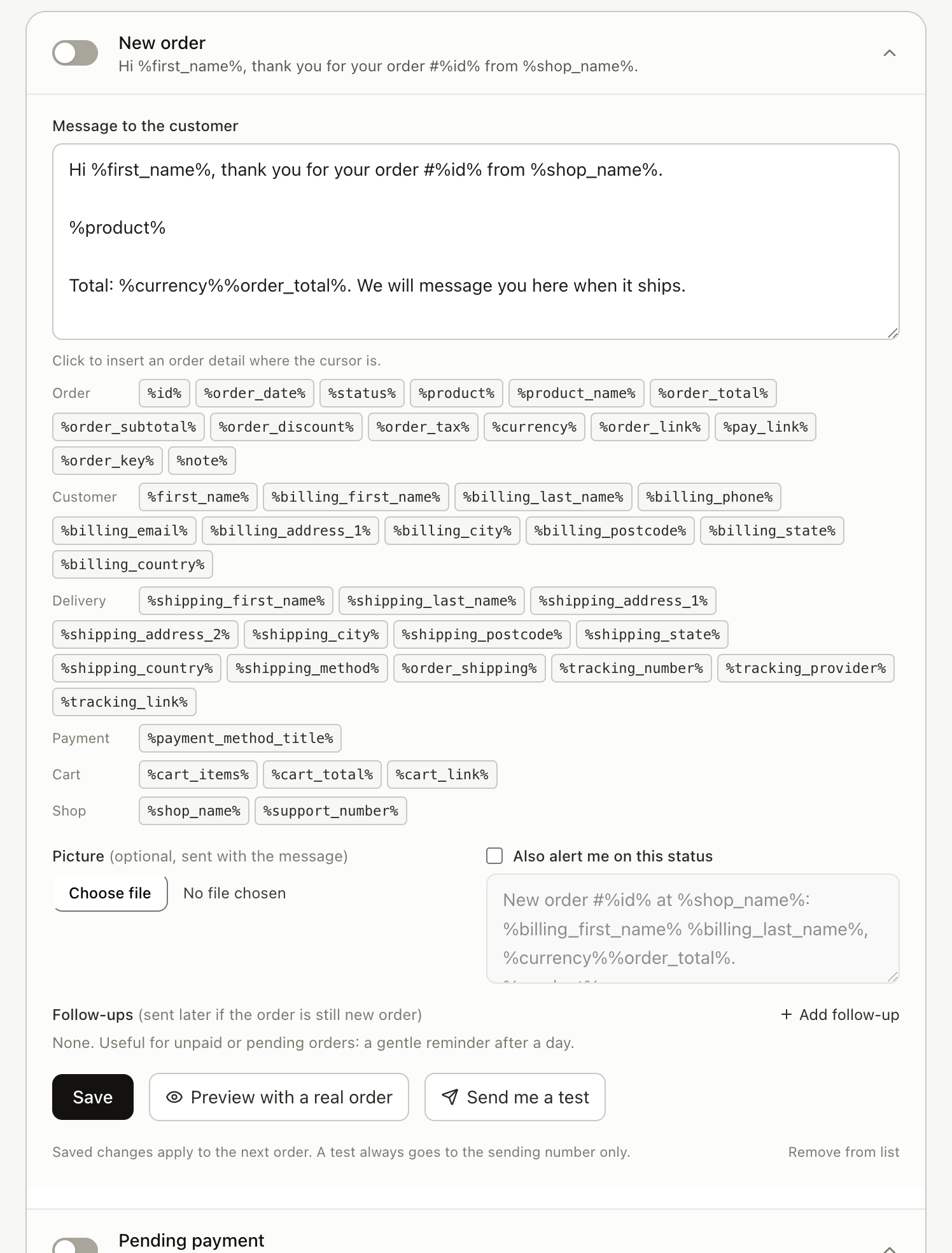
Full message wording for every other order status is in the templates post, and the wider picture is on the order updates page.
Frequently asked questions
Does the customer need to have messaged us first?
- No. The reminder goes to the number they typed at checkout, from your own WhatsApp number. Because this is your number rather than the Business Platform, there is no template to submit and no 24-hour window rule to work around. In exchange you carry the responsibility for consent, which is why the plugin puts a consent note or a checkbox at the phone field.
What happens if they open the link on a different phone or a laptop?
- That is the point of it. The link carries a token that rebuilds the cart server side, so items, variations, quantities and any applied coupon come back on whatever device opens it, even a browser that never saw the shop before. A plain link to /cart cannot do this, because a cart normally lives in a cookie on the original browser.
Will someone who already ordered still get chased?
- No. The reminder is checked against the live store before it goes out and cancelled within seconds of an order being placed for that cart. The same rule applies to unpaid-order follow-ups: pay the order and the reminder stops.
How many reminders does it send?
- As many as you configure, and one is the sensible starting point. Each reminder is a separate step with its own delay, so a second one a day later is a choice you make, not a default. Every message shares the same pacing and daily cap as the rest of your outbound, and a reply of STOP ends them.
Does it work with product add-ons such as custom names or uploaded photos?
- The rebuild is written for standard products, variations and coupons, and that is what we can vouch for today. Stores that use add-on plugins for custom text or file uploads should test with a real cart before switching the reminder on, because those fields are stored by the add-on plugin rather than by the cart itself.
Can I do this on Shopify?
- Yes. Shopify produces its own abandoned checkout link and Replai sends it through the same rules, timing and pacing. The wording below applies equally; only the source of the link differs.
Sources
- WhatsApp Business Platform pricing, Meta for Developers, 2025-07-01
- Recover abandoned checkouts, Shopify Help Center, 2026-09-10
Keep reading
Article
Four days of chasing unpaid orders on WhatsApp, and what came back
Article
Meta Business Agent on WhatsApp: what it does, who can use it and how to pause it
Article
How to connect ChatGPT to WhatsApp Business: the routes that exist, what Meta bans, and what each costs
Tutorial
How to connect WooCommerce to Replai
See it answer your own customers.
Pair your number, paste in what you know, and message it from another phone. Ten minutes, no card.