Quick answer
A good WhatsApp order message is three to five lines: who it is from, the order number, what changed, the one detail the customer wants next (a tracking link, a pay link, a pickup time), and how to opt out. Send one message per status change, never a burst, and keep marketing out of it. The 14 templates below cover every status a WooCommerce or Shopify store uses, with fields for the order number, items, totals, tracking and links.
- One message per order status, three to five lines, one link. Customers read it in a lock-screen preview.
- Fill in fields (order number, first item, tracking number, courier, pay link) so every message is specific without retyping.
- Follow-ups for unpaid orders and abandoned carts work best after 60 minutes and again the next morning, never at night.
- Sent from the shop's own WhatsApp number there is no template approval and no per-message fee; the wording is yours.
Every online store sends the same five messages a hundred times: we got your order, we got your payment, it has shipped, it is ready, it is done. Most stores send them by email, where about a third get opened. On WhatsApp the same message is read within minutes, and the customer replies in the same thread when something is wrong. That is why order messages moved to WhatsApp in most of the markets where WhatsApp is the default channel, and why the wording matters: a message that lands in a lock-screen preview has three lines to do its job.
Below are 14 templates, one per status, written for a store that sends from its own number. Copy them, change the shop name and tone, and keep the shape.
What should a WhatsApp order confirmation say?
Four things, in this order. Who it is from, because the customer may not have the shop's number saved. The order number, because it is what they will quote back. What changed and what happens next, in one sentence. The single link or detail they want at that moment: the order page after purchase, the tracking link after shipping, the pay link when a payment is pending.
Then stop. The strongest order messages are shorter than this paragraph. Marketing lines, loyalty points and review requests belong in a separate message, sent later, or not at all.
Fields in square brackets are the details your store fills in automatically. In Replai they are inserted from a picker with a click; the names below are what the picker shows.
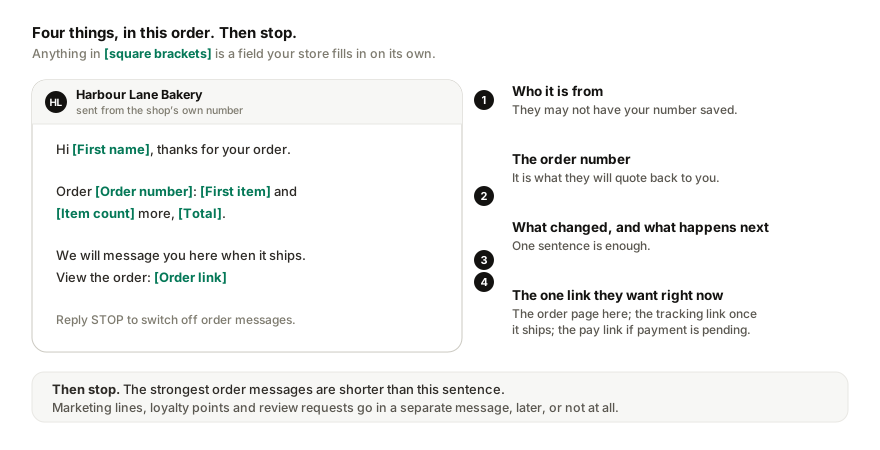
Order placed and paid
Harbour Lane Bakery
Order update, sent from the shop's own number
Use this for stores where payment is taken at checkout. If your store separates the two, split it into the next two templates.
Order received, payment pending
Harbour Lane Bakery
Order update
This is the message that recovers bank-transfer orders. The pay link opens the store's own payment page for that order on any device, so the customer does not have to find the checkout again.
Payment confirmed
Harbour Lane Bakery
Order update
Being prepared
Only send this if there is a real gap between payment and shipping, for example made-to-order goods. A store that ships the same day should skip it; two messages an hour apart feel like noise.
Harbour Lane Bakery
Order update
Shipped, with tracking
The message customers keep. Put the tracking number in plain text, because people copy it into the courier's app, and the tracking link on its own line.
Harbour Lane Bakery
Order update
Out for delivery
Send this only when the courier feeds that status back to your store; a message that says out for delivery while the parcel sits in a depot does harm. The order lookup on the shop's number should answer "where is it?" instead.
Harbour Lane Bakery
Order update
Ready for pickup
Harbour Lane Bakery
Order update
Stores that renamed a status (Ready for collection, Ready at counter) keep their own wording; the message goes out on whatever the store calls it.
Delivered
Two jobs: close the loop, and open the door for a problem before it becomes a chargeback.
Harbour Lane Bakery
Order update
Refunded
Harbour Lane Bakery
Order update
Cancelled
Harbour Lane Bakery
Order update
Payment reminder for an unpaid order
The first message went out when the order was placed. This is the follow-up, sent only if the order is still unpaid, and cancelled the moment it is paid. Send it after 60 minutes, and again the next morning; never after 10pm.
Harbour Lane Bakery
Follow-up, 60 minutes later
Harbour Lane Bakery
Second follow-up, next morning
Failed payment
Harbour Lane Bakery
Order update
Cash on delivery confirmation
For stores that lose money to fake or unconfirmed cash orders. The reply is the confirmation; an order with no reply by a set time can be held. There is more on this in the cash-on-delivery guide.
Harbour Lane Bakery
Order update
Abandoned cart
Sent after the customer typed their phone number at checkout and left. The link matters more than the words: a link to the cart page opens an empty cart on another device, so use one that rebuilds the cart. The consent line the customer saw at checkout is what makes this message welcome.
Harbour Lane Bakery
60 minutes after checkout was abandoned
New order alert for the owner
Not a customer message, but worth having. Sent to the owner's own number on every new order, or only on failed payments and refunds.
Harbour Lane Bakery
Admin alert, to the owner's number
Rules that keep order messages welcome
- One message per order and status, ever. If a status flips back and forth, the customer does not need to see it.
- Immediate updates go out at once, because the customer expects them. Follow-ups wait for morning: quiet hours from 10pm to 8am in the store's time zone.
- Space messages out. A bulk status change on fifty orders should trickle out over a few minutes, not land as a burst; WhatsApp reads bursts as spam and so do people. The broadcast limits guide covers the pacing that keeps a number safe.
- Honour STOP. A customer who replies STOP gets no more order messages, and the store's other messages should stop too.
- No marketing inside a transactional message. Announce the sale in a separate message to people who opted in for it.
Sent from your own number or through the API?
Two routes exist. Through the WhatsApp Business Platform, each of these templates has to be submitted to Meta for approval before use, the sending number cannot be the one on your phone, and Meta charges per delivered utility message, outside a customer's 24-hour service window since 1 July 2025 and inside it too since 1 October 2026 (Meta for Developers, 2026). Sent from the shop's own number, paired to a tool like Replai by QR the way WhatsApp Web pairs, the wording is yours to change at any time, there is no per-message fee, and replies land in the inbox you already use. The trade-off is that the connection is unofficial, which is why pacing and caps matter; the order updates page explains how Replai handles both.
How to send these automatically
For a WooCommerce store, the step-by-step guide takes about ten minutes: install the plugin, paste one URL and one secret, pick statuses, paste a template, press Send me a test. Shopify connects through its notification webhooks. Either way, test mode sends every message to your own phone first, tagged [TEST], until you switch it off.
Related
- WhatsApp order updates for WooCommerce and Shopify
- How to send WhatsApp order notifications from WooCommerce
- WhatsApp chatbot for cash-on-delivery orders
- WhatsApp customer service for your online store
- WhatsApp broadcast limits per hour and per day
Frequently asked questions
What should a WhatsApp order confirmation include?
- The shop's name, the order number, what was ordered (or the first item and a count), the total, what happens next and when, and one link to the order page. Three to five lines. Leave out marketing, and add a short opt-out line so the customer knows a reply of STOP ends the messages.
When should the shipping message be sent?
- The moment the order moves to shipped and the tracking number exists. If tracking is added later, send the shipping message then, not before. One message per status is the rule; a second message for the same status reads as spam and costs trust.
Do I need WhatsApp Business API templates for order messages?
- Only if you send through the official API, which needs a dedicated number, Meta's approval for each template, and a per-message fee for every utility message: outside a customer's 24-hour service window since 1 July 2025, and inside it too since 1 October 2026. Sent from the shop's own paired number the wording is yours and there is no fee, though the connection is unofficial and must be paced.
How do I send these automatically from WooCommerce or Shopify?
- Connect the store to a tool that watches order status changes and sends the message for each one. With Replai you install a small WooCommerce plugin or paste a Shopify webhook secret, pick the statuses, paste a template like the ones here, insert the fields with a click, and press Send me a test before switching it on.
Can I send order updates in the customer's language?
- Yes. Write each status message in the language most of your customers use, and keep a second version for the other one if your store serves two. The order fields fill in the same way. Replies from customers can be in any language; an assistant answers them from your own information.
Sources
- WhatsApp Business Platform pricing, Meta for Developers, 2025-07-01
- WhatsApp: About, WhatsApp, checked 9 September 2026
Keep reading
Article
WhatsApp message stuck on one grey tick? What it means for a business
Tutorial
How to set up WhatsApp order updates that customers actually want
Article
How to write a system prompt for a WhatsApp customer service bot (with 4 templates)
Article
WhatsApp Business away message not working? Seven things to check
See it answer your own customers.
Pair your number, paste in what you know, and message it from another phone. Ten minutes, no card.