Quick answer
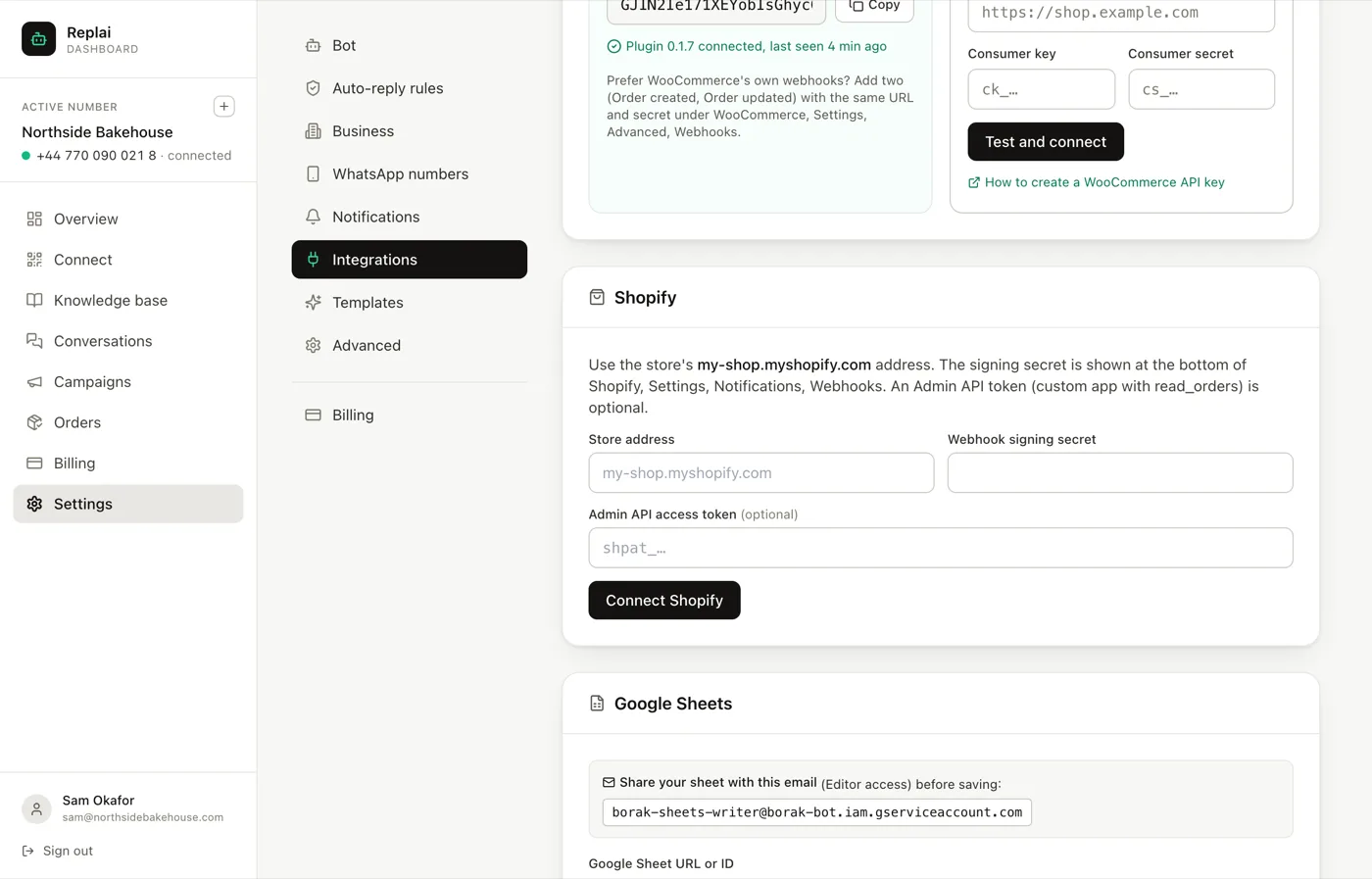
Open Settings, Integrations and find the Shopify panel. Enter your store's myshopify.com address and the webhook signing secret from Shopify, Settings, Notifications, Webhooks. Add an Admin API token from a custom app with read_orders if you want order lookup in chat. Then set up webhooks in Shopify pointing at Replai.
- The signing secret lives at the bottom of the Webhooks page, not next to each webhook.
- The Admin API token is optional and only needed for order lookup in chat.
- A custom app with read_orders is the correct scope. Anything wider is more access than this needs.
- Sending stays off and test mode stays on until you deliberately change them.
About 10 minutes
Before you start
- A Shopify store you are an admin on
- The Growth plan or above
- A connected WhatsApp number
Shopify connects through webhooks rather than a plugin: Shopify tells Replai when an order changes, and Replai turns that into a WhatsApp message from your own number.
Shopify is on the Growth plan and above.
Step 1: Get your store address
The one Replai wants is the my-shop.myshopify.com form, not your custom domain.
Every Shopify store keeps that address even after a domain is attached, and it is
what identifies the store to the API.
Step 2: Copy the webhook signing secret
In Shopify go to Settings, Notifications, Webhooks.
The signing secret is at the bottom of that page, underneath the list, rather than attached to any individual webhook. This trips people up: they look next to each webhook, find nothing, and assume they need to create one first.
It is one secret for the whole store. It is what proves to Replai that a webhook really came from Shopify and not from someone who guessed your URL.
Step 3: Save the connection
Back in Replai, paste the store address and the signing secret, then press Connect Shopify.
Step 4: Point Shopify's webhooks at Replai
In the same Shopify webhooks page, create webhooks for the order events you care about, using the delivery URL Replai shows you.
Order creation and Order updated cover the common cases: a new order arriving, and a status changing to paid, fulfilled or cancelled.
Step 5: Add order lookup, optionally
If you want the bot to answer "where is my order" from live data rather than from the last status message it sent, Replai needs to be able to ask Shopify.
In Shopify:
- Settings, Apps and sales channels, Develop apps
- Create an app
- Give it the read_orders scope, and only that
- Install it and copy the Admin API access token
Paste that token into the optional field in Replai.
Read-only is the right level and it is worth insisting on. Replai never changes anything in your store, so a token that could is access you are carrying for no benefit.
Nothing sends yet
As with WooCommerce, connecting does not message anyone.
Sending is off by default, and test mode is on, which routes every
message to your own WhatsApp number with a [TEST] tag. You read the exact text a
customer would receive, adjust it, and only then switch sending on.
What Shopify does not cover
Abandoned checkout recovery is a WooCommerce feature today. The reason is mechanical rather than a matter of preference: the WooCommerce plugin sits inside the store and sees a checkout that was started and never finished, while Shopify integration works from order webhooks, and an abandoned checkout never becomes an order.
Order status messages, order lookup in chat and unpaid-order follow-ups all work on Shopify.
What to do next
The connection is the plumbing. The next guide is the part customers actually see: which statuses trigger a message, and what those messages say.
Frequently asked questions
Where is the webhook signing secret in Shopify?
- At the bottom of Settings, Notifications, Webhooks, below the list of webhooks rather than attached to any one of them. It is a single secret for the whole store, which catches people out because they expect one per webhook.
Do I need the Admin API token?
- Only for order lookup in chat. Without it, order updates still go out, because those arrive by webhook. What you lose is the ability for the bot to answer where is my order from live data, and the ability to preview a message against a real order.
Which scope should the custom app have?
- read_orders, and nothing else. Replai never writes to your store. A token with write scopes is more access than the feature needs and more damage if it ever leaks.
Does Shopify support abandoned cart recovery through Replai?
- Abandoned checkout recovery is a WooCommerce plugin feature today, because the plugin sees an unfinished checkout that never becomes an order. On Shopify, Replai works from order webhooks, so it covers order statuses rather than abandoned checkouts.
Can I run Shopify and WooCommerce at the same time?
- Yes. The Orders page serves both, and the message settings apply to whatever arrives. This matters for businesses mid-migration, where orders come from two places for a while.
Sources
- About webhooks, Shopify, 2026-09-14
Keep reading
See it answer your own customers.
Pair your number, paste in what you know, and message it from another phone. Ten minutes, no card.