Quick answer
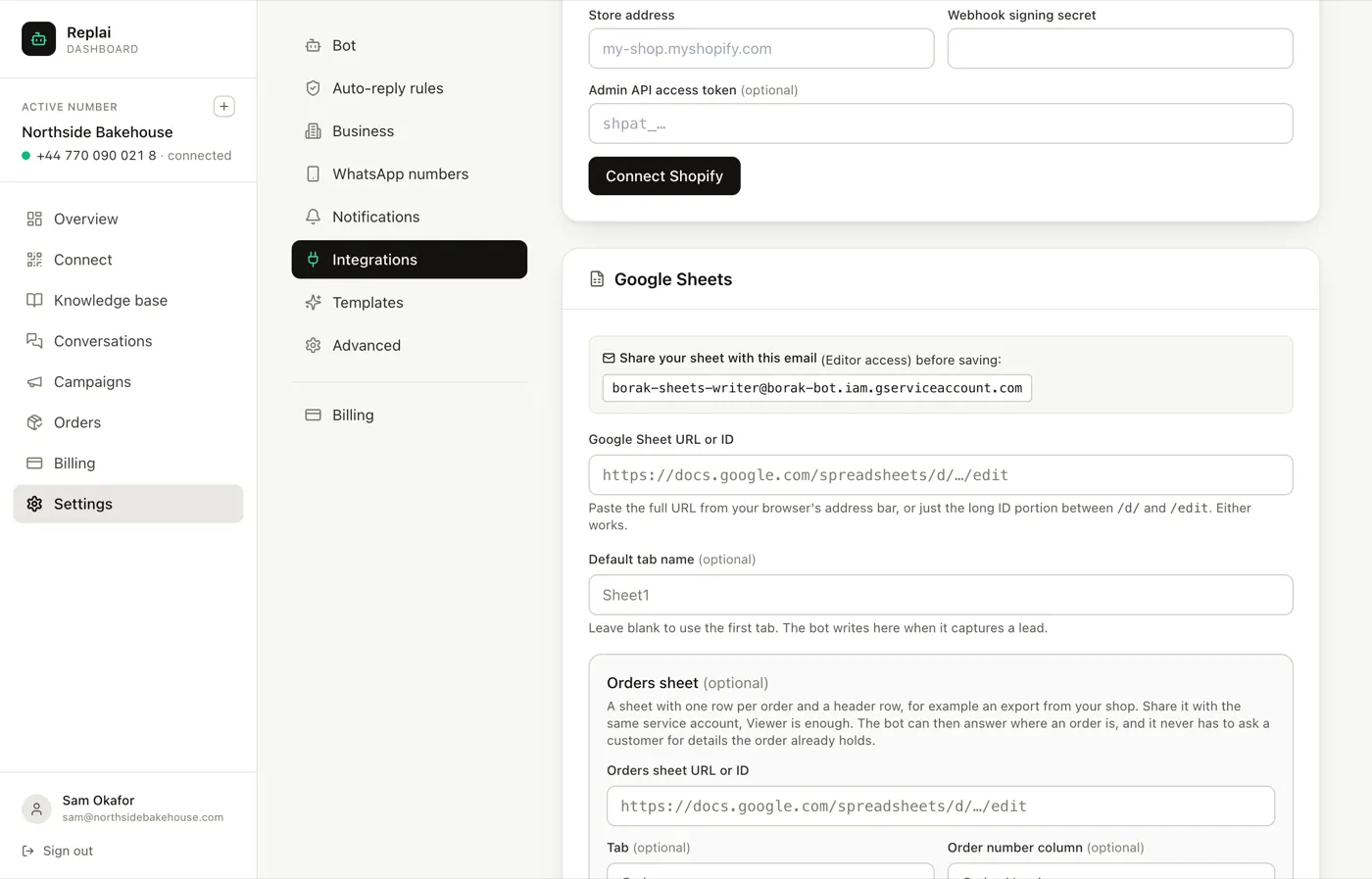
Share your sheet with the service account email shown in Settings, Integrations, giving Editor access for the leads sheet. Paste the sheet URL and save. Optionally bind a second sheet of orders with Viewer access, and the bot can answer where an order is without asking the customer for details the sheet already holds.
- Sharing with the service account is the step people skip, and nothing works until they do.
- The leads sheet needs Editor access because the bot writes to it. The orders sheet only needs Viewer.
- An orders sheet is the cheapest way to get order lookup without a store integration.
- Paste the whole URL. Replai extracts the id.
About 10 minutes
Before you start
- A Google account and a spreadsheet
- A connected WhatsApp number
The Google Sheets binding does two unrelated jobs, and most businesses want one of them rather than both.
A leads sheet is written to. The bot records what it learns from a conversation in columns you choose, and a row appears.
An orders sheet is read from. The bot can answer "where is my order" out of a spreadsheet, with no store integration at all.
The step everyone skips
Replai reads and writes as its own service account, not as you. That account has its own email address, shown on the settings page.
A sheet that only you can open is a sheet Replai cannot see. Share it with that address first, and only then paste the URL. Saving before sharing is the single most common reason this appears not to work, and the failure is quiet rather than loud.
Editor for a leads sheet, because the bot writes rows. Viewer for an orders sheet, because it only reads.
Binding a leads sheet
Copy the sheet's address straight from your browser's address bar and paste it in. The whole URL is fine; Replai pulls the id out of it.
Name a tab if you want rows going somewhere other than the first one. This is worth doing on any sheet that is already in use for something else, because the default is the first tab and the first tab is usually the one someone is working in.
You choose the columns
This is the part most people miss, because it looks like a lead capture feature and is really a "write down whatever matters to me" feature.
What gets recorded comes from the bot's own instructions, so the columns are whatever your business actually runs on:
- Lead quality, budget and what they asked about
- A booking slot, written into a separate Bookings tab
- A support ticket with its category and a description
Headers are created on the first write, so you do not have to set the sheet up in advance. Describe what to record in the system prompt and the structure follows.
Two limits worth knowing. It appends a row, it does not edit one, so this is a log rather than a database. And it writes what the conversation contained: if nobody ever mentions a budget, no budget appears, and that is the sheet being honest rather than the feature failing.
Updating rows, on Pro
Appending is one thing; going back and filling in a row that already exists is another, and it is the Pro half.
When a broadcast runs from a sheet on Pro, the rows the leads came from update themselves: Status, Last Contacted and Notes, with enough detail to be a record rather than a tick. The list you sent from becomes the log of what happened to it.
Binding an orders sheet
This is the underrated half.
The sheet needs one row per order and a header row. An export from your shop is exactly the right shape, and so is the spreadsheet a lot of small businesses already keep by hand.
Replai finds the order number column by looking for a header containing the word order. Name the column explicitly when that is ambiguous, which it usually is the moment a sheet has both Order Number and Order Date.
What this buys you: a customer asks about order 2418, and the bot answers from the sheet instead of asking them for details the sheet already holds. For a shop with no store integration, or one running on a platform Replai does not integrate with, this is the whole of order lookup for the price of keeping a spreadsheet current.
The obvious limit is that the sheet is as fresh as your last export. A daily export is fine for "has it shipped". It is not fine for stock levels.
What to do next
If you write your own software and want Replai's events rather than its spreadsheets, outgoing webhooks are the next guide.
Frequently asked questions
Why does nothing save when I paste the sheet URL?
- Almost always because the sheet has not been shared with the service account. Replai reads and writes as that account, not as you, so a sheet only you can open is a sheet it cannot see. Share it with the address shown on the settings page first, then save.
Editor or Viewer?
- Editor for the leads sheet, because the bot writes rows into it. Viewer for the orders sheet, because it only reads. Giving the orders sheet Editor access works but hands out write access nothing needs.
What does the bot write into the leads sheet?
- Whatever you tell it to. The columns are yours: lead quality, budget, what they asked about, a booking slot, a support ticket and its category. You describe what to record in the bot's instructions and it writes a row per conversation, creating the headers on the first write. It appends rather than edits, so treat it as a log rather than a database.
Can the bot update a row it already wrote?
- Only on Pro, and only for broadcast results. Every plan can append rows. Pro adds going back to a row that already exists and filling in Status, Last Contacted and Notes as a broadcast runs, so the list you sent from becomes the record of what happened. Appending is common across tools; updating the row a lead came from is the unusual part.
Do I need a store integration if I have an orders sheet?
- No, and that is the point of it. A shop that exports orders to a spreadsheet, or runs on something Replai has no integration for, can still let customers ask where their order is. The trade-off is that the sheet is as current as your last export.
Which column does it match order numbers on?
- It looks for a header containing the word order. Name the column explicitly if your header is unusual, or if the sheet has several columns that could match, such as Order Number and Order Date.
Sources
- Share files from Google Drive, Google Docs Editors Help, 2026-09-14
Keep reading
See it answer your own customers.
Pair your number, paste in what you know, and message it from another phone. Ten minutes, no card.