Quick answer
Open Orders, then Messages, and add the statuses you want customers to hear about. Each comes with a message you can edit using merge fields like %first_name% and %id%. Keep test mode on while you check the wording on your own phone, then switch sending on.
- Three statuses is usually the right number. Ten is a reason to mute you.
- Test mode sends every message to your own number with a TEST tag, so nothing reaches a customer while you tune.
- The best order message answers the next question rather than announcing a state change.
- Sending is a deliberate switch, not something a connected store turns on.
About 20 minutes
Before you start
- A connected WooCommerce or Shopify store
- A connected WhatsApp number
Connecting a store is plumbing. This is the part customers see, and the difference between an order update people like and one they mute is almost entirely in the wording.
The Orders page
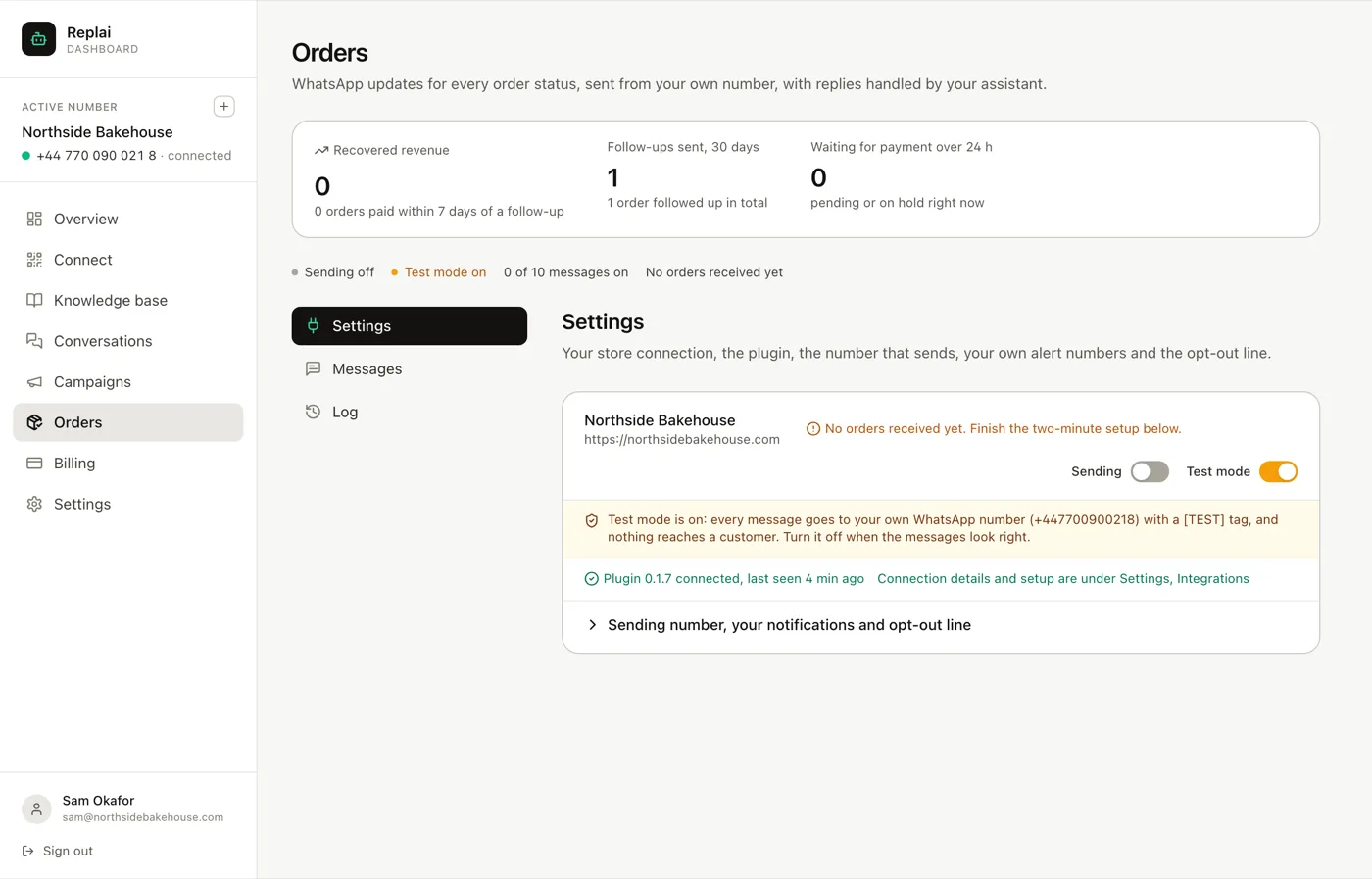
Three tabs. Settings holds the store connection and the two switches that matter. Messages is where you decide what goes out. Log shows what actually went.
The counters along the top are worth understanding before you touch anything. Recovered revenue counts orders paid within seven days of a follow-up, which is the only honest way to measure whether chasing unpaid orders is working.
Pick the statuses worth a message
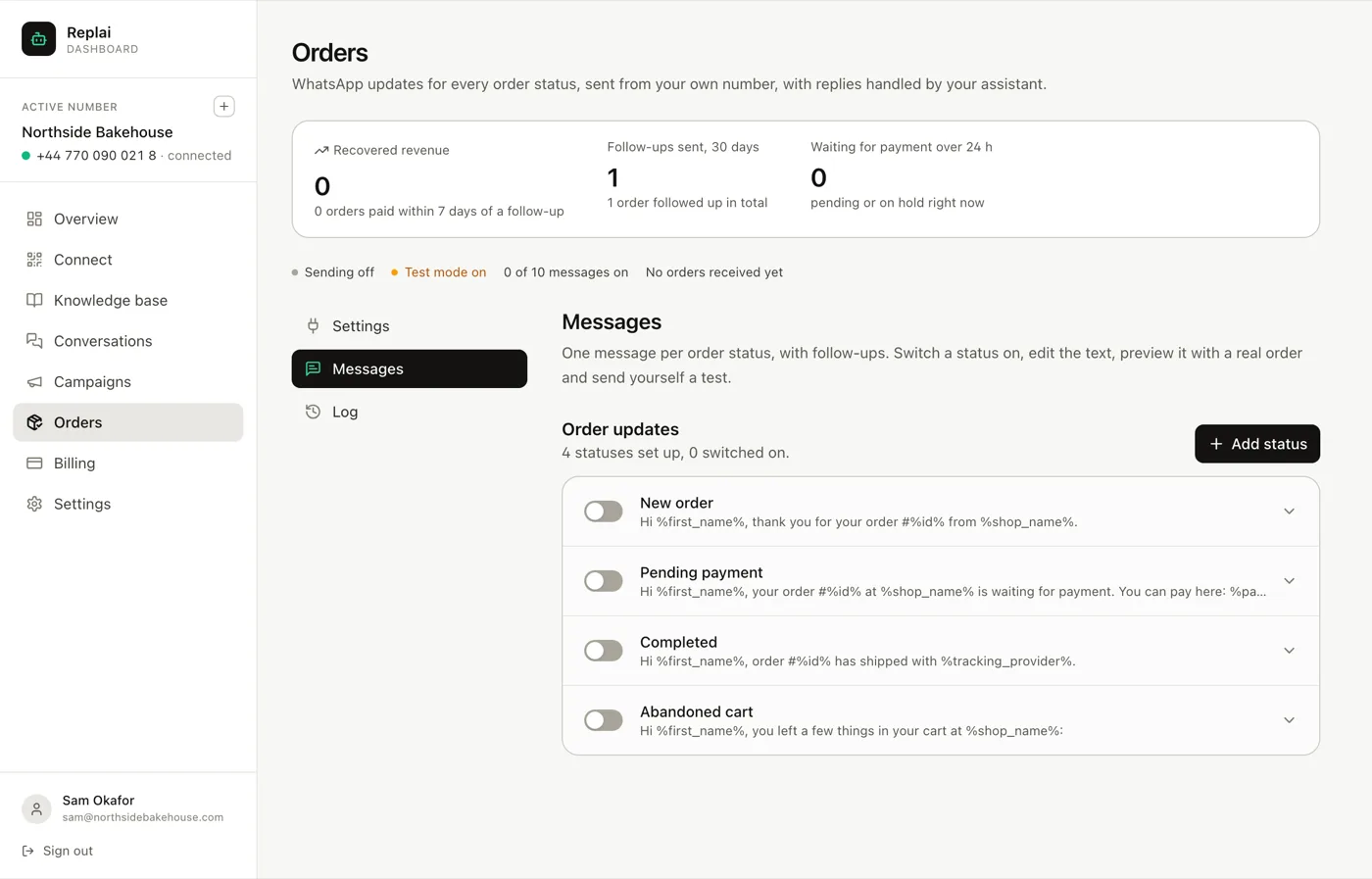
Quick-add buttons offer the common ones. For most shops:
New order is the one customers genuinely want. It replaces the small anxiety of wondering whether the order went through.
Completed, meaning dispatched or ready, is the second. It is the message that stops the "has it shipped yet" question.
Pending payment matters if you take bank transfer or cash on delivery, where an order can sit unpaid without anyone noticing.
That is usually the whole list. The temptation is to switch on everything available, and the result is a customer receiving four messages about one small purchase, including a couple that describe internal states they have no view of. A shop that messages on every status change gets muted, and then the one message that mattered does not arrive either.
Write them so they answer the next question
The default templates work and they are generic by necessity. The upgrade is small and specific: say what the customer will wonder next.
A confirmation that only confirms:
Hi %first_name%, thank you for your order #%id% from %shop_name%.
The same message doing a job:
Hi %first_name%, order #%id% is confirmed, %order_total%.
It will be ready for collection from 7am on Saturday. Reply here if you need to change anything.
The second one is barely longer and it removes the two follow-up messages the first one invites: when will it be ready, and can I change it.
Merge fields are percent-wrapped. The important thing about them is what happens when one is empty: you get the rest of the sentence with a gap in it. Write sentences that survive a missing first name, because guest checkouts produce them constantly.
Test it on yourself first
Test mode routes every message to your own WhatsApp number with a [TEST]
tag. The wording, the merge fields and the timing are all real.
Read it on a phone, not in the dashboard. Order messages are read in a notification shade, three lines at a time, usually while the person is doing something else. Length that looks fine in a browser looks like an essay there.
If you added an API key, preview against a real order rather than placeholder data. That is how you find out that your order numbers have a prefix, or that the total arrives with a currency symbol you were not expecting.
Then switch sending on
Two switches, both off to begin with, and both deliberate:
Test mode off stops messages going to you.
Sending on starts them going to customers.
Do them in that order and watch the first few in the Log tab. The log shows what went to whom and what happened to it, which is where you find out that a customer number is not on WhatsApp, or that someone on the opt-out list was correctly skipped.
One thing worth checking first
Order updates provoke replies. That is the advantage over email, and it is only an advantage if the replies get answered well.
Before switching sending on, make sure your knowledge base covers what an order message makes people ask: how long until it arrives, can I change the address, can I add something to it. Those land in Conversations and the bot answers them. An order message that generates a question the bot cannot answer has moved work rather than removed it.
What to do next
The other half of this feature is chasing what has not happened yet: orders that were placed and never paid, and checkouts that were started and abandoned.
Frequently asked questions
How many statuses should I switch on?
- Two or three. Order received, order on its way, and if you take bank transfer, payment still outstanding. Every extra message is one more chance for a customer to decide you send too much, and the marginal ones tend to announce things nobody was waiting for, like an internal status moving from processing to on-hold.
What does test mode actually do?
- Routes every message to your own WhatsApp number with a TEST tag instead of to the customer. The text, the merge fields and the timing are all real, so you are reading exactly what a customer would get. Nothing reaches them while it is on.
Which merge fields are available?
- The customer's first name, the order number, the order total and your shop name, written as percent-wrapped tokens such as %first_name% and %id%. If a field is empty for a particular order, you get the sentence with a hole in it, so write sentences that survive that.
Will customers be able to reply?
- Yes, and that is the main advantage over email. The reply lands in Conversations and your bot answers it from the knowledge base. It is worth checking your knowledge base covers the questions an order update provokes, which are usually about timing and changing a delivery address.
What happens if the same order changes status twice quickly?
- Each status you have switched on sends its own message. If a shop moves an order through several internal states in a minute, a customer can receive a burst. That is the strongest argument for switching on few statuses rather than many.
Keep reading
See it answer your own customers.
Pair your number, paste in what you know, and message it from another phone. Ten minutes, no card.