Quick answer
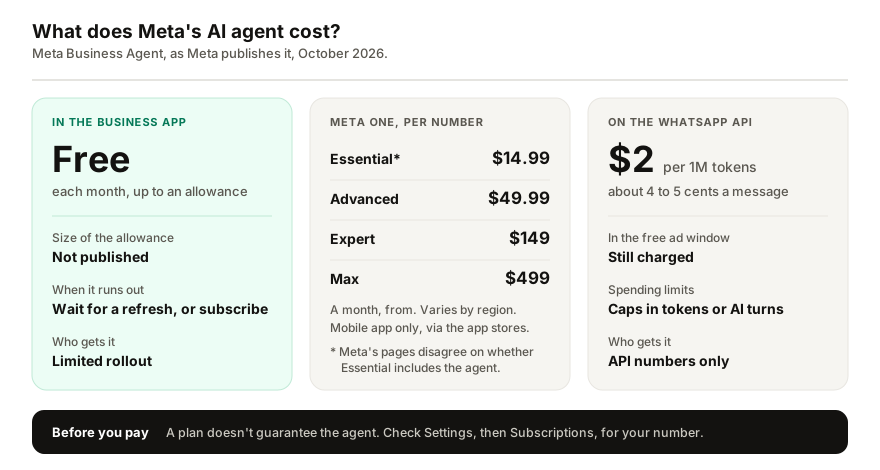
Partly. Meta Business Agent is free to use each month up to an included allowance, but Meta does not say how big it is. When it runs out, you wait for it to refresh or buy a Meta One business plan, from $14.99 a month for Essential to $499 for Max. On the WhatsApp Business Platform the agent costs $2 per million tokens, about 4 to 5 cents a message.
- Meta Business Agent is free up to a monthly allowance whose size Meta does not publish.
- Meta One business plans start at US$14.99 a month, or €16.99 in France and Spain.
- You subscribe in the mobile app, per business number, billed through Google Play or the App Store.
- On the API, the agent costs $2 per million tokens, about 4 to 5 cents a message.
Meta's AI agent for the WhatsApp Business app started free, and it still is, up to a point Meta has chosen not to put a number on. Past that point the answer is a subscription, and on the API it is a meter. Here is what is free, what each paid route costs, and what Meta leaves unsaid.
Is Meta Business Agent free?
Free to start, and free every month up to an allowance. Meta's own page for the WhatsApp Business app says the agent is free to use each month up to an included allowance, with more responses available through Meta One plans, and that the app itself stays free (Meta).
What it does not say is how large that allowance is. Meta publishes no number for the free tier or for any paid tier. It counts usage in responses, calls the extra capacity on its top plans AI credits, and does not say whether the allowance resets on the calendar month or on a rolling window.
What happens when the free allowance runs out?
WhatsApp gives two options: subscribe to a Meta One plan to get more access to round-the-clock responses from the agent, or wait for your free limit to refresh (WhatsApp Help Center). Meta's pages do not describe what customers see in the meantime, so watch your chats closely the first time it happens.
What does Meta One cost?
Meta One is Meta's paid subscription across its apps, launched on 15 September 2026. Its four business plans are priced per month, from (Meta):
| Plan | US dollars | France, Spain | Brazil | Business Agent |
|---|---|---|---|---|
| Essential | $14.99 | €16.99 | R$59 | More access |
| Advanced | $49.99 | €54.99 | R$199 | More again |
| Expert | $149 | €169 | R$599 | Highest capacity |
| Max | $499 | €549 | R$1,999 | Highest capacity |
Three caveats before you pick a plan:
- Prices are "from" and vary by region. Meta says so on every price it publishes, and the plans are still rolling out, so your app may show a different figure or none at all.
- One plan, one number. On the WhatsApp Business app, Meta One is bought per business profile or phone number (Meta).
- Meta's pages disagree on Essential. The launch post says Essential adds more access to Meta Business Agent on WhatsApp, while WhatsApp's help page lists the agent only from Advanced upward (WhatsApp Help Center). If the agent is the reason you are buying, check what Settings, Subscriptions shows for your number before choosing Essential.
Where do you pay, and how?
In the mobile app only. You subscribe from Settings, Subscriptions, Meta One in WhatsApp or WhatsApp Business on your phone, payment goes through Google Play or the App Store, and the plan renews each period until you cancel in the same store account (WhatsApp Help Center). WhatsApp Web cannot start a subscription. Eligible new subscribers may get a 7-day free trial, but not every region offers one (Meta).
Does paying guarantee you get the agent?
No. WhatsApp says Meta Business Agent isn't available in some countries, and that subscribing to a plan that lists it doesn't guarantee access (WhatsApp Help Center). Its language follows your business phone number, and not every language is supported. If the agent never appeared in your Tools tab, start with why the AI agent may not be showing before you pay for capacity you cannot use. The rest of a Meta One plan, such as extra linked devices, and the verified badge once your business is verified, works either way.
What does the agent cost on the WhatsApp API?
The WhatsApp Business Platform prices it differently: by the token, not by the month. Since 1 August 2026 Meta charges one global rate of $2 per million tokens, which covers both the AI work and delivering the message (Meta for Developers). Meta's own estimate is 20,000 to 25,000 tokens a message, about 4 to 5 cents. Three details matter:
- the charge applies even inside the free window that follows a click-to-WhatsApp ad;
- agent messages are not delivered without a payment method on the account;
- you can cap spending in tokens or AI turns over rolling periods, after which the agent hands chats to a person.
This route needs an API number, not the WhatsApp Business app, and Meta excludes some industries, including finance, health, alcohol and gambling.
What if you need a predictable bill?
I build Replai, so weigh this section with that in mind.
If Meta's agent is offered to you and its free allowance covers your volume, it is the cheapest option there is, and the guide to what it does and how to pause it covers the rest. The trouble starts when you cannot see the limit coming: a busy week ends in a subscription decision, or in chats that quietly wait.
Replai prices the other way round. Plans are $19, $49 or $99 a month with the AI included and the number of conversations stated up front (120, 300 or 600), and extra packs of 100 if you run over. It works on WhatsApp or WhatsApp Business in any country, in the language each customer writes in. It connects as a linked device, which is unofficial and carries a restriction risk that Meta's own agent does not. Before deciding, see what it would answer for your business.
Frequently asked questions
Is the WhatsApp Business AI agent free?
- Up to a point. Meta says Meta Business Agent is free to use each month up to an included allowance, and sells more responses through Meta One plans. It does not publish how many responses the free allowance covers. When you reach it, WhatsApp says you can wait for the limit to refresh or subscribe to a Meta One plan.
How much does Meta One cost for a business?
- Meta lists four business plans, priced from $14.99 a month for Essential, $49.99 for Advanced, $149 for Expert and $499 for Max, with local prices such as €16.99 in France and Spain or R$59 in Brazil for Essential. Each plan covers one business profile or number on the WhatsApp Business app, and prices vary by region.
Can I subscribe to Meta One on WhatsApp Web?
- No. WhatsApp's instructions are for the mobile apps: you open Settings, then Subscriptions, then Meta One, and payment goes through Google Play or the App Store. You manage or cancel the plan in the same app store account. Eligible new subscribers may get a 7-day free trial, though not every region offers one.
Does paying for Meta One guarantee the AI agent?
- No. WhatsApp says Meta Business Agent isn't available in some countries, and that subscribing to a plan that lists it doesn't guarantee access. Its language also follows your business phone number. Check Settings, then Subscriptions in your app before you buy, and keep in mind the rest of the plan works either way.
How much does Meta Business Agent cost on the WhatsApp API?
- On the WhatsApp Business Platform, Meta charges one global rate of $2 per million tokens, covering the AI work and the message. Meta says a message typically uses 20,000 to 25,000 tokens, about 4 to 5 cents. The charge applies even inside the free window after a click-to-WhatsApp ad, and you can set spending caps.
Sources
- Meta One for the WhatsApp Business app, Meta, 2026-09-29
- Introducing Meta One, Meta, 2026-09-15
- About using Meta Business Agent with Meta One, WhatsApp Help Center, 2026-10-13
- About Meta One plans, WhatsApp Help Center, 2026-10-13
- Pricing for non-template messages, Meta for Developers, 2026-09-28
Keep reading
Article
How many devices can use one WhatsApp Business number?
Article
How to connect ChatGPT to WhatsApp Business: the routes that exist, what Meta bans, and what each costs
Article
Can you auto reply in a WhatsApp group? What works, and what WhatsApp keeps out
Tutorial
How to build a knowledge base your bot can actually answer from
See it answer your own customers.
Pair your number, paste in what you know, and message it from another phone. Ten minutes, no card.