Quick answer
Meta Business Agent is Meta's AI that replies to customers inside the WhatsApp Business app, trained on your Facebook Page, past chats, website and catalog. Getting started is free, but it is only available to select businesses in limited countries, in a language set by your phone number. To pause it: Tools, Meta Business Agent, Response settings, Disconnect AI, Pause AI replies.
- Meta Business Agent lives under Tools in the WhatsApp Business app, where it is available.
- It learns from your Facebook Page, past WhatsApp chats, website, catalog and price lists.
- Select businesses in limited countries only, and its language follows your phone number.
- Pause or delete it in the mobile app, not WhatsApp Web.
Meta now builds an AI agent into the WhatsApp Business app. Where it is available, it sits under Tools, learns from what your business has already published, and answers customers around the clock. Where it is not, there is no button and a waitlist. Here is what it does, how to switch it off, and how it compares with running a separate assistant.
What is Meta Business Agent?
It is Meta's AI agent for businesses, replying for you in WhatsApp chats (and, per Meta, on Messenger and Instagram too). According to Meta's product page it can:
- answer questions about your hours, location, products and services,
- recommend products and give prices,
- answer questions about discounts, payment and shipping,
- ask customers questions and collect the details you need,
- hand chats to you on topics you flag, or whenever you step in.
It learns from your Facebook Page posts and past WhatsApp chats, plus a website, catalog or price list if you add them (Meta). Meta says more than a million businesses were already using a Business Agent on WhatsApp and Messenger when it announced a global expansion on 3 June 2026.
Who can use it?
Not everyone, yet. WhatsApp's help pages describe it as available in limited countries to select businesses. The language it uses is determined by your business's phone number, and not every language is supported yet. If there is no AI agent option under Tools, it is not available to you. There is a waitlist, but WhatsApp says joining it guarantees neither access nor a date (WhatsApp Help Center).
Meta's June announcement talks about businesses of all sizes globally, while its help pages still say limited countries. Go by what your own app shows.
What does it cost?
Getting started is free. In June Meta said paid subscriptions would follow, and in September it launched Meta One, whose business plans start at $14.99 a month and include access to Meta Business Agent, with more capacity on the higher tiers (Meta). Prices and availability vary by region, so check the Subscriptions screen in your app for your figure.
How do you set it up?
- Make sure the number is registered in the WhatsApp Business app.
- Go to Tools, then Meta Business Agent, authenticate, link your account if asked, and confirm.
- Teach it: it reads your past chats, and you can add a website, catalog or price list.
- Test it by chatting with it as a customer would, then activate it.
Then choose where it replies, from AI replies in its settings: all new one-to-one chats, all except your saved contacts, only chats that start from your Facebook or Instagram ads, or paused for new chats while it keeps learning. If you switch it on in a chat where you are mid-conversation, it stays quiet there unless that chat has been inactive for seven days (WhatsApp Help Center).
How to pause or delete Meta Business Agent
This has to be done in the WhatsApp Business mobile app. It cannot be paused or deleted from WhatsApp Web.
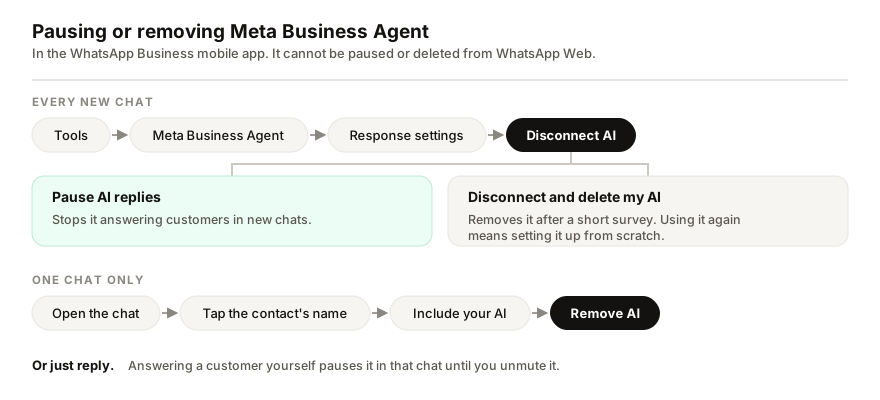
- Pause it: Tools, Meta Business Agent, Response settings, Disconnect AI, Pause AI replies. It stops answering new chats.
- Delete it: the same path, then Disconnect and delete my AI, and a short survey. Turning it on again later means going through setup again.
- Remove it from one chat: open the chat, tap the contact's name, then Include your AI and Remove AI. It stops replying there and stops learning from that chat.
- Reply yourself: answering a customer by hand pauses the agent in that chat until you unmute it.
What do customers see?
WhatsApp tells them. A notice in the chat says that AI from Meta receives chats to improve AI quality and generate messages for the business, and messages the AI writes carry an AI label. Customers can ask to stop receiving AI-generated messages, and the agent will then try to connect them with you (WhatsApp Help Center).
Meta Business Agent or a separate assistant?
| Meta Business Agent | A separate assistant, such as Replai | |
|---|---|---|
| Works with | The WhatsApp Business app | WhatsApp or the WhatsApp Business app |
| Availability | Select businesses in limited countries | Anywhere WhatsApp works |
| Language | Determined by your business's phone number; not all languages supported yet | Whatever language each customer writes in |
| Learns from | Facebook Page, past chats, website, catalog, price lists | Website, documents and notes you add |
| Cost | Free to start; Meta One from $14.99 a month | $19, $49 or $99 a month |
| Order updates from WooCommerce or Shopify | Not among its listed features | Growth plan and above |
| Connection | Official, built into the app by Meta | Unofficial, as a linked device, with a restriction risk |
I build Replai, so read the right-hand column with that in mind. My honest advice: if Meta Business Agent is available to you and answers your customers well, start there. It is official and it is free to start. A separate assistant earns its place when Meta's is not offered in your country, when your customers write in languages it does not cover, or when you want order updates and payment reminders sent from your store's number. If that is you, see what it would answer for your business. And whichever you use, run one assistant per number, not two.
Related reading: how WhatsApp Business chatbots work without the API, and what a restriction does to linked devices.
Frequently asked questions
How do I turn off the AI agent in WhatsApp Business?
- In the WhatsApp Business mobile app, tap Tools, then Meta Business Agent, then Response settings, then Disconnect AI, and choose Pause AI replies. That stops it answering new chats. To remove it completely, choose Disconnect and delete my AI instead. It cannot be paused from WhatsApp Web, and replying yourself in a chat pauses it in that chat.
Is Meta Business Agent free?
- Meta says getting started is free, and said in June 2026 that paid subscriptions would follow. Its Meta One business plans, launched in September 2026 and starting at $14.99 a month, include access to Meta Business Agent, with more capacity on the higher plans. Prices and availability vary by region.
Why can't I find Meta Business Agent in my WhatsApp Business app?
- It is being made available gradually, to select businesses in limited countries. If there is no AI agent option under Tools, it is not available to your business yet. You can join Meta's waitlist, but that guarantees neither access nor a date, and the language it uses is set by your business's phone number.
Do customers know they are talking to Meta's AI?
- Yes. WhatsApp shows customers a notice in the chat that AI from Meta receives chats to improve AI quality and generate messages for the business, and messages written by the AI carry an AI label. A customer can ask to stop receiving AI-generated messages, and it will then try to connect them with the business.
Can I use Meta Business Agent and another AI assistant on the same number?
- You can, but both would answer the same chats and talk over each other. Pick one per number. If Meta Business Agent is available to you and answers your customers well, it is the simpler choice. A separate assistant earns its place where Meta's is not available, or where you need something it does not do.
Sources
- Meta Business Agent on WhatsApp, Meta, 2026-09-30
- Be There for Every Customer With Meta Business Agent, Meta, 2026-06-03
- How to set up Meta Business Agent, WhatsApp Help Center, 2026-09-30
- How to pause or delete Meta Business Agent, WhatsApp Help Center, 2026-09-30
- Introducing Meta One, Meta, 2026-09-15
Keep reading
See it answer your own customers.
Pair your number, paste in what you know, and message it from another phone. Ten minutes, no card.