Quick answer
A WhatsApp Business number runs on one main phone plus up to four linked devices at a time, such as WhatsApp Web, the desktop app or a second phone. Meta Verified for Business and Meta One business plans raise that to as many as 10 through multi-agent. Linked devices work with the phone offline, but log out if it goes unused for 14 days.
- The free app allows one main phone plus four linked devices, all used at the same time.
- A second phone can be one of the four, linked as a companion device.
- Meta Verified for Business or a Meta One business plan raises the limit to up to 10.
- Devices log out after 14 days without the phone being used, or 30 days of their own idleness.
On the standard WhatsApp Business app, one number can be answered from five screens at once: the main phone and four linked devices. For most small shops that is plenty. It stops being plenty the week three staff, a laptop at the counter and an assistant all want a seat, so it helps to know exactly what counts and what your options are.
How many devices can use one WhatsApp Business number?
Up to four linked devices and one phone at a time (WhatsApp Help Center). A linked device can be:
- WhatsApp Web in a browser,
- the WhatsApp desktop app,
- a second phone, linked as a companion device,
- an Android tablet, or Meta's own hardware such as Portal and Ray-Ban Stories.
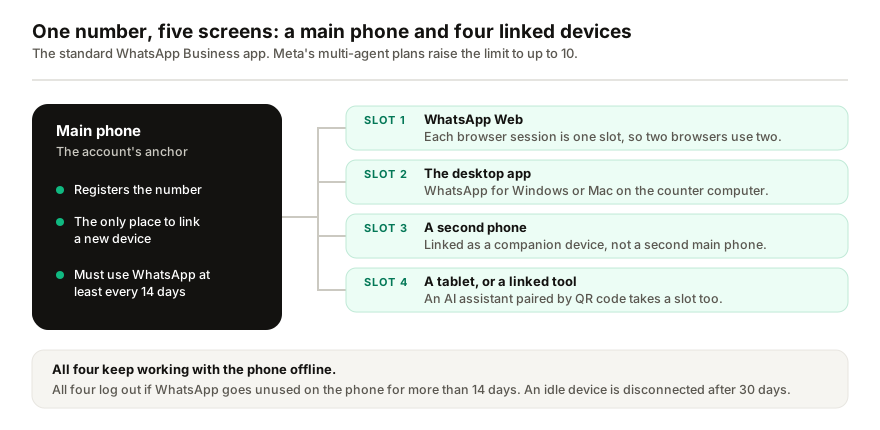
Linked devices keep working when the phone is offline, which is what makes a shared setup practical. Staff can answer from the office while the phone is in someone's pocket, or dead.
Can two phones use the same WhatsApp Business number?
Yes, but not as two main phones. The number is registered on one phone, and the second joins as a companion device (WhatsApp Help Center):
- On the second phone, install WhatsApp, open it and choose Link as companion device. It shows a QR code.
- On the main phone, go to Linked devices, then Link a device, and unlock the phone when asked.
- Scan the second phone's QR code. It now says "This is a linked device."
WhatsApp's instructions cover an Android phone as the companion. The second phone takes one of the four slots, it cannot share live location, and it logs out like any other linked device if the main phone goes 14 days without WhatsApp being opened.
What counts toward the four?
Every entry in the main phone's Linked devices list. In practice:
- Each WhatsApp Web session is its own slot. Two browsers on the same laptop use two.
- The desktop app is one more.
- A companion phone or tablet is one each.
- Any tool paired by QR code, including AI assistants, is one more.
Slots also free themselves up: WhatsApp disconnects a linked device after 30 days of inactivity. Check the list now and then and log out anything nobody recognises; if you allow push notifications on the phone, WhatsApp will tell you when a new device is linked, so you can remove it straight away.
What does the main phone still control?
Three things a linked device cannot do without it:
- Registration and new links. The account is registered on the phone, and only the phone can link a new device.
- The 14-day rule. Linked devices log out if WhatsApp goes unused on the phone for more than 14 days. A spare "office phone" left in a drawer is the usual culprit, which is why the guide to linked devices that keep logging out starts there.
- A few features. Live location, creating and viewing broadcast lists, and adding or deleting status updates do not work on linked devices, so broadcast lists are managed from the phone.
What if four devices are not enough?
| Option | How many devices | What it adds | The catch |
|---|---|---|---|
| WhatsApp Business app | Phone plus 4 linked | Nothing extra; it is free | No chat assignment, and the 14-day rule |
| Multi-agent, with Meta Verified for Business or a Meta One business plan | Up to 10, depending on the plan | Named devices, chat assignment, and which agent sent each message | A paid subscription, not yet available to every account; no tablets; with more than 4 devices, calls ring only on the main phone |
| WhatsApp Business Platform through a provider | Seats in the provider's shared inbox | A multi-agent inbox, automation and templates | Per-message fees plus the provider's fee, and a policy review before you can send |
| Coexistence: the app and the API on one number | The app, plus the API side | Keep the phone app and add an API inbox | Connecting unlinks every companion device, and WhatsApp for Windows cannot be linked again |
Meta One business plans start at $14.99 a month and, like Meta Verified for Business, may not be offered in every region yet (Meta). If you cancel, only the four most recently active devices stay linked. The official platform is the right answer for a real support team, with costs that the breakdown of WhatsApp API fees sets out; Coexistence is worth reading before you connect an existing number, because of what it unlinks.
If you use an AI tool on the same number
I build Replai, so weigh this accordingly. Assistants that pair by QR code, Replai included, are linked devices: they take one of the four slots and follow the same rules as WhatsApp Web. If your team already uses three browsers and the desktop app, all four slots are full, and one has to be logged out before anything else can connect. Count the slots first, then see how pairing works. If you are deciding whether an assistant deserves a slot at all, check what it would answer for your business first.
Frequently asked questions
How many devices can use one WhatsApp Business account?
- Up to four linked devices plus one phone at a time on the standard WhatsApp Business app. Linked devices can be WhatsApp Web in a browser, the desktop app, a second phone or an Android tablet. With multi-agent, part of Meta Verified for Business and Meta One business plans, the limit rises to as many as 10, depending on the plan.
Can I use WhatsApp Business on two phones with the same number?
- Yes, but only one of them is the main phone. The second phone is linked as a companion device: on it, choose Link as companion device, then scan the QR code it shows with your main phone. It then counts as one of your four linked devices, and it logs out if WhatsApp goes unused on the main phone for over 14 days.
Does the main phone need to stay online for linked devices to work?
- No. Linked devices keep working when the main phone is off or has no signal. The phone is still the anchor: it registers the account and links new devices, and if WhatsApp is not used on it for over 14 days, every linked device logs out. Separately, WhatsApp disconnects any linked device that has itself been idle for 30 days.
Can more than four people answer one WhatsApp Business number?
- On the standard app, four linked devices plus the phone is the ceiling. Multi-agent, included with Meta Verified for Business and Meta One business plans, raises it to up to 10 devices and adds chat assignment. Past that, a team needs the WhatsApp Business Platform with a shared inbox from a provider, which brings per-message fees.
Does an AI tool on my number use up a device slot?
- It depends how it connects. Tools that pair by QR code as a linked device, Replai included, take one of the slots and follow the same rules as WhatsApp Web, including the 14-day rule. Tools built on the WhatsApp Business Platform do not use a slot, because they do not connect through the app at all.
Sources
- About linked devices on the WhatsApp Business app, WhatsApp Help Center, 2026-09-30
- About linking WhatsApp to a second phone, WhatsApp Help Center, 2026-09-30
- About multi-agent, WhatsApp Help Center, 2026-09-30
- Introducing Meta One, Meta, 2026-09-15
- Onboard WhatsApp Business app users, Meta for Developers, 2026-09-30
Keep reading
Article
WhatsApp chatbot without the Business API: how QR pairing works, what it costs and where it breaks
Article
Meta Business Agent on WhatsApp: what it does, who can use it and how to pause it
Article
How to send a WhatsApp broadcast with a photo without getting your number flagged
Tutorial
How to run more than one WhatsApp number from one workspace
See it answer your own customers.
Pair your number, paste in what you know, and message it from another phone. Ten minutes, no card.