Quick answer
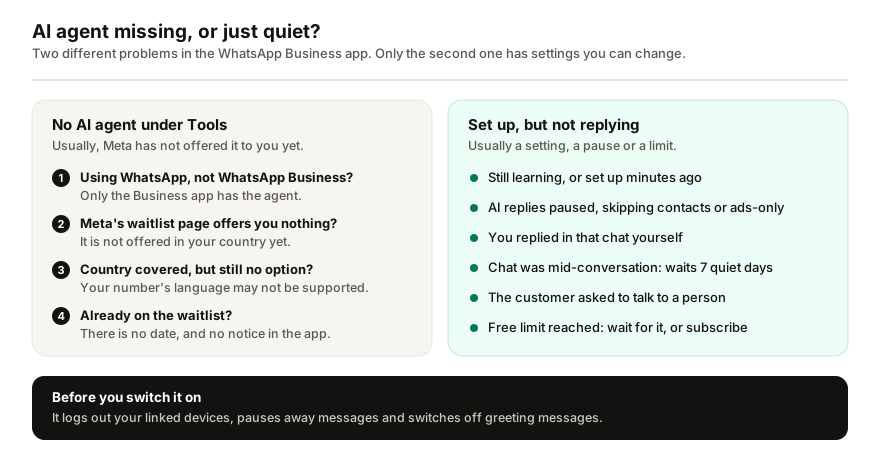
If the Tools tab of the WhatsApp Business app has no AI agent option, Meta has not made it available to your business yet. It is rolling out gradually, to select businesses in limited countries, and its language is set by your phone number. Make sure you are in WhatsApp Business, not WhatsApp, then join Meta's waitlist. Joining guarantees neither access nor a date.
- No AI agent under Tools means Meta has not made it available to your business yet.
- If Meta's waitlist page offers you nothing, the agent is not offered in your country.
- Its language follows your phone number, so it can be missing where your country is covered.
- Switching it on logs out linked devices and pauses away messages.
The AI agent in the WhatsApp Business app is Meta Business Agent, the assistant Meta builds into the app to answer customers for you. When it is missing, it is not a setting you forgot to switch on. WhatsApp's own rule is blunt: if there is no AI agent option in the Tools tab, it is not available to your business yet (WhatsApp Help Center). What you can do is rule out the two mistakes that look the same, and know what the waitlist will and will not do.
Where should the AI agent be in WhatsApp Business?
In the WhatsApp Business app on your phone, in the Tools tab. WhatsApp's setup steps start there: tap AI agent, then Continue, Accept and Confirm (WhatsApp Help Center). After setup the same item reads Your AI agent. The name moves around: the help pages call the product Meta Business Agent, and when Meta launched it in India in May 2026 the item was called Your Business AI (Meta). Any of those names counts.
Two places it will never appear:
- WhatsApp, the personal app. WhatsApp says Meta Business Agent is only available in the WhatsApp Business app, not in WhatsApp Messenger. If your number runs on the regular app, there is no Tools tab to look in.
- Meta AI. The Meta AI assistant you can chat with yourself is a different product. Having it on your phone says nothing about whether your business can use the agent.
Five reasons the AI agent is not showing
| Reason | How to tell | What to do |
|---|---|---|
| Wrong app | No Tools tab | Use WhatsApp Business |
| Wrong place | Looking in Settings | Tools tab, phone app |
| Country not covered | Waitlist not offered | Nothing to fix yet |
| Language not supported | Country covered, still missing | Nothing to fix yet |
| Not selected yet | Waitlist offered | Join it, then wait |
Is the AI agent available in my country?
WhatsApp's help pages describe Meta Business Agent as available in limited countries to select businesses, and they give no country list (WhatsApp Help Center). Meta's announcement of 3 June 2026 spoke of expanding it to businesses of all sizes globally (Meta), so the two read differently. Go by what your own app shows.
The quickest test is Meta's waitlist page. WhatsApp says that if the page does not offer you the waitlist, the agent is not being offered in your country yet, and that this is not a problem with your account or with the link (WhatsApp Help Center). Nothing in the app changes that.
Why is it missing when my country is supported?
Because of your number. The language Meta Business Agent uses is determined by your business's phone number, and not every language is supported yet, so WhatsApp warns it may be unavailable even where your country is covered (WhatsApp Help Center). That is not something you can change in settings.
The other reason is plain selection: it is offered gradually, to select businesses. Meta does not publish the criteria for the app. When it launched in India, Meta said businesses had to meet certain criteria to be eligible, without listing them (Meta).
What does joining the waitlist do?
It puts your business in line, and that is all. WhatsApp is specific about the rest (WhatsApp Help Center):
- Joining guarantees neither access nor a date.
- You will not be notified in the WhatsApp Business app, so check the Tools tab now and then.
- Nothing else in the app is affected while you wait. Your catalog, labels and automated messages work as usual.
One thing not to do: buy a subscription in the hope of unlocking it. Meta One business plans include more access to Meta Business Agent, but WhatsApp says subscribing to a plan that lists it does not guarantee access, and that it is only available in countries where it is supported (WhatsApp Help Center). Check Settings, then Subscriptions in the app to see what is actually available to you.
What changes when it does appear?
Read this before you tap Continue, because switching it on changes more than who replies (WhatsApp Help Center):
- Linked devices are logged out. Turning on Meta Business Agent disconnects every linked device. Most can be linked again after setup, but not WhatsApp for Windows, Android tablets or Wear OS. If you answer customers from a computer, or use one of your four linked devices for another tool, plan for that.
- Automations pause. Away messages pause while the AI is active in a chat, greeting messages are switched off, and broadcast lists and disappearing messages may be limited. Deleting the agent restores them. It is the first thing to check if your away message stops working.
- Customers are told. A notice in the chat says that AI from Meta receives chats to improve AI quality and generate messages for the business.
- Meta learns from those chats. Messages in chats where the agent is connected are collected by Meta to improve its AI, even while it is muted, until you delete the agent.
Why is my AI agent set up but not replying?
Once it is on, silence is usually a setting or a limit rather than a fault. Work down this list (all from the WhatsApp Help Center):
- It is still learning. Without enough information it goes into learning mode and collects data from new chats before it starts answering. Right after setup it can also take several minutes to become active.
- AI replies leaves the chat out. Under Tools, Your AI agent, AI replies, you choose between all new one-to-one chats, one-to-one chats except with contacts, only chats that start from your Facebook or Instagram ads, and paused for new chats while it keeps learning. A saved contact gets nothing on the second setting, and only ad chats get answers on the third.
- You replied yourself. Answering a customer by hand pauses it in that chat until you unmute it.
- The chat was already going. If you turn it on in a chat where you are mid-conversation, it stays quiet there until the chat has been inactive for seven days, unless you tap Restart AI replies in this chat.
- It was removed from that chat. Tap the contact's name, then Include your AI, to switch it back on there.
- The customer asked for a person. Customers can ask to stop chatting with AI at any time, and it hands them over to your team.
- The other side has its own agent. AI responses may not be available when your contact is a business that has also turned on Meta Business Agent.
- You reached the free limit. Access is limited. When the free limit runs out you can wait for it to refresh, or subscribe to a Meta One plan for more where the agent is available.
If Meta's agent is not offered to you
I build Replai, so weigh this section with that in mind.
While you wait, the WhatsApp Business app's own tools still work: a greeting message for first contact and an away message outside your hours. They send fixed text and cannot answer a question, which is the gap the agent fills (what each kind of auto-reply can and cannot do).
A separate assistant is the other route. Replai pairs to the number you already have as a linked device, in any country where WhatsApp works, on WhatsApp or WhatsApp Business. It answers in whatever language each customer writes in, from the website, documents and notes you give it, and hands anything else to you. It is unofficial, which carries a restriction risk that Meta's own agent does not, and it costs $19, $49 or $99 a month after a 7-day free trial. Before deciding, see what it would answer for your business.
If Meta's agent reaches you later, remember the linked-device rule above: switching it on logs out every linked device, an assistant like Replai included. Run one assistant per number. The side-by-side comparison is in the guide to what Meta Business Agent does and how to pause it.
Frequently asked questions
Why is there no AI agent option in my WhatsApp Business app?
- Because Meta has not made it available to your business yet. WhatsApp says Meta Business Agent is being offered gradually, to select businesses in limited countries, and that a missing AI agent option in the Tools tab means it is not available to you. Its language also depends on your phone number. You can join Meta's waitlist, which promises no date.
How do I get the AI agent in WhatsApp Business?
- If it has been offered to you, open the WhatsApp Business app on your phone, go to the Tools tab, tap AI agent, then Continue, Accept and Confirm. It then learns from past chats, your catalog, documents and website. If the option is not there, join the waitlist on Meta's Business AI page. WhatsApp will not notify you in the app when access arrives.
Why did my WhatsApp Business AI agent stop replying?
- Usually a setting or a limit. Replying to a customer yourself pauses it in that chat until you unmute it. AI replies can be set to pause new chats, skip saved contacts or answer ad chats only. It skips a chat you were mid-conversation in until that chat has been inactive for seven days, and after the free limit runs out it stops until the limit refreshes or you subscribe.
Is Meta Business Agent the same as Meta AI?
- No. Meta AI is the assistant anyone can chat with inside WhatsApp. Meta Business Agent is a separate AI service that answers your customers on behalf of your business, and WhatsApp says it is only available in the WhatsApp Business app, not in WhatsApp Messenger. Having Meta AI on your phone tells you nothing about whether your business can use the agent.
What happens to linked devices when I turn on Meta Business Agent?
- WhatsApp says turning it on disconnects every linked device. Most can be linked again once setup is finished, but not WhatsApp for Windows, Android tablets or Wear OS. It can also limit broadcast lists, disappearing messages, and greeting and away messages until you delete the agent. Plan the switch for a quiet hour if your team answers customers from a computer.
Sources
- How to set up Meta Business Agent, WhatsApp Help Center, 2026-10-07
- About using Meta Business Agent to chat with customers, WhatsApp Help Center, 2026-10-07
- About using Meta Business Agent with Meta One, WhatsApp Help Center, 2026-10-07
- Be There for Every Customer With Meta Business Agent, Meta, 2026-06-03
- Introducing Business AI on WhatsApp for Small Businesses in India, Meta, 2026-05-14
Keep reading
See it answer your own customers.
Pair your number, paste in what you know, and message it from another phone. Ten minutes, no card.