Quick answer
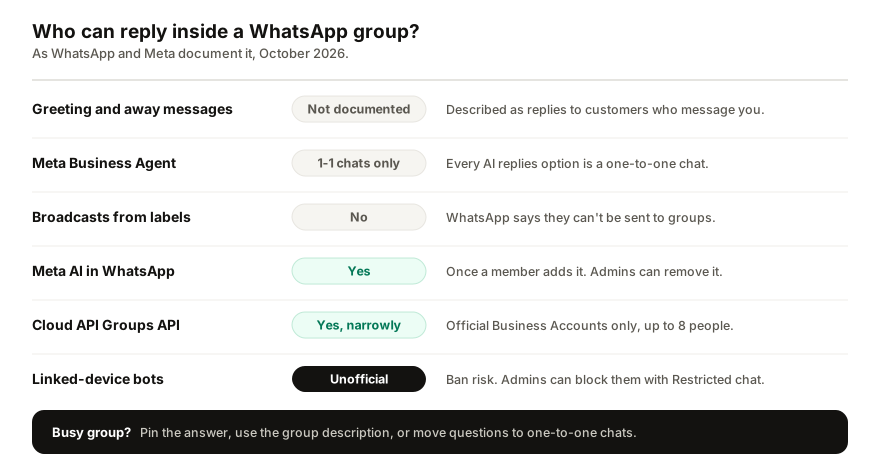
Not with the WhatsApp Business app's own tools. WhatsApp documents its greeting and away messages as replies to customers who message you, never groups, Meta's AI agent answers one-to-one chats, and label broadcasts can't be sent to groups. The official route is the Cloud API's Groups API, open only to verified Official Business Accounts, with up to eight participants. In personal WhatsApp, members can add Meta AI to a group.
- WhatsApp documents greeting and away messages as replies to people who message you, not groups.
- Meta Business Agent's reply settings cover one-to-one chats only.
- The Cloud API Groups API needs an Official Business Account and caps groups at eight participants.
- Group admins can switch on Restricted chat, which blocks linked devices and AI agents.
People ask this for two different reasons. Some run a group for customers, parents or members and want a bot to field the questions that pile up in it. Others want the WhatsApp Business app's away message to cover their groups as well as their chats. The short answer for both: WhatsApp's own automation is built for one-to-one chats, the official group tool is narrow, and the rest sits in territory WhatsApp is actively closing.
Do greeting and away messages work in WhatsApp groups?
WhatsApp does not say they do, anywhere. Its help pages describe away messages as replies to customers who message you, and greeting messages as replies to customers who message you for the first time (WhatsApp Help Center). The Recipients choices for both are people: Everyone, Everyone not in address book, Everyone except…, Only send to… selected contacts. None of them names a group. Quick replies are not automatic at all: they are shortcuts you type yourself.
The one Business app feature with a stated group rule is the broadcast built from labels, and the rule is that it can't be sent to groups; only individual customers receive it (WhatsApp Help Center).
Can Meta Business Agent reply in a group?
WhatsApp does not document it. Every option under AI replies is about one-to-one chats: all new 1-1 chats, 1-1 chats except with contacts, 1-1 chats from your ads, or paused for new chats (WhatsApp Help Center). The only mention of a group in its help pages is a step for removing the agent from a chat, which says to tap the name of the contact or group.
Two side effects matter more than the group question. Turning the agent on switches off greeting messages and pauses away messages while it is active, and it disconnects every linked device. The details are in the guide to what Meta Business Agent does and how to pause it.
Can Meta AI answer questions in a group?
In WhatsApp itself, yes, if a member adds it. Once Meta AI is a member, it can read and respond to new messages in that group, answer questions, summarise long threads, and help admins of large groups with tasks such as sharing group rules (WhatsApp Help Center). Group admins can remove it at any time.
Two catches. Meta AI is only available in some countries, and when a member adds it, Meta can read new messages sent in the group to provide those features. And it answers as Meta's general assistant, not as your business: it does not know your prices or your stock unless someone pastes them into the group.
Is there an official group bot for businesses?
There is an official group feature for businesses on the WhatsApp Business Platform, and it is narrow by design. Meta's Groups API lets a business create and run groups through the Cloud API (Meta for Developers):
| What | The rule |
|---|---|
| Who can use it | Official Business Accounts only |
| Business app numbers | Not supported |
| Participants per group | Up to 8 |
| Groups per number | Up to 10,000 |
| Adding people | Invite link only |
| Billing | Per member who receives it |
An Official Business Account is a verified number on the platform, and Meta states it does not grant that status to WhatsApp Business app numbers. The business cannot add people itself: it sends an invite link, and members join. Messages from members arrive by webhook, so a developer could connect an assistant to them, but Meta's documentation does not describe a bot or AI in these groups. Billing is per member who receives each message, and since 1 October 2026 even a reply in a group draws on the number's free allowance at one unit per member who receives it (Meta for Developers).
In practice it suits small, structured groups, such as a customer and two of your staff, rather than a community of hundreds.
What about third-party bots that join a group?
These connect to WhatsApp as a linked device, the way WhatsApp Web does, and reply inside the group as if they were a member. They are unofficial, and the risks are stated plainly:
- Account bans. WhatsApp says that linking an account to an unofficial app or website may result in a temporary or permanent ban (WhatsApp Help Center).
- Group etiquette rules. WhatsApp asks you to get permission before adding people to a group, and not to bulk message or auto-message.
- Restricted chat. WhatsApp is rolling out a setting that group admins can switch on to stop everyone in the group from using linked devices for that chat, which it says prevents the use of unofficial clients or AI agents (WhatsApp Help Center). Once an admin turns it on, a linked-device bot cannot read the group.
What works instead in a busy group?
Most group questions are the same three or four, asked again by whoever joined last. WhatsApp's own group tools handle that without a bot:
| Need | WhatsApp feature | Who sets it |
|---|---|---|
| Answer once for everyone | Pin the message | Admins, or members if allowed |
| Keep rules in view | Group description | Admins or members |
| Announcements only | Turn off Send new messages | Admins |
| Personal questions | Move to a one-to-one chat | You |
You can pin up to four messages to the top of a chat, for 24 hours, 7 days or 30 days, and admins choose whether members may pin (WhatsApp Help Center). With Send new messages turned off under Group permissions, only admins can post, which turns a noisy group into a clean announcements channel.
For anything personal, such as a price for a specific order, a booking or a complaint, the best move is to take it out of the group. Put a direct link to your WhatsApp in the group description, made with a WhatsApp link generator, so members can message you one to one. That is where away messages, Meta's agent and other assistants actually work.
Does Replai reply in groups?
No, and that is deliberate. I build Replai, so here is exactly what it does: it answers one-to-one chats and ignores group chats, channels and broadcast lists entirely. Group conversations stay with you and your team.
When someone from a group messages your number directly, it answers from your own prices, hours and policies, in their language, and hands anything it cannot answer to you. It connects as a linked device, which is unofficial and carries a restriction risk, and the same Restricted chat setting applies to one-to-one chats too: if a customer switches it on in their chat with you, a linked-device assistant cannot read that chat. If moving questions out of your groups is the plan, see what it would answer for your business, and read why your away message may not be sending if you rely on the built-in tools instead.
Frequently asked questions
Do WhatsApp Business away messages work in group chats?
- WhatsApp does not say so anywhere. Its help pages describe away and greeting messages as replies to customers who message you, and the recipient options list people and contacts, never groups. Label broadcasts are stated not to go to groups at all. If members need an answer out of hours, ask them to message the business one to one.
Can Meta Business Agent reply in a WhatsApp group?
- WhatsApp does not document it. Every option under AI replies covers one-to-one chats: all new 1-1 chats, 1-1 chats except contacts, 1-1 chats from ads, or paused. The only place a group appears is in the steps for removing the agent from a chat. Treat it as a one-to-one tool, and note it switches off greeting messages.
Can I add a bot to a WhatsApp group?
- In personal WhatsApp, any member can add Meta AI, which then reads and answers new messages in that group, and admins can remove it at any time. Businesses on the official platform can create groups through the Groups API, if they hold an Official Business Account. Other bots join as unofficial linked devices, which WhatsApp warns can get an account banned.
How many people can be in a WhatsApp Groups API group?
- Eight participants, according to Meta's developer documentation, with up to 10,000 groups per business number and one Cloud API business per group. The business cannot add people directly; it sends an invite link. It is open to businesses with an Official Business Account, and each message is billed per member who receives it.
How do I stop answering the same question in a WhatsApp group?
- Pin the answer: WhatsApp lets you pin up to four messages to the top of a chat for 24 hours, 7 days or 30 days, and admins decide whether members can pin. Put the rules in the group description, turn off Send new messages for an announcements-only group, and move individual questions into one-to-one chats.
Sources
- How to use away messages, WhatsApp Help Center, 2026-10-13
- About groups with Meta AI as a member, WhatsApp Help Center, 2026-10-13
- Groups, Meta for Developers, 2026-06-16
- About restricted chat, WhatsApp Help Center, 2026-10-13
- How to pin a message, WhatsApp Help Center, 2026-10-13
Keep reading
Article
WhatsApp MCP: can Claude or ChatGPT answer your WhatsApp?
Article
Running Click-to-WhatsApp ads? Here's how to answer the flood
Article
WhatsApp auto-reply bot for small businesses: the three kinds, what they cost, and how to set one up
Tutorial
Auto-reply rules explained: who the bot answers and when it steps back
See it answer your own customers.
Pair your number, paste in what you know, and message it from another phone. Ten minutes, no card.