Quick answer
Yes, but only when you ask. A WhatsApp MCP server connects Claude or ChatGPT to WhatsApp so it can read, search and send messages during a chat with you. It never answers customers by itself, because the AI acts only inside a conversation you start. For automatic replies you need an assistant that runs on your number, such as Meta Business Agent or a linked-device assistant.
- A WhatsApp MCP server lets Claude or ChatGPT read and send messages, only when you ask.
- The open-source whatsapp-mcp has had no code changes since 6 April 2025.
- Never connect it to the number customers message: any message can carry instructions to the AI.
- Respond.io and Wati offer hosted MCP connectors to their own inboxes, on the official API.
A WhatsApp MCP server plugs WhatsApp into an AI app such as Claude or ChatGPT, so the AI can read your chats, search them and send messages for you. It is genuinely useful, and widely misunderstood: it does not turn Claude into something that answers your customers. Here is what it does, the options that exist, the security catch, and what to use if automatic replies are what you are after.
What is a WhatsApp MCP server?
MCP, the Model Context Protocol, is an open-source standard for connecting AI applications to outside systems. Its documentation compares it to a USB-C port for AI apps, and lists Claude and ChatGPT among the assistants that support it (Model Context Protocol). A WhatsApp MCP server is that port for WhatsApp. It gives the AI a set of tools, such as list my chats, search my messages and send a message, and the AI calls them while it works on something you asked for.
So you can ask it to:
- summarise what a group discussed while you were away,
- find the message where a supplier quoted a price,
- draft replies in your tone and send the ones you approve,
- send a file or a voice note to a contact.
Can Claude or ChatGPT answer my WhatsApp automatically?
Not with MCP alone. The AI uses those tools only inside a conversation you start. Nothing in MCP makes it watch your number and reply when a customer writes at 2am: until you ask, it does nothing.
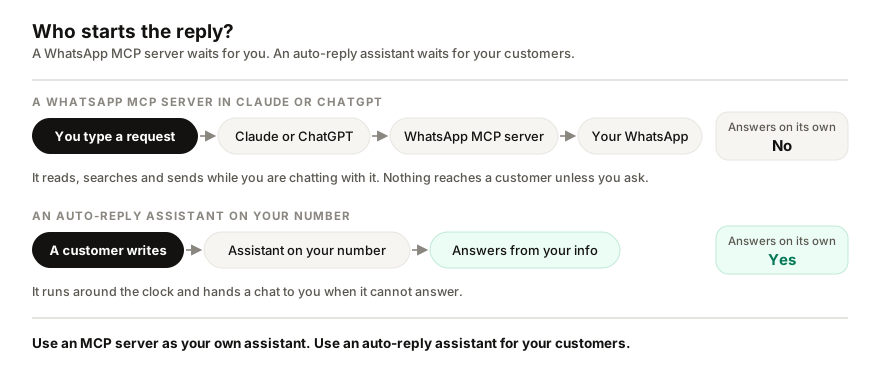
That leaves three practical routes, depending on who the AI is working for:
- For you: a WhatsApp MCP server in Claude or ChatGPT. You ask, it reads and sends.
- For your team's inbox: a hosted connector from a WhatsApp inbox platform you already use, such as respond.io or Wati.
- For your customers: an assistant that runs on your number and answers on its own, such as Meta Business Agent inside the WhatsApp Business app where it is available, or a separate assistant.
What does the open-source whatsapp-mcp do?
The best-known option is whatsapp-mcp, an open-source project with more than 6,000 stars on GitHub. It connects your personal WhatsApp account through the WhatsApp Web multi-device protocol, using a library called whatsmeow, so your account treats it as one more linked device. A small Go program keeps a copy of your messages in a database on your own computer, and a Python MCP server lets the Claude desktop app or Cursor search contacts, read chats, send messages, files and voice notes, and download media (whatsapp-mcp on GitHub).
Setting it up is a developer's job:
- Install Go, Python and the uv package manager.
- Download the project and run its WhatsApp bridge in a terminal.
- Scan the QR code with your phone, under Linked devices.
- Add the server to the Claude desktop app's configuration file and restart the app.
The bridge has to keep running on your computer for any of it to work, and the README warns you may need to scan again after about 20 days. It also takes one of your linked-device slots, and WhatsApp allows four per account (how many devices one number can use).
Two things to know before you rely on it. The code has not changed since 6 April 2025: more than a hundred pull requests are waiting, and contributors opened an issue in April 2026 asking the author to add maintainers. And an open security report from April 2026 says its built-in web interface, which can send messages, listens on your whole network without a password by default. Pull requests that fix both are waiting too; the original has not taken them.
Is it safe to connect WhatsApp to an AI?
It depends on what else the AI can do. The programmer Simon Willison calls the dangerous combination the lethal trifecta: access to private data, exposure to untrusted content, and a way to send data out. A WhatsApp MCP server has all three by design. Your chats are private, anyone can send you a message with instructions for the AI hidden in it, and the AI can send messages.
This is not theoretical. In April 2025 Invariant Labs showed that a malicious MCP server running alongside whatsapp-mcp could make the AI send a user's entire chat history to an attacker, and that a crafted WhatsApp message could leak a user's contacts (Invariant Labs). The project's README carries the warning itself.
If you use one:
- Connect a personal account, never the number your customers write to: every stranger's message lands in the AI's context.
- Run no unknown MCP servers beside it, and keep the bridge on your own computer.
- Read every message before you approve sending it.
- Keep your volume normal. WhatsApp does not support unofficial clients, and numbers that send in bulk or get reported can be restricted. That is true of every linked-device tool, Replai included (what a restriction does).
Which WhatsApp MCP options exist for businesses?
Inbox platforms built on the official WhatsApp Business Platform now offer hosted connectors that you add to Claude or ChatGPT by signing in, with nothing to install. Respond.io runs one at mcp.respond.io: it can look up contacts, send messages and templates, assign and close conversations, and create or switch on the platform's own AI agents (respond.io Help Center). Wati runs one at mcp.wati.io for Claude and ChatGPT (Wati, September 2026).
These connectors still act on request. On those platforms, the AI that answers customers automatically is the platform's own agent, which the connector lets you set up and manage from Claude.
| Connects | Personal WhatsApp | Respond.io inbox | Wati inbox | Your WhatsApp number |
| Starts when | You ask the AI | You ask the AI | You ask the AI | A customer writes |
| Answers customers alone | No | Through its agents | Through its agents | Yes |
| Runs on | Your computer | Hosted by them | Hosted by them | Hosted for you |
| WhatsApp connection | Linked device, unofficial | Official platform | Official platform | Linked device, unofficial |
| Setup | Terminal and QR code | Sign in | Sign in | QR or pairing code |
| Cost | Free | Needs their account | Needs their account | $19, $49 or $99 a month |
Which one should you use?
Pick by who the AI is working for. If you want help with your own chats, such as summaries, finding things and drafting replies you send yourself, a WhatsApp MCP server is a good tool, on a personal account and with the precautions above. If your team already works in respond.io or Wati, their hosted connector is the safe way to bring Claude or ChatGPT into that inbox.
If what you actually want is customers answered while you sleep, MCP is the wrong tool. Check first whether Meta Business Agent is available in your WhatsApp Business app: it is official and free to start. If it is not, or it does not fit, that gap is what I build Replai for. It links to the number you already have, answers from your own website and documents in each customer's language, and hands anything it cannot answer to you. I build Replai, so read that paragraph with that in mind, and see what it would answer for your business before you decide.
Related reading: WhatsApp chatbots without the Business API, and why linked devices keep logging out.
Frequently asked questions
Can I connect WhatsApp to Claude?
- Yes. Claude accepts MCP connectors, and several connect WhatsApp. The open-source whatsapp-mcp links your personal account to the Claude desktop app as a linked device, running on your own computer. Inbox platforms such as respond.io and Wati offer hosted connectors you sign in to instead. Either way, Claude reads and sends messages only when you ask it to in a chat.
Can ChatGPT reply to my WhatsApp messages automatically?
- Not through MCP. A connector lets ChatGPT read and send WhatsApp messages while you are chatting with it, but it does not sit on your number waiting for customers. Automatic replies need an assistant that runs continuously on the number, such as Meta Business Agent in the WhatsApp Business app where it is available, or a linked-device assistant that answers from your own information.
Is whatsapp-mcp safe to use?
- Only with care. Every message it reads enters the AI's context, so a stranger's message can carry instructions, and in April 2025 Invariant Labs showed a malicious connector making the AI send a user's whole chat history out. Use it on a personal account, never a number customers write to, run no unknown MCP servers beside it, and check every message before it is sent.
Can a WhatsApp MCP server get my number banned?
- It can put the number at risk. whatsapp-mcp joins your account as a linked device through an unofficial client, which WhatsApp does not support, and numbers that send in bulk or get reported can be restricted. The same is true of every linked-device tool, Replai included. Connectors built on the official WhatsApp Business Platform avoid that risk but need a Meta business account.
Sources
- whatsapp-mcp: WhatsApp MCP server, GitHub, 2026-10-02
- What is the Model Context Protocol (MCP)?, Model Context Protocol, 2026-10-02
- WhatsApp MCP Exploited: Exfiltrating your message history via MCP, Invariant Labs, 2025-04-07
- Model Context Protocol (MCP), respond.io Help Center, 2026-09-18
Keep reading
See it answer your own customers.
Pair your number, paste in what you know, and message it from another phone. Ten minutes, no card.