Quick answer
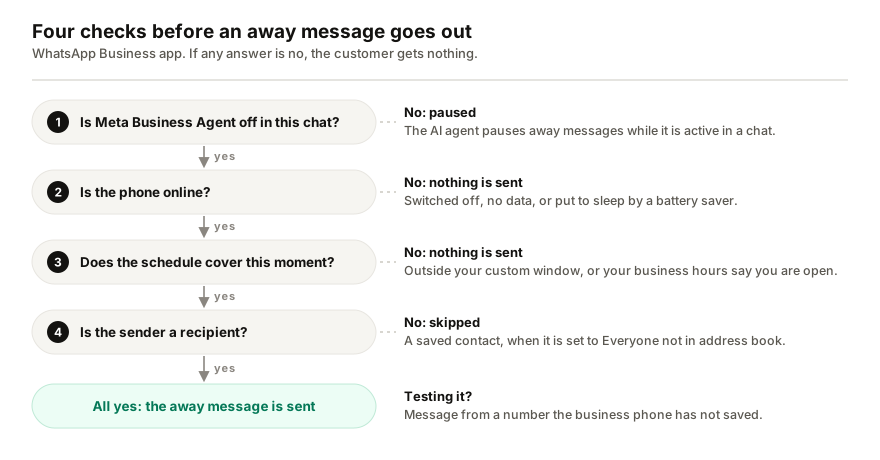
A WhatsApp Business away message only goes out when the phone is online, the schedule covers the moment a message arrives, and the recipient setting includes the sender. Check three things first: whether you are testing from a saved contact while it is set to Everyone not in address book, whether your business hours say you are open, and whether Meta Business Agent is on, which pauses it.
- WhatsApp says the device must have an active internet connection to send away messages.
- Everyone not in address book skips saved contacts, including your own test number.
- Outside of business hours only appears once business hours are set in your profile.
- Meta Business Agent pauses away messages while it is active and switches off greetings.
When an away message seems broken, it is usually doing exactly what its settings say: waiting for a time it has not reached, skipping a contact it was told to skip, or paused by something else on the number. WhatsApp's rules for when it sends fit on one screen, so they can be checked in order. Start with the test itself, because a test can fail while the setting works fine.
How does a WhatsApp Business away message decide to send?
You set it up under Tools, Away message, Send away message, and two choices then decide everything (WhatsApp Help Center):
- Schedule: Always send, Custom schedule (only during a period you set), or Outside of business hours (offered only once business hours are set in your business profile).
- Recipients: Everyone, Everyone not in address book, Everyone except… (everyone but the contacts you pick), or Only send to… (only the contacts you pick).
Two conditions sit outside those settings. WhatsApp says the device must have an active internet connection to send away messages, and that away messages pause while Meta Business Agent is active in a chat (WhatsApp Help Center).
Seven reasons your away message is not sending
| Check | Symptom | Fix |
|---|---|---|
| Testing from a saved number | Your test gets nothing | Test from an unsaved number |
| Recipients leave them out | Some customers never get it | Review the recipient list |
| Schedule misses that time | Silent at some hours | Check the window and AM/PM |
| Business hours say open | Outside-hours mode stays silent | Correct your profile hours |
| Phone offline | Silent while phone is off | Keep the phone online |
| Battery saver | Silent until app opens | Exempt WhatsApp Business |
| Meta Business Agent on | Away settings ignored | Delete the agent |
1. Are you testing from a saved contact?
Do this check first, because it fails the test without anything being wrong. With Everyone not in address book, WhatsApp only sends the away message to customers who are not in your address book. If you test from your own personal number, and that number is saved in the business phone, nothing arrives and nothing is broken.
Test from a number the business phone has never saved, and judge the first message only. WhatsApp's help pages say when the away message is active and who gets it, not how many times one person receives it in a row.
2. Does the recipient setting leave them out?
The same list decides it for real customers. Everyone except… skips the contacts you picked, Only send to… reaches only the ones you picked, and Everyone not in address book skips every saved contact, including regular customers you saved to keep track of their orders. If the people who most need the notice are saved contacts, switch to Everyone.
3. Does the schedule cover the time the message arrived?
Always send covers every hour. Custom schedule only sends inside the period you set, so check the start and end you saved, including AM and PM. Outside of business hours depends on the hours in your business profile, which is the next check.
4. Do your business hours say you are open?
Outside of business hours only appears as an option once you have set business hours in your business profile (WhatsApp Help Center), and it only sends when those hours say you are closed. If the profile says you are open at that moment, or open 24 hours, there is no outside, and nothing is sent. Fix the hours on the profile, not the away message.
5. Was the phone online?
WhatsApp says your device must have an active internet connection to send away messages, and the same goes for greeting messages (WhatsApp Help Center). An away message matters most when you are not looking at the phone, which is exactly when it is likely to be switched off, out of data or in flight mode.
WhatsApp Web and the desktop app are no substitute here. Linked devices keep working while the phone is offline, but they log out if the phone goes unused for more than 14 days (WhatsApp Help Center), and WhatsApp does not say a linked device sends the away message in the phone's place. Treat the phone as the device that matters.
6. Is a battery saver putting WhatsApp Business to sleep?
On Android, a phone can be online and still stop an app from working in the background. WhatsApp's own troubleshooting says that if new messages only appear once you open the app, the cause sits in notification permissions, background data and battery settings (WhatsApp Help Center). A message the phone has not received cannot trigger an away message either.
What WhatsApp suggests, applied to the WhatsApp Business app:
- Allow Background data for the app in your phone's settings.
- Take it out of battery optimisation. On most Android phones that is Settings, Battery, Battery optimization, then the app and Don't optimize. Samsung keeps it under Background usage limits, where the app goes on the Never sleeping apps list.
7. Is Meta Business Agent switched on?
If Meta's AI agent is connected to the number, it takes over. WhatsApp says away messages pause while the AI is active in a chat and resume once it exits that chat, and that greeting messages are switched off for as long as the agent is connected (WhatsApp Help Center). Deleting the agent restores them; the steps, and how to pause it instead, are in the guide to Meta Business Agent. If you expected the agent and cannot find it, here is why it may not be showing.
Still not sending?
WhatsApp's checklist for a greeting message that will not send ends with three steps that cost nothing, and they are worth trying here too: turn the feature off, wait a moment and turn it back on; update WhatsApp Business to the latest version; restart the phone (WhatsApp Help Center).
Why is my greeting message not working?
The greeting message has one rule of its own that catches people out. It only goes to a customer who messages you for the first time, or after 14 days without a message in that chat (WhatsApp Help Center). A regular customer who wrote last week will not get it, and neither will your own test number if you used it recently. Beyond that it follows the same recipient options as the away message, needs the phone online, and is switched off while Meta Business Agent is connected.
Is the away message option not showing?
Away messages are a WhatsApp Business feature, so the regular WhatsApp app has no such setting. In WhatsApp Business, current versions put it in the Tools tab: Tools, then Away message. If Outside of business hours is missing from the schedule options, set your business hours in the business profile first.
When an away message is not enough
I build Replai, so read this part with that in mind.
An away message tells a customer that you are away. It cannot tell them the price, whether something is in stock or when an order ships, which is usually what they wrote to ask. The free tools in the app stop there, and the difference between an away message and an auto-reply bot is that whole gap.
Replai pairs to your number as a linked device and answers those questions from your own website, documents and notes, in the customer's language. Because linked devices keep working while the phone is offline, it does not depend on the phone being online the way the app's away message does. It is unofficial, which carries a restriction risk that the app's own tools do not. If you would rather send a notice outside opening hours, it has its own away message, sent once per hour per conversation (opening hours and the away message). Use one away message, not both, or customers get two. See what it would answer for your business before you decide.
Frequently asked questions
Why is my WhatsApp Business away message not sending?
- Check the recipient setting first: Everyone not in address book never sends to saved contacts, so a test from your own saved number proves nothing. Then check that the schedule covers that time, that business hours are set if you chose Outside of business hours, that the phone is online, and that Meta Business Agent is off, because it pauses away messages.
Why is the away message option not showing in WhatsApp?
- Away messages are a WhatsApp Business feature, so the regular WhatsApp app has no such setting. In WhatsApp Business, current versions keep it in the Tools tab: tap Tools, then Away message. If Outside of business hours is missing from the schedule options, add your business hours to the business profile first, because that option only appears once hours are set.
Why is my WhatsApp Business greeting message not working?
- WhatsApp only sends it to someone messaging you for the first time, or after 14 days without messages in that chat, so a regular customer will not get it. It is also switched off while Meta Business Agent is connected, it follows the same recipient options as the away message, and the phone needs an internet connection to send it.
Does the away message work when my phone is off?
- Do not count on it. WhatsApp says the device must have an active internet connection to send away messages, and its instructions are written for the phone app. Linked devices such as WhatsApp Web keep working without the phone, but WhatsApp does not say they send the away message in its place, so treat the phone as the device that has to be online.
How often does the same customer get the away message?
- WhatsApp's help pages do not say. Its settings decide when the away message is active and who receives it, not how many times one person gets it in a row. So when you test, judge by the first message from a number that is not saved in the business phone, rather than by the second or third message you send.
Sources
- How to use away messages, WhatsApp Help Center, 2026-10-07
- How to use greeting messages, WhatsApp Help Center, 2026-10-07
- About using Meta Business Agent with Meta One, WhatsApp Help Center, 2026-10-07
- Can't see or hear notifications, WhatsApp Help Center, 2026-10-07
- About linked devices, WhatsApp Help Center, 2026-10-07
Keep reading
See it answer your own customers.
Pair your number, paste in what you know, and message it from another phone. Ten minutes, no card.