Quick answer
The free WhatsApp Business app auto-replies with a greeting, an away message and quick replies, but it cannot read a question. An AI auto-reply paired to the same number answers price, stock, hours and delivery questions from your own price list, in the customer's language, from $19 a month. The official API path usually costs several times that.
- The WhatsApp Business app sends greetings and away messages, but it cannot answer an actual question.
- An AI auto-reply pairs to your existing number by QR scan, with no Meta application.
- Replai Starter is $19 a month for one number and 120 conversations a cycle.
- Linked-device tools carry a restriction risk; inbound replies are the safest use of WhatsApp.
If you run a kedai, a tuition centre, a clinic or a café in Malaysia, WhatsApp is your front door. Customers don't call and they don't email. They send "hi, ada stok?" at 10.40pm and expect an answer before they fall asleep.
"Auto-reply" covers three very different things, from a free canned message in the WhatsApp Business app to an AI assistant that reads the question and answers it from your own price list. This guide walks through all three in order of cost.
What can the free WhatsApp Business app auto-reply?
Most Malaysian SMEs already use the WhatsApp Business app. Six of its features count as auto-reply or sit next to it, and they all live under Business tools in the app.
Greeting message. Sent automatically to anyone who messages you for the first time, or after 14 days of silence. Open Business tools, tap Greeting message, switch it on and write your text.
Away message. Sent when someone messages outside the hours you choose. Tap Away message, switch it on, pick "outside of business hours" or a custom schedule, and write the text.
Quick replies. Saved answers you insert by typing a slash. Tap Quick replies, add a shortcut like /harga with the full message, then type / in any chat to use it.
Labels. Colour tags for chats such as New order, Paid, Pending. Tap Labels to create them, then apply one from the chat menu and filter chats by label.
Catalog. A product list with photos and prices on your profile. Tap Catalog, add items, then share an item into a chat instead of retyping the price.
Business hours. Shown on your profile and used by the away message. Tap Business profile and set the hours for each day.
A bilingual greeting for a Malaysian shop looks like this:
Terima kasih kerana menghubungi [nama kedai]. Kami balas dalam waktu operasi, 10am–7pm. / Thanks for messaging us, we reply during opening hours.
For many one-person businesses that's genuinely enough, and it costs nothing.
Where the app stops
Everything above is a fixed piece of text. It cannot read the question.
- Static text. The greeting says the same thing to the customer asking for a price and the one asking for a refund.
- It can't answer an actual question. "Ada saiz M tak?" gets "Terima kasih kerana menghubungi kami." The customer is still waiting for you.
- No language switching. You write one greeting. A customer who writes in Mandarin or English gets your Bahasa Malaysia text.
- No lead capture. Nothing is recorded. If you don't reply by morning, the enquiry is just another unread chat.
- No voice notes. Older and busier customers send voice notes. The app can't listen, transcribe or reply to them.
Most "auto reply Bahasa" templates online are exactly this: a fixed greeting in Bahasa Malaysia. Useful, but still one message for everyone. Quick replies help, but only while you're holding the phone. The gap is the hours when you're not.
When should you move to an AI auto-reply?
Some honest signals:
- The same five questions arrive more than a few times a day: price, stock, location, hours, delivery.
- Enquiries come in after 9pm and you answer at 7am, after some have gone to the shop that answered at 9.15pm.
- Customers write in Bahasa Malaysia, English and Mandarin, often in the same message, and you're translating your own replies.
- You're losing track of who asked what, and orders slip.
If none apply, stay on the free app. If two or three do, an AI reply that answers from your own price list pays for itself on the first order it saves.
Three paths compared
| Feature | WhatsApp Business app | Linked-device AI tool (Replai) | Official API via a BSP |
|---|---|---|---|
| Answers real questions | No | Yes, from your knowledge base | Yes, with a bot builder on top |
| BM / English / Mandarin | One fixed text | Auto-detected per message | Depends on the tool |
| Voice notes | No | Transcribed and answered | Depends on the tool |
| Lead capture | No | To Google Sheets | Depends on the tool |
| Setup | Minutes | Minutes, QR scan on your existing number | Days to weeks, business verification |
| Rough monthly cost | RM 0 | From about RM 76 (Starter, $19) | Typically several hundred ringgit all-in |
| Ban risk | Low, inbound only | Present, mitigated | Lowest |
On cost: the API path has three layers, Meta's per-conversation fees, the BSP's fee and the chatbot tool on top, and the total for a small business usually lands in the hundreds of ringgit a month. We've broken that down in what the WhatsApp Business API actually costs in 2026; the numbers move, so we won't quote a BSP price here.
The linked-device path, which is what Replai is, pairs to the number you already use the way WhatsApp Web does: scan a QR, no new SIM, no Meta application. Starter is $19 a month, about RM 76, for one number and 120 conversations a cycle, with the AI cost included. A conversation is up to five bot replies in one thread, so a typical "harga berapa, ok saya nak satu" exchange uses one.
Pick the API path if you need the green verified badge, Meta-approved broadcast templates, or a number your whole business depends on with no fallback. Pick the free app if you're happy replying yourself. Pick a linked-device AI tool for everything in between, which is most Malaysian SMEs.
Common Malaysian scenarios
The audience behind these scenarios is not small. Malaysia counted 25.1 million active social media user identities in January 2025, 70.2 percent of the population (DataReportal, Digital 2025: Malaysia). WhatsApp is the default channel for most of them, which is why an enquiry left unanswered until morning is usually a sale that went to whoever replied at 9.15pm.
Kedai orders. A customer sends "ada stok warna hitam? cod area Shah Alam boleh?" The bot answers stock and colour from your catalogue, quotes your COD rule, and asks for a name and phone number before logging the order to a sheet.
Tuition enquiries. Parents ask about subjects, fees, year groups and trial classes at 11pm. The bot answers from your fee sheet and captures the parent's details for a morning call. See the tuition centre page.
Clinic appointments. "Boleh booking esok pagi?" becomes a row in your sheet with the preferred time and reason, and any clinical question is redirected to the doctor. See WhatsApp appointment booking for clinics in Malaysia.
F&B pre-orders. Set menus, minimum quantities, pickup slots and delivery areas, answered while your kitchen is busy. See WhatsApp customer service for restaurants in Malaysia.
Raya and Merdeka promos. Seasonal promos are outbound, a different job from replying. In Replai that's a campaign (Growth plan and above): import a list of customers who agreed to hear from you, write a template with merge fields, attach the promo image, and let it send slowly under rate limits. Do not blast a bought list. That's the fastest route to a banned number.
A 30-minute setup checklist
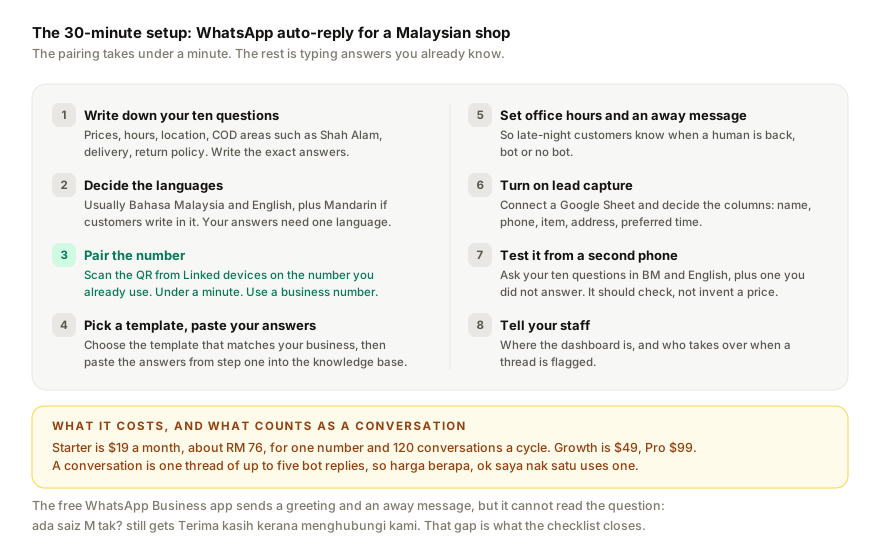
- Write down your ten most common questions and the exact answers. Prices, hours, location, delivery areas, COD rules, return policy. If you're stuck, the free FAQ generator will draft them from your website.
- Decide the languages. Usually Bahasa Malaysia and English, plus Mandarin if your customers write in it. The bot detects and matches; your source answers only need to be in one.
- Pair the number. Scan the QR from your existing WhatsApp Business number. Use a business number, not your personal one.
- Pick a template that matches your business, then paste the answers from step 1 into the knowledge base.
- Set office hours and an away message so late-night customers know when a human is back, bot or no bot.
- Turn on lead capture and connect a Google Sheet. Decide which columns you need: name, phone, item, address, preferred time.
- Test it yourself from a second phone. Ask the ten questions in BM and English, plus one you didn't write an answer for. It should say it will check with the team, not invent a price.
- Tell your staff where the dashboard is and who takes over when a thread is flagged.
The pairing takes under a minute; the rest is typing answers you already know.
A closing note on ban risk
Any tool that pairs to WhatsApp as a linked device, Replai included, runs on an unofficial library. Ban risk is real for every tool in this category and nobody honest will promise otherwise. Replying to customers who message you first is the safest thing you can do on WhatsApp; the risk is in outbound bursts, new numbers sending too much too soon, and lists people didn't opt into. The full picture is in will WhatsApp ban your number. Read it, use a dedicated business number, and keep your outbound slow.
If that trade-off sits right with you, the 7-day trial at replai.pm needs no card and gives you 60 conversations to test on a real week of enquiries.
Related
- WhatsApp Business API vs WhatsApp Business App
- What WhatsApp Business API actually costs in 2026
- Setting up a multilingual WhatsApp chatbot
- WhatsApp customer service for restaurants in Malaysia
- Will WhatsApp ban your number? An honest answer
Frequently asked questions
Can the WhatsApp Business app reply automatically to questions?
- It can send an automatic message, but not an answer. The greeting message goes to anyone messaging for the first time or after 14 days of silence, and the away message goes out outside your business hours. Both are fixed text, so a customer asking about stock or a price gets the same words as everyone else.
How much does a WhatsApp AI auto-reply cost in Malaysia?
- A linked-device tool charges a flat monthly fee with no Meta message fees. Replai starts at $19 a month, about RM 76, for one number and 120 conversations a cycle, where a conversation is one thread of up to five bot replies. Growth is $49 and Pro is $99, and a 7-day trial needs no card.
Will an auto-reply bot answer my existing WhatsApp chats?
- On Replai, only if nobody else does. New customers get an answer straight away. For chats that were already on your phone when you scanned the QR code, it waits 5 minutes and answers only if nobody from your team has replied. Mark friends, family or suppliers "Never answer this contact" and it leaves them alone for good. Prefer it to stay out of existing chats completely? Choose "New conversations only" in Settings.
Does an auto-reply need the WhatsApp Business API?
- No. A linked-device tool pairs to the number you already use by scanning a QR code from Linked devices, the same mechanism as WhatsApp Web, so there is no Meta application, no business verification and no per-message fee. The trade-off is that the connection is unofficial, so a restriction risk exists and outbound sending stays slow.
Sources
- Digital 2025: Malaysia, DataReportal, 2025-03-03
- WhatsApp Business app, Meta, 2026-09-08
- WhatsApp Business Platform pricing, Meta for Developers, 2025-07-01
Keep reading
Article
WhatsApp Business away message not working? Seven things to check
Article
WhatsApp auto-reply bot for small businesses: the three kinds, what they cost, and how to set one up
Article
6 Tidio alternatives for WhatsApp-first businesses (2026 pricing compared)
Tutorial
Business settings explained: name, opening hours and payment QR
See it answer your own customers.
Pair your number, paste in what you know, and message it from another phone. Ten minutes, no card.