Quick answer
It depends on what is being reviewed. After you appeal a ban in the WhatsApp Business app, most reviews finish within 24 hours. Appeals against a restriction on the Business Platform typically take 24 to 48 hours, and a new catalog collection no more than 24 hours. New API accounts, display names and verified badges have no published timeframe.
- Ban reviews in the app mostly finish within 24 hours; chasing support does not speed them up.
- A new API account cannot send anything until Meta's policy review approves it.
- Display names, API accounts and verified badges have no published review time.
- No Request review option on a banned number means the ban is final.
"Under review" is one phrase for six different processes at WhatsApp and Meta, and they run on different clocks. Some finish within a day. Others have no published timeframe at all. The first job is to work out which one is yours, because the right amount of patience depends on it.
Which "under review" are you looking at?
| Where you see it | What is being reviewed | How long, per Meta | Meanwhile |
|---|---|---|---|
| WhatsApp Business app, after tapping Request review on a ban | Whether the ban stands | Most within 24 hours | The number cannot use WhatsApp |
| A new WhatsApp Business account on the API | Whether the account meets Meta's policies | Not published | The account cannot be used with the API |
| Business Support Home, after appealing a Platform restriction | The restriction | Typically 24 to 48 hours | The restriction stays until reversed or over |
| WhatsApp Manager, a display name pending review | The display name | Not published | After approval, re-register within 14 days |
| Meta Verified or Meta One, after subscribing | Whether the business gets a verified badge | Not published | The plan's other benefits apply |
| The catalog in the WhatsApp Business app | A new collection | No more than 24 hours | Customers see it once approved |
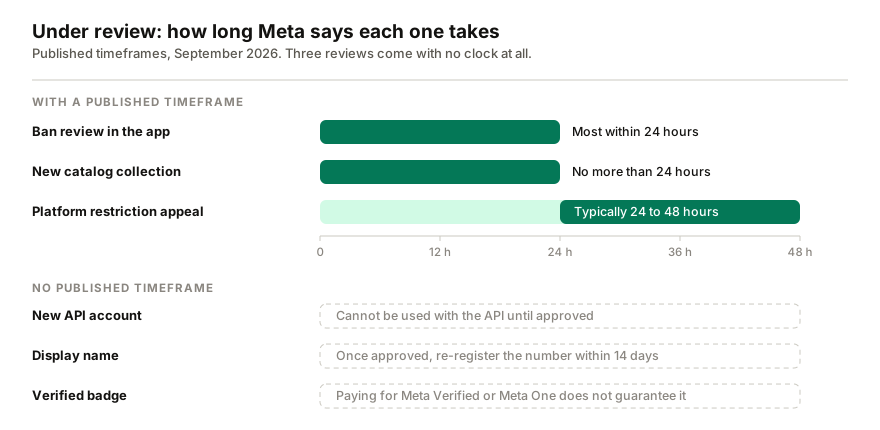
How long does a WhatsApp ban review take?
A banned number shows "This phone number can't use WhatsApp" and offers a review. Tap Request review in the WhatsApp Business app. WhatsApp says most reviews are completed within 24 hours, and you get a notification when there is a decision (WhatsApp Help Center).
A few things WhatsApp is explicit about:
- Nothing speeds it up. Contacting WhatsApp outside the review, or through someone else's account, does not change the timing or the outcome, and support cannot reverse a ban by email or chat.
- One number per appeal. If you run several numbers, each needs its own.
- No Request review option means the ban is final.
- A banned business loses its Meta Verified subscription, and the refund is not available.
While you wait, the number cannot be used at all, and chat history and backups are out of reach until it is unbanned. For what to do next, see what to do if WhatsApp bans your business number.
Why is my new WhatsApp Business API account under review?
Every new WhatsApp Business account on the official platform is reviewed against Meta's policy guidelines. The review can come back approved, rejected, pending or deferred, and while it is pending or deferred, or if it is rejected, the account cannot be used with the API (Meta for Developers).
Meta does not publish how long this review takes. If you are onboarding through a provider and it has been pending for days, ask the provider: they can see the same status and raise it with Meta. This review is also one reason a move to the API is a project rather than a setting; the API versus app comparison covers the rest.
What if a restriction on the Business Platform is under review?
If your number is on the platform and Meta has restricted it, you appeal from Business Support Home in Meta Business Suite. Meta says decisions typically take 24 to 48 hours, and the violation comes back marked either unchanged or reversed. Not every spam violation can be appealed; sometimes the only option is to wait for the restriction to end.
If your number is on the WhatsApp Business app instead, a restriction has no review at all. It ends on its own, and the guide to restricted accounts explains what still works until it does.
How long does a display name review take?
Meta does not publish a timeframe. On the Business Platform, a display name is reviewed when you change it, and automatically when the number reaches a higher messaging limit. Two rules catch people out (Meta for Developers):
- after a new name is approved, you have 14 days to re-register the number, or the name has to go through review again;
- you can change a display name 10 times in 30 days.
Does Meta Verified mean my business gets verified?
Not automatically. After you subscribe to Meta Verified for Business or a Meta One business plan, one of three things happens: Meta verifies the business from its activity across Meta's apps, it asks you for documents (optional, and no guarantee), or you subscribe without a verification option at all. You keep the plan's other benefits in all three cases (WhatsApp Help Center). A badge can also be removed later if Meta asks for more checks, such as an identity document and a selfie, and they are not completed.
Why is my catalog under review?
New collections in a WhatsApp Business catalog are reviewed against WhatsApp's Commerce Policy, and WhatsApp says the review should take no more than 24 hours. Customers see the collection once it is approved. A rejected item shows a red exclamation mark; tap it, choose Request another review and give your reason.
If an AI assistant is on the number
I build Replai, so read this with that in mind. Assistants that connect as a linked device, Replai included, cannot work on a number that is banned or restricted, because nothing linked to it can. Reviews of API accounts, display names, badges and catalogs do not affect a linked device, which does not go through the API at all. If a ban is lifted, open Linked devices on the phone and link again whatever was logged out.
Frequently asked questions
How long does WhatsApp take to review a banned account?
- WhatsApp says most reviews are completed within 24 hours of tapping Request review in the app. You get a notification when there is a decision, and you can check the status by opening WhatsApp. Emailing support or asking through someone else's account does not speed it up, and if there is no Request review option, the ban is final.
Why is my new WhatsApp Business API account under review?
- Meta reviews every new WhatsApp Business account against its policy guidelines. While the review is pending or deferred, and if it is rejected, the account cannot be used with the API at all. Meta does not publish how long the review takes, so if it has been pending for days, ask the provider that set the account up.
How long does a WhatsApp display name review take?
- Meta does not publish a timeframe. A display name is reviewed when you change it, and automatically when the number reaches a higher messaging limit. After a new name is approved you have 14 days to re-register the number, or the name has to be reviewed again, and you can change the name up to 10 times in 30 days.
Does paying for Meta Verified guarantee a verified badge?
- No. After you subscribe to Meta Verified or a Meta One business plan, Meta either verifies the business automatically, asks for documents, which is optional and guarantees nothing, or offers no verification at all. The plan's other benefits apply in every case, and a badge can be removed later if extra checks are not completed.
How long does a WhatsApp catalog review take?
- WhatsApp says a new catalog collection is reviewed against its Commerce Policy and the review should take no more than 24 hours; customers see the collection once it is approved. A rejected catalog item shows a red exclamation mark, and you can tap it and choose Request another review to explain why it should stand.
Sources
- About account bans on the WhatsApp Business app, WhatsApp Help Center, 2026-09-30
- account_review_update webhook, Meta for Developers, 2026-09-30
- Policy enforcement, Meta for Developers, 2026-09-30
- Display names, Meta for Developers, 2026-09-30
- How to create and manage a collection in your catalog, WhatsApp Help Center, 2026-09-30
Keep reading
Article
Why do WhatsApp linked devices keep logging out? The causes, and how to tell which one it is
Article
WhatsApp Coexistence: can the app and the Cloud API share one number?
Article
How many WhatsApp broadcast messages can you safely send per hour and per day?
Tutorial
How to connect Google Sheets for leads and order lookup
See it answer your own customers.
Pair your number, paste in what you know, and message it from another phone. Ten minutes, no card.