Quick answer
Yes. Meta's Coexistence flow connects a number that is already on the WhatsApp Business app to the Cloud API, and both keep working on that one number. The moment you connect, every linked device is unlinked and has to be paired again, the number is capped at 20 messages a second, and up to 180 days of one-to-one history is copied across. Messages you send from the app stay free; messages sent through the API are billed at Cloud API rates.
- Coexistence is real and documented: the WhatsApp Business app and the Cloud API can run on the same number, with message history kept in sync.
- Connecting unlinks every companion device at once. WhatsApp for Windows and WearOS cannot be linked again afterwards.
- A number on both is capped at a fixed 20 messages per second, which is lower than a Cloud API number on its own can reach.
- Onboarding copies up to 180 days of one-to-one messages, media from the last 14 days only, and no group chats.
- Disappearing messages, view once, live location and broadcast lists stop working on that number.
For years the answer to "can I keep the WhatsApp Business app and add the API?" was no: moving a number to the API meant giving up the app on that number. That changed. Meta's Coexistence flow connects a number that is already running the WhatsApp Business app to the Cloud API, and both keep working.
It is worth knowing exactly what the switch does, because it is not free of consequences and several of them land on the day you flip it.
What Coexistence is
When a Business Solution Provider configures Embedded Signup for WhatsApp Business app numbers, a business going through that flow is offered the option to connect its existing app account to the Cloud API. The owner keeps answering customers one by one in the app on their phone. Software sends through the API. WhatsApp keeps the message history in sync between the two, so a conversation started by the API and finished by hand reads as one thread.
The app has to be on version 2.24.17 or higher.
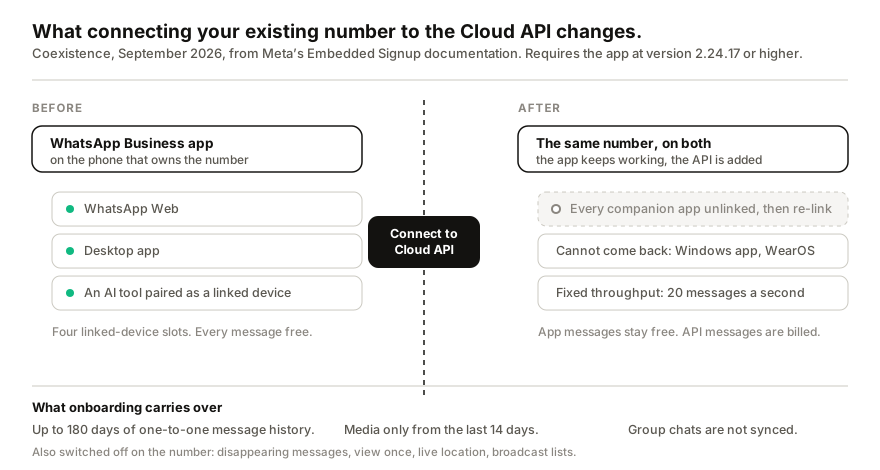
What happens the moment you connect
Every companion app is unlinked. Not one, all of them. WhatsApp Web in the office, the desktop app on the laptop, any tool paired as a linked device: they all drop at once and have to be linked again. If you have three agents working from WhatsApp Web, plan for that minute rather than discovering it.
Two companions never come back. WhatsApp for Windows and WhatsApp for WearOS are not supported on a Coexistence number. If the shop runs on the Windows app, that is a real loss, and the browser version is the fallback.
The number is capped at 20 messages a second. Meta fixes throughput at 20 mps for any number in use with both the app and the Cloud API. A Cloud API number on its own can be raised much higher. For a small business answering customers this cap is irrelevant; for anyone whose reason to move was sending volume, it defeats the purpose.
Some features switch off. Disappearing messages, view once, live location sharing and broadcast lists stop working on that number. Voice and video calls, channels and the app's business tools are not available through the API side either.
What carries over, and what does not
Onboarding copies up to 180 days of messages sent to and received from WhatsApp users. Three limits are worth reading twice:
- One-to-one only. Group chats are not synced.
- Media from the last 14 days only. Older photos, voice notes and documents do not come across as media, even where the message does.
- Nothing before the window. A business with two years of customer history in the app keeps that history in the app, not in whatever inbox the API feeds.
What it costs
Messages you type into the WhatsApp Business app stay free, and they do not create, extend or affect a Cloud API conversation window. That is the genuinely good part of Coexistence: hand replies do not trigger billing.
Everything sent through the API is billed at Cloud API rates. Meta's per-message pricing is only part of the bill: a Business Solution Provider sits in the middle and takes a platform fee on top, which is where most of the monthly cost comes from. Our breakdown of BSP fees puts the realistic total for a small business at $100 to $200 a month.
Who should turn it on
Coexistence earns its keep when all of these are true:
- You have outgrown one phone. Several people need to answer the same number from a proper shared inbox, with assignment and internal notes.
- You want to send template messages outside the 24-hour window, legitimately, to people who opted in.
- You are willing to run a Meta application through a provider and pay per message, on top of the provider's monthly fee.
It is the wrong tool when the actual problem is that nobody answers at night, when the volume is tens of conversations a day rather than thousands, or when the only reason to move was to send more messages faster. The 20 mps cap and the unlinking make it a poor fit for the last one in particular.
The other route, and my bias
I build Replai, so weigh this accordingly. The route we take is the opposite one: pair to the number the business already has as one of its four linked devices, answer from a knowledge base the owner writes, no Meta application and no per-message fee. The honest trade-off is that it is unofficial, it is paced to protect the number, and it is not the tool for bulk marketing. If you have a support team and templated notifications to send, the official platform, through Coexistence or a straight migration, is the better answer, and I would rather say so than sell you the wrong shape.
One practical note if you do both: because Coexistence unlinks every companion device on connection, any linked-device tool on that number stops until it is paired again. Pair it back afterwards, not before, and see how linked devices behave if sessions keep dropping after the move.
Frequently asked questions
Can I use the WhatsApp Business app and the WhatsApp API on the same number?
- Yes. Meta calls it Coexistence. A business that already uses the WhatsApp Business app can connect that number to the Cloud API through Embedded Signup, keep replying by hand in the app, and let software send through the API. WhatsApp keeps the message history in sync between the two. The app must be on version 2.24.17 or higher.
What happens to my linked devices when I turn on Coexistence?
- All of them are unlinked at the moment you connect, and you link the ones you still want again afterwards. WhatsApp for Windows and WhatsApp for WearOS are not supported after onboarding, so those two do not come back.
Does Coexistence make my messages cost money?
- Only the ones sent through the API. Messages you send from the WhatsApp Business app stay free and do not open, extend or affect a Cloud API conversation window. Anything the API sends is billed at Cloud API rates, which for most small businesses lands between $100 and $200 a month once a Business Solution Provider takes its cut.
How much chat history moves across?
- Up to 180 days of messages sent to and from WhatsApp users, one-to-one only. Media is available only for items from the last 14 days, and group chats are not synced at all.
Why is my throughput capped at 20 messages per second?
- Meta fixes throughput at 20 mps for any number in use with both the app and the Cloud API. A Cloud API number on its own can be raised well above that. If high-volume sending is the point of the exercise, Coexistence is the wrong shape.
Is Coexistence the same as pairing an AI tool as a linked device?
- No, they are opposite routes. A linked-device tool, Replai included, borrows one of the four companion slots on the account you already have, with no Meta application and no per-message fee. Coexistence puts the number on Meta's official platform, with an application, a Business Solution Provider and per-message pricing, and unlinks your companion devices on the way in.
Sources
- Onboard WhatsApp Business app users (Embedded Signup), Meta for Developers, 2026-09-18
- Embedded Signup overview, Meta for Developers, 2026-09-18
- About linked devices, WhatsApp Help Center, 2026-09-18
Keep reading
See it answer your own customers.
Pair your number, paste in what you know, and message it from another phone. Ten minutes, no card.