Quick answer
A restriction is a temporary block, not a ban. While it lasts, you can keep messaging contacts and groups you have talked to before, but you cannot start chats with new contacts, create or grow groups, or use linked devices. It ends on its own, and the app shows the time left when you try to message someone new.
- A restriction ends on its own. WhatsApp publishes no standard length; the app shows the time left.
- Existing chats keep working. New contacts, new groups and linked devices stop until it ends.
- WhatsApp ties restrictions to signs of spam, automated or bulk messaging.
- Repeated restrictions can mean longer ones, and bulk or unwanted messaging can get a number banned.
If WhatsApp Business shows "Your account is restricted right now", the account is still yours and the restriction will end on its own. What catches businesses out is everything that stops in the meantime, starting with every laptop and tool linked to the number.
Here is what a restriction actually does, according to WhatsApp's own help pages, and what to do while you wait.
What does "account restricted" mean on WhatsApp Business?
It is a temporary limit on the account. WhatsApp says a restriction means recent activity may show signs of spam, automated or bulk messaging, which its Terms of Service do not allow (WhatsApp Help Center). You may see one of two messages:
- "Your account may be restricted soon." A warning that a restriction may follow. This is the moment to stop whatever is drawing complaints.
- "Your account is restricted right now." The limits below apply until the timer runs out.
Two other messages look similar and are not restrictions. "Account locked due to inactivity" means the number has to be registered again. "This phone number can't use WhatsApp" is a ban, covered further down. Losing a verified badge is not a restriction either, and does not limit chats, calls or groups.
What still works during a restriction?
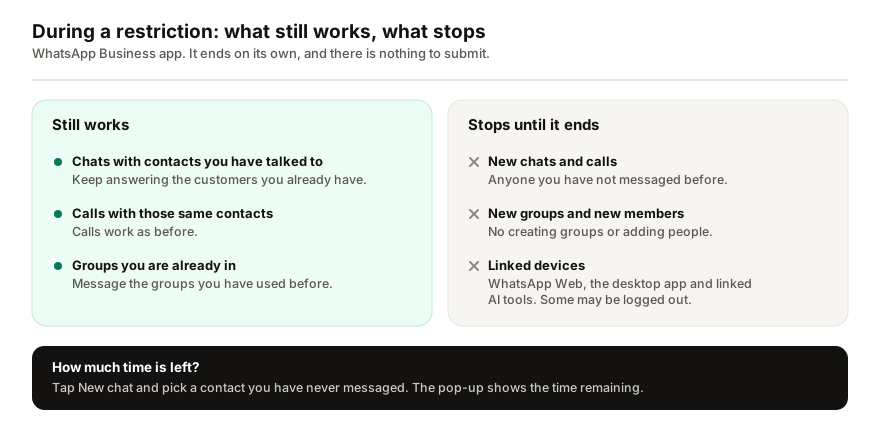
Customers you already talk to can still reach you, and you can still answer them. WhatsApp's wording is that you can keep communicating with contacts and groups you have exchanged chats or calls with before (WhatsApp Help Center).
What stops, until the restriction ends:
- starting chats or calls with new contacts,
- creating groups, or adding new members to groups,
- using linked devices. WhatsApp Web, the desktop app and anything else linked to the number go quiet, and some may be logged out.
That last point matters more than it sounds. A shop that answers from WhatsApp Web in the office loses its whole workstation for the duration, and the only place left to reply is the phone itself.
How long does a WhatsApp restriction last?
WhatsApp does not publish a standard length. The restriction ends automatically once its time passes, and the app sends a notification when it does. You do not need to do anything to lift it.
To see how long is left, tap New chat and choose a contact you have never messaged. The pop-up shows the time remaining (WhatsApp Help Center).
You will see "24 hours" quoted online. WhatsApp's help pages do not commit to that or any other figure, so plan around the timer in your own app.
There is one stated length. Where business broadcasts are available, a business that keeps sending spam after a warning has broadcasts suspended for three days. That suspension cannot be appealed, it lifts at the date and time shown in the app, and repeated restrictions can mean longer ones (WhatsApp Help Center).
Why does WhatsApp restrict business accounts?
WhatsApp detects abuse with machine learning and with reports from users. The cause it names for a restriction is spam, automated or bulk messaging, and its guidance on responsible use lists the practices that can get an account banned:
- messaging people who asked you to stop,
- bulk messaging, auto-messaging or auto-dialling,
- creating accounts or groups in automated ways, or using a modified version of WhatsApp,
- messaging contact lists that are not yours,
- over-using broadcast lists: frequent broadcasts lead people to report you, and accounts reported many times get banned.
The rule WhatsApp gives is simple: only message people who contacted you first or asked you to contact them. And one fear you can drop: WhatsApp says that receiving a lot of messages at once, for example after an ad, does not get an account banned (WhatsApp Help Center).
For the numbers behind safe sending, see WhatsApp broadcast limits per hour and per day.
What to do while your account is restricted
- Keep answering existing customers from the phone. That still works, and it is where the day's orders are.
- Stop whatever reaches new people. Pause broadcasts, campaigns and any automation that starts chats. Do not switch to a second number or a modified app to get around the limit; modified versions are a ban reason in their own right.
- Check the time left with the New chat trick, and wait it out. There is nothing to submit for a restriction.
- Clean your list before you send again. WhatsApp's own advice: message only people who opted in, remove contacts who have not interacted recently, send what they signed up for, and do not message the same people again the moment you are reinstated.
- Relink your devices when it ends. Open Linked devices on the phone and link again anything that was logged out.
Nobody can buy you a faster way out. WhatsApp says only it can ban or unban an account, and third-party services can do neither.
Restricted or banned: how to tell which one you have
| Restricted | Banned | |
|---|---|---|
| What the app says | "Your account is restricted right now" | "This phone number can't use WhatsApp" |
| Reply to customers you already talk to | Yes | No |
| Message or call new contacts | No | No |
| Linked devices, including WhatsApp Web | No | No |
| How it ends | On its own, when the timer runs out | Only if a review succeeds |
| What you do | Wait, and fix the cause | Tap Request review; most reviews finish within 24 hours |
If you see the ban message, the next steps are different: see what to do if WhatsApp bans your business number. If there is no Request review option, WhatsApp treats the ban as final, and if you have appealed and are waiting, here is how long each WhatsApp review takes.
If your number is on the WhatsApp Business Platform (API)
Restrictions on the official platform work differently and are shown in Business Support Home, in WhatsApp Manager and by email to the business admins. Meta's enforcement steps, from mildest to most severe (Meta for Developers):
- a 1 or 3 day block on sending marketing, utility and authentication templates,
- a 5, 7 or 30 day block on sending any messages and adding phone numbers,
- an account lock, lifted only by appeal,
- permanent removal from the platform.
Appeals go through Business Support Home and typically take 24 to 48 hours, though not every spam violation can be appealed. Separately, every business portfolio has a messaging limit: how many different people it can message outside a customer service window in a rolling 24 hours, starting at 250 for a new portfolio and rising through 2,000, 10,000 and 100,000 to unlimited.
If an AI assistant is on the same number
I build Replai, so weigh this accordingly. Assistants that pair to your number as a linked device, Replai included, follow the same rules as WhatsApp Web: during a restriction they stop, because linked devices stop. If your assistant went quiet on the same day your team lost WhatsApp Web, look at the phone before you look at the tool.
The restriction applies to the whole account, whatever caused it. Replai's assistant replies to people who message the business, and anything it sends out is paced, but it is still an unofficial connection, so the risk is real and we say so. If you run campaigns from any tool, send only to people who opted in. There is an honest answer on ban risk if you want the longer version, and a guide to linked devices that keep logging out if yours do not come back after the restriction ends.
Frequently asked questions
How long does a WhatsApp Business restriction last?
- WhatsApp does not publish a standard length. The restriction ends by itself after a set period, and the app sends a notification when it does. To see the time left, tap New chat and pick a contact you have never messaged; the pop-up shows it. The one stated length is for business broadcasts, which a spam suspension stops for three days.
Can I still reply to customers while my account is restricted?
- Yes, in chats that already exist. A restricted account can keep messaging contacts and groups it has exchanged chats or calls with before. What stops is starting chats or calls with new contacts, creating groups, adding people to groups, and using linked devices, so WhatsApp Web and the desktop app go quiet until the restriction ends.
Why did WhatsApp restrict my business account?
- WhatsApp says a restriction means recent activity may show signs of spam, automated or bulk messaging. In practice that usually means messages to people who did not expect them, broadcasts that draw blocks and reports, or software starting chats automatically. Receiving a flood of messages is not a cause: WhatsApp says that alone does not get an account banned.
Is a restricted account the same as a banned one?
- No. A banned number sees "This phone number can't use WhatsApp" and cannot use the app until a review succeeds. Most reviews finish within 24 hours, and if there is no Request review option the ban is final. A restriction only limits what you can do, and it ends on its own without a review.
Why did my WhatsApp AI assistant stop replying?
- Check the phone for a restriction message first. WhatsApp switches linked devices off while an account is restricted, and assistants that connect as a linked device, Replai included, stop with them. When the restriction ends, open Linked devices on the phone and link again anything that was logged out.
Sources
- About restricted accounts, WhatsApp Help Center, 2026-09-30
- Can't send business broadcasts, WhatsApp Help Center, 2026-09-30
- How to use WhatsApp responsibly, WhatsApp Help Center, 2026-09-30
- Policy enforcement, Meta for Developers, 2026-09-30
Keep reading
Article
WhatsApp Coexistence: can the app and the Cloud API share one number?
Article
How many devices can use one WhatsApp Business number?
Article
WhatsApp chatbot without the Business API: how QR pairing works, what it costs and where it breaks
Tutorial
How to connect Google Sheets for leads and order lookup
See it answer your own customers.
Pair your number, paste in what you know, and message it from another phone. Ten minutes, no card.