Quick answer
Check whether every linked device logs out at the same moment or one at a time. All at once points to the main phone or the account: the phone unused for 14 days, the number registered again, or a security logout. One at a time points to that device: a browser clearing its stored data, or the session ended from the phone's Linked devices list.
- WhatsApp allows up to four linked devices per account, and all of them log out if the main phone is unused for more than 14 days.
- Devices dropping at the same moment point to the phone or the account; devices dropping one at a time point to the devices.
- A WhatsApp Web session lives in that browser's own storage, so anything that clears site data ends it without warning.
- Log every logout for a week with the device and the time; the pattern usually names the cause.
A linked device that logs out every day or two is maddening because WhatsApp tells you nothing. The agent opens WhatsApp Web, sees a QR code and has to find whoever holds the main phone.
It is almost never random. There are a handful of causes, and one question separates them: does every device drop at the same moment, or one at a time?
How many devices can be linked to WhatsApp?
Up to four at a time, on top of the main phone (WhatsApp Blog). Linked devices keep working when the phone is off or has no signal, which is what makes a shared WhatsApp Web setup practical for a small team. The main phone is still the account's anchor: it registers the number and it is the only place new devices can be linked from.
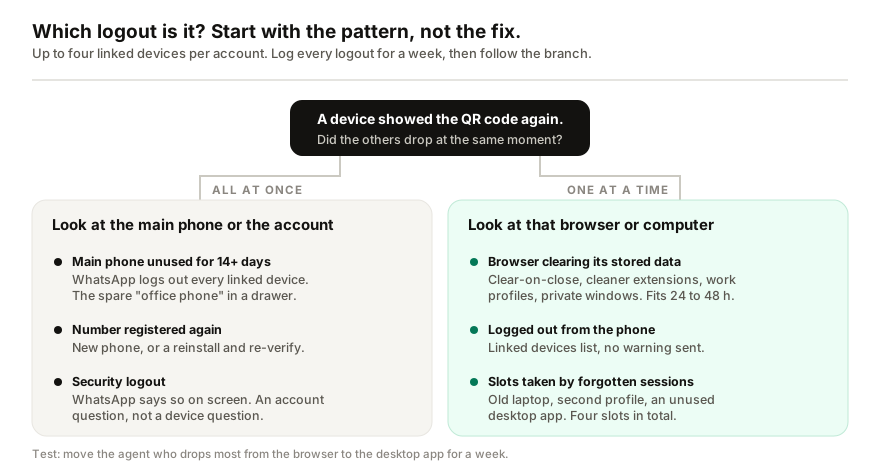
Why do all linked devices log out at once?
When every device drops at the same moment, the cause sits with the main phone or the account, not with the computers.
- The main phone was unused for more than 14 days. WhatsApp logs out all linked devices when that happens. A spare phone kept in a drawer as the "office number" is the usual culprit: nobody opens WhatsApp on it.
- The number was registered again. Setting WhatsApp up on a new phone, or reinstalling it and verifying the number, ends the sessions that were linked to the old installation.
- A security logout. WhatsApp can log devices out to protect the account, and when it does, it says so on screen. That is an account question, not a device question.
Why does only one device keep logging out?
When devices drop one at a time, on different days, the cause is on the device.
- The browser is clearing its data. A WhatsApp Web session is stored in that browser. Anything that clears site data ends it: a browser set to delete cookies when it closes, a cleaner or privacy extension, a managed work profile that resets, or someone using a private window. A 24 to 48 hour rhythm matches this cause very well, and it survives a new phone, a new SIM and a new account untouched, because none of those touch the browser.
- Someone ended the session from the phone. Anyone holding the main phone can open Linked devices and log a device out. The device gets no warning; it just shows the QR code next time. In a shop where several people pick up the business phone, this happens more than anyone admits.
- Slots are taken by sessions nobody uses. With a limit of four, an old laptop, a second browser profile and a desktop app installed once and forgotten all count. Check the list against the people who should be on it and log out anything nobody recognises.
How to find the cause in a week
- Write down every logout for seven days: which device, browser or desktop app, and the time it was noticed.
- Look at the pattern. Same moment on every device points up the left-hand side of the diagram. Different devices on different days points down the right.
- Run one swap. Move the agent who drops most from the browser to the desktop app for the week. If their logouts stop, it was browser storage.
- Open Linked devices on the main phone at the start and end of the week, and compare the list.
Should you move to the WhatsApp Business API instead?
For a team that has outgrown one phone and four slots, the official API is a legitimate answer: no linked devices, proper multi-agent inboxes, and higher sending limits. It is also a migration, with templates for messages outside the 24-hour window and per-message fees, which the BSP fees guide breaks down. It is the right move for a support team, and a heavy fix for a browser that clears cookies.
If you use an AI tool on the same number
I build Replai, so read this with that in mind. Tools that pair to your number by QR code, Replai included, are linked devices: they take one of the four slots and follow the same rules as WhatsApp Web. If your team already uses three browsers and a desktop app, all four slots are taken, and one of them has to be logged out before anything else can connect. Count the slots before you connect anything, and see how pairing works if you want the details.
Frequently asked questions
How many devices can be linked to one WhatsApp account?
- Up to four linked devices at a time, on top of the main phone. Linked devices keep working when the phone is offline, but WhatsApp needs the main phone to register the account and to link new devices.
Why did all my WhatsApp linked devices log out at once?
- Look at the main phone and the account first. WhatsApp logs out every linked device when the main phone has been unused for more than 14 days, and registering the number again, on a new phone or after a reinstall, ends the existing sessions too. WhatsApp can also log devices out for account security, in which case it shows a message saying so.
Why does only one of my linked devices keep logging out?
- Look at that device. A WhatsApp Web session is stored in the browser, so a browser set to clear cookies on close, a cleaner or privacy extension, a managed work profile or a private window will end it. Also check the Linked devices list on the main phone: anyone with the phone can log a device out from there, and the device gets no warning.
Will moving to the WhatsApp Business API stop the logouts?
- It removes linked devices from the picture, so yes in that narrow sense, but it is a migration: a Business API account, templates for messages outside the 24-hour window and per-message fees. It is worth doing for a team that has outgrown the app, and a heavy fix for a browser setting.
Does a WhatsApp AI tool count as a linked device?
- Tools that pair by QR code, including Replai, connect as a linked device and take one of the four slots. Tools on the official Business API do not use a slot, because they do not connect through the app at all.
Sources
- One WhatsApp account, now across multiple phones, WhatsApp Blog, 2023-04-25
- How WhatsApp enables multi-device capability, Engineering at Meta, 2021-07-14
- About linked devices, WhatsApp Help Center, 2026-09-17
Keep reading
See it answer your own customers.
Pair your number, paste in what you know, and message it from another phone. Ten minutes, no card.