Quick answer
One grey tick means the message was sent but has not yet been delivered to the recipient's phone or any of their linked devices. Their phone may be off or offline, or they may have blocked you, which WhatsApp will not confirm. In a group, the second tick only appears once every member has received the message, and a clock instead of a tick means it is not sent yet, often because of a connection problem.
- One grey tick: sent. Two grey ticks: delivered to the recipient's phone or a linked device. Two blue ticks: read.
- If the recipient's phone is off and no linked device of theirs receives it, the second tick does not appear.
- A contact who has blocked you only ever shows one grey tick, but WhatsApp will not tell you whether you are blocked.
- A WhatsApp Business broadcast only reaches contacts who have saved your number.
A message to a customer that sits on one grey tick looks like a failure, but it usually is not one. The tick tells you where the message has got to, and WhatsApp's own help pages say exactly what each mark means. Often the customer's phone is just off, and there is nothing for you to fix.
What do the ticks on WhatsApp mean?
WhatsApp shows marks next to every message you send (WhatsApp Help Center):
- A clock: not sent or delivered yet, often a connection problem.
- One grey tick: sent.
- Two grey ticks: delivered to the recipient's phone or to any of their linked devices.
- Two blue ticks: read.
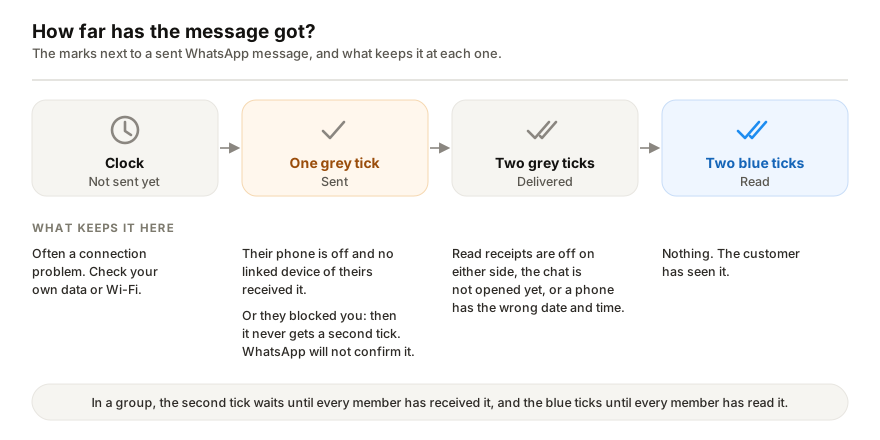
For anything finer, open the message's Message info screen. It shows when the message was delivered and when it was read, or for a voice message, played (WhatsApp Help Center).
Why is my message stuck on one grey tick?
Three things keep a message on one tick.
1. The customer's phone is off or offline
WhatsApp says that if the recipient's phone is off and the message is not delivered to any of their linked devices, the second tick will not appear (WhatsApp Help Center). A customer who switches their phone off at night, runs out of data or travels without a connection shows one tick until they come back.
The first tick already means WhatsApp has the message, so sending it again only gives the customer two copies when they reconnect. If it is urgent, try another channel, such as a phone call or email.
2. They have blocked you
WhatsApp says any message sent to a contact who has blocked you only shows one grey tick and never a second (WhatsApp Help Center). It lists other signs that come with it: you no longer see their profile photo updates, status, last seen or online, calls do not go through, and you cannot add them to a group you run.
Even if you see every one of those signs, WhatsApp says they could have other reasons, and it will not tell you whether, or by whom, you have been blocked. One tick alone tells you very little; a customer whose phone has been off for a day looks the same.
3. It is a group, and not everyone has received it
In a group chat the second tick only appears once every member has received the message, and the ticks turn blue only once every member has read it (WhatsApp Help Center). One member with a phone switched off holds the whole group's message on one tick.
What does a clock mean instead of a tick?
WhatsApp says the clock means the message is not yet sent or delivered, and that this could be due to connectivity issues (WhatsApp Help Center). Start with your own side: check the data or Wi-Fi on the phone or computer you sent it from.
Two grey ticks but not blue?
The message was delivered; WhatsApp just has no read receipt for it. Its help page lists the reasons (WhatsApp Help Center):
- You or the customer turned off Read receipts in privacy settings. Turn yours off and you stop seeing other people's too, although read receipts in groups cannot be turned off.
- The customer has not opened the chat yet.
- One of you has a connection problem.
- The date and time on one of the phones is wrong.
- The first time a person gets a message from you, a read receipt might not be sent.
A contact who has blocked you also never shows blue ticks, but they would not show the second grey tick either.
Is your broadcast not reaching some customers?
That is a different problem, and the ticks will not explain it. WhatsApp says a broadcast list in the WhatsApp Business app only delivers to customers who have your number saved in their phone's address book (WhatsApp Help Center). Anyone who has not saved you never gets it.
WhatsApp's advice is to check that the customer has added you, and for customers who have not, to consider sending a marketing message instead. The steps for a broadcast with images and the safe broadcast volumes per hour and per day are covered separately.
If messages to new customers do not go out at all, check whether WhatsApp has restricted the account: while a restriction lasts you can keep messaging people you have talked to before, but not start new chats.
When the customer is the one waiting
I build Replai, so read this part with that in mind.
The ticks work the same way whoever sends the message. Replai pairs to your number as a linked device and answers customers from your own website, documents and notes. When a customer's phone is off, its reply sits on one tick just like yours would, and arrives when they reconnect. What it changes is the other direction: the customer who writes at 11pm gets an answer then, rather than a grey tick on your reply the next morning. It is unofficial, which carries a restriction risk that the app's own tools do not. See what it would answer for your business before you decide.
Frequently asked questions
What does one grey tick mean on WhatsApp?
- It means the message was sent. The second grey tick appears once it is delivered to the recipient's phone or to any of their linked devices, and both turn blue when they read it. If their phone is off and no linked device of theirs receives the message, it stays on one tick.
Does one grey tick mean I have been blocked?
- Not on its own. A contact who blocked you will only ever show one grey tick, but so will a customer whose phone is simply off. WhatsApp lists other signs, such as no longer seeing their profile photo updates, last seen or online, and calls that do not go through, and says even all of them together could have other reasons. It will not tell you whether someone has blocked you.
Why does my message show two grey ticks but not blue?
- It was delivered but WhatsApp has no read receipt for it. Either of you may have turned read receipts off, the customer may not have opened the chat, either of you may have a connection problem, or the date and time on one of the phones may be wrong. WhatsApp also says a read receipt might not be sent the first time a person gets a message from you.
What does the clock icon mean instead of a tick?
- The message is not yet sent or delivered. WhatsApp says this could be due to connectivity issues, so start with the data or Wi-Fi on the phone or computer you sent it from.
Why did my WhatsApp Business broadcast not reach some customers?
- A broadcast list only delivers to contacts who have your number saved in their phone's address book. WhatsApp's own advice is to check that the customer has saved you, and for customers who have not, to consider sending a marketing message instead.
Sources
- How to check read receipts, WhatsApp Help Center, 2026-10-12
- Being blocked by someone, WhatsApp Help Center, 2026-10-12
- How to use broadcast lists on the WhatsApp Business app, WhatsApp Help Center, 2026-10-12
Keep reading
Article
WhatsApp order confirmation and update messages: 14 templates you can copy
Article
WhatsApp Business away message not working? Seven things to check
Article
WhatsApp auto-reply bot for small businesses: the three kinds, what they cost, and how to set one up
Tutorial
Business settings explained: name, opening hours and payment QR
See it answer your own customers.
Pair your number, paste in what you know, and message it from another phone. Ten minutes, no card.