Quick answer
Keep the image under about 1 MB in JPEG or PNG, cropped square or 4:5 so it reads on a phone. Write three lines of caption: a first name, what the photo shows, one action. Send only to contacts who opted in, test on 10 to 20 people first, then spread the rest across the day inside 30 an hour.
- Keep broadcast images under about 1 MB, cropped square or 4:5 for phone screens.
- Three caption lines: greet by first name, say what it is, give one action.
- Test on 10 to 20 contacts before the full list, then watch for opt-outs.
- A marketing image on the official API needs Meta template approval before it goes out.
A photo in a WhatsApp broadcast does something text can't: it gets looked at before it gets read. A new menu, a rack of stock that just arrived, a promo poster, an event flyer. These are things customers want to see, and a photo with a short caption is how most small businesses already share them, one chat at a time.
Sending that same photo to a list is where numbers get into trouble. Not because of the image, but because a list send is exactly the pattern WhatsApp's anti-spam watches for. This guide covers how to do it properly: the image, the caption, the consent question, the test batch and the limits.
How do you send a photo to a WhatsApp broadcast list?
- Create the list once. On the Chats screen, open the menu and choose New broadcast on Android, or Broadcast lists then New list on iPhone. Pick the contacts.
- Open the list like any chat.
- Tap attach (the paperclip on Android, the plus on iPhone) and choose the photo from your gallery.
- Write the caption in the box under the photo, then send.
Two things surprise people the first time. Only contacts who have saved your number receive a broadcast, so anyone who has not saved you simply never sees it, with no error. And each person gets it as a private message from you, so their replies come back to you one by one, not into a group.
A message that is sent but stays on one grey tick is a different problem; what one grey tick means covers it.
If you were hoping to forward a photo instead, WhatsApp caps forwarding at five chats at a time, so forwarding is not a way around a list.
When a photo beats text
Scale is why the caution further down matters. More than 3 billion people in over 180 countries use WhatsApp (WhatsApp, About page), and the anti-spam system that keeps a network that size workable does not read your picture. It reads how many people you sent it to, how fast they were sent, and how many recipients blocked or reported you afterwards.
Use an image when the thing you're announcing is visual, or has more than three facts in it:
- Menus and daily specials. One photo replaces a wall of text nobody reads to the end.
- New stock. A shelf, a rack, a box of arrivals. Customers reply "is the blue one still available?" and now you have a conversation.
- Promo posters. The offer, the dates and the terms sit in the design. The caption carries the action.
- Event flyers. Date, venue, time and price on one image, with a caption that says how to book.
Stick to text when it's a one-line update: "we're closed on Monday", "your order is ready". A photo there adds weight without adding information.
What size should a WhatsApp broadcast image be?
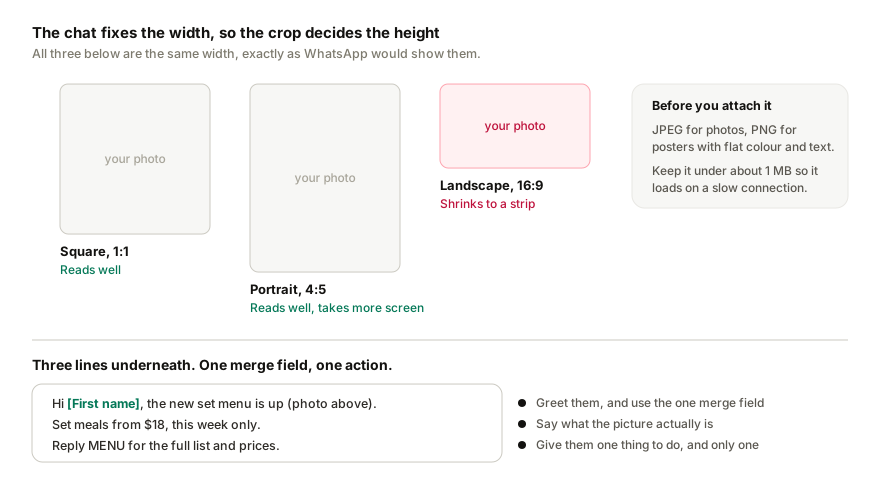
- Format: JPEG or PNG. JPEG for photos, PNG for posters with flat colour and text.
- Size: keep it under about 1 MB. Bigger files are slower to arrive on mobile data and gain you nothing at phone size.
- Crop: square or 4:5 reads best in the chat view. A wide 16:9 banner shrinks to a strip on a phone and the text becomes unreadable.
- Put the offer in the image and the details in the caption. The image should work on its own if the caption gets skimmed: the product, the price, the one thing you want remembered. The caption handles dates, terms and the action.
- Check it on a phone before you send it. Not on a laptop. If you can't read the price at arm's length, the crop or the font is wrong.
Caption rules
Three lines, one merge field, one action. That's the whole rule.
- Line one greets by first name. It's the one merge field worth using; more than that starts to read like a mail merge.
- Line two says what the image is and why it matters to them.
- Line three is the action: reply, book, order, come in. One action, not three.
Rendered for one recipient, a cafe's caption looks like this:
Hi Aina, the new Raya set menu is up (photo above).
Set meals from RM 18, this week only.
Reply MENU for the full list and prices.
If the caption is taller than the photo on a phone screen, cut it.
The consent question
This is the part that decides whether the campaign is a broadcast or spam, and WhatsApp can't tell the difference from the content. It tells from how recipients react.
Send only to lists that opted in through one of these:
- A form, on your website or at the counter, that says they'll hear from you on WhatsApp
- A purchase, where they gave their number and agreed to hear about offers
- A group sign-up: a class, a club or a membership list where they handed over their number to be kept informed
- A prior conversation, where they messaged you first and asked to be kept posted
Never a scraped list. Never a purchased list. Never numbers pulled from a Facebook group or a directory. One report from someone who never asked to hear from you counts against the number, and a cold list produces dozens.
If you're unsure whether a list qualifies, it doesn't. Send to the part of it that does.
Send a test batch first
Before the full list, send to 10 to 20 contacts: a mix of regulars who'll tell you the truth and a few staff phones.
You're checking four things. The image renders at a readable size. The merge field filled in correctly. The action line produces the reply you expected. Nobody blocked or opted out. If a test batch of 15 gives you two opt-outs, the full list will give you far more, and that's the moment to fix the list or the message rather than push on.
How many image broadcasts can you send a day?
An image broadcast is still a broadcast, and the same limits apply as to text. In short:
- A new number should stay under roughly 20 outbound messages a day for the first 14 days.
- After that, 30 per hour and 200 per day per number is a sensible default, spread across the day rather than sent in one go.
- Sends need a few seconds between them, with random variation, so they don't look like a script.
The full figures, including the official API tiers and a week-by-week schedule, are in How many WhatsApp broadcast messages can you safely send per hour and per day?.
STOP replies
Some people will reply "stop". That's a good outcome: they're leaving the list rather than reporting you. Honour it the same day, every time, and never message them again from that number. A tool should do this automatically. If you're sending by hand, keep a do-not-contact list and check it before every campaign.
How it works in Replai
Replai runs outbound campaigns from your existing WhatsApp number, paired as a linked device, and image attachments were added to campaigns this month. The flow:
- Open Campaigns and start a new campaign.
- Import your list.
- Write the template, with the first name as a merge field.
- Attach the image and write the caption.
- Declare the consent source for the list.
- Schedule it. Replai spreads the sends with jitter inside your hourly and daily limits, waits a random 2 to 8 seconds before each one, and skips anyone who has opted out.
While it runs, the campaign shows sent, replied, opted out and failed counts. STOP replies are recorded automatically. When a recipient replies with a question, the assistant answers from your knowledge base, so a "reply MENU" action doesn't leave you typing out the menu 80 times.
Campaigns are available on Growth and above.
Compared with the official API
On the WhatsApp Business API, a marketing message with an image is a media template. The template, image included, has to be submitted to Meta and approved before it can go out, and each send is billed as a marketing message. The upside is published sending tiers and the green verified badge. The downside is that "new stock arrived this morning" can't go out this morning.
If you need to reach thousands of people a day, or your industry needs the verified badge, the API is the right tool and the approval step is worth it. If you're a cafe, a boutique or a tuition centre with a few hundred opted-in customers, a linked-device send with the rules above is the practical route. WhatsApp Business API vs WhatsApp Business App covers that choice in more depth.
Three things not to do
- Don't send to people who never opted in. Not "probably interested", not "they follow us on Instagram". They'll report you, and reports are the signal that matters most.
- Don't send the whole list at once. A test batch first, then the rest spread across the day, inside your hourly limit.
- Don't send a photo with nothing to reply to. A broadcast that produces replies looks like a business talking to its customers. One that produces silence and blocks looks like spam, whatever the image shows.
If you'd like to see how the assistant handles the replies before you run a campaign, the 7-day free trial at replai.pm pairs to your existing number in minutes, no card needed.
Related
- How many WhatsApp broadcast messages can you safely send per hour and per day?
- Will WhatsApp ban your number? An honest answer
- WhatsApp Business API vs WhatsApp Business App
- WhatsApp bot for restaurants in Malaysia
- WhatsApp chatbot for e-commerce
Frequently asked questions
What image size works best for a WhatsApp broadcast?
- Keep the file under about 1 MB and crop it square or 4:5. JPEG suits photographs, PNG suits posters with flat colour and text. A wide 16:9 banner shrinks to a strip on a phone and the text becomes unreadable, so check the picture on a phone at arm's length before you send it to anyone.
Who is allowed to receive a WhatsApp image broadcast?
- Only people who gave you their number and agreed to hear from you: a sign-up form, a purchase, a class or membership list, or a conversation where they asked to be kept posted. Never a scraped or purchased list, and never numbers taken from a group or a directory. If you are unsure whether a list qualifies, it does not.
How do you handle STOP replies to a broadcast?
- Record the opt-out the same day and never message that person from the number again. A reply of stop or unsubscribe is a good outcome, because the alternative is a report, and reports are the signal that damages a number most. Replai records opt-outs automatically; if you send by hand, keep a do-not-contact list.
Does an image broadcast need Meta template approval?
- On the official WhatsApp Business API, yes: a marketing message with a picture is a media template that Meta has to approve before the first send, and each delivery is billed. On a linked device there is no approval step and no per-message fee, which is why stock that arrived this morning can go out this morning, at much smaller volume.
Why did some contacts not receive my WhatsApp broadcast photo?
- Almost always because they have not saved your number. A broadcast only reaches contacts who have your number in their address book, and WhatsApp gives you no error for the ones it skips. Ask new customers to save the number when they first message you, or reply to them individually.
Can you forward an image to a broadcast list instead?
- Forwarding is capped at five chats at a time, so it does not replace a list. Open the broadcast list itself, tap attach, pick the photo from your gallery and add the caption there.
Sources
- About WhatsApp, WhatsApp, 2026-09-08
- WhatsApp Business Platform pricing, Meta for Developers, 2025-07-01
Keep reading
Article
What's new in Replai: photo broadcasts, yearly plans and conversation top-ups
Article
How to send WhatsApp order notifications from WooCommerce, from your own number
Article
How to connect ChatGPT to WhatsApp Business: the routes that exist, what Meta bans, and what each costs
Tutorial
How to connect your WhatsApp number to Replai
See it answer your own customers.
Pair your number, paste in what you know, and message it from another phone. Ten minutes, no card.