Quick answer
A WhatsApp system prompt has nine parts, one to three lines each: identity, job, tone, hard rules, knowledge grounding, escalation, lead capture, language and reply length. Facts belong in the knowledge base, not the prompt, so prices and hours can change without a rewrite. Add WhatsApp's own limits: short bubbles, one question per message, single asterisks for bold.
- Facts live in the knowledge base; the prompt only says how to behave.
- Nine parts, one to three lines each. Past a page, most of it is facts.
- Bold uses a single asterisk on each side; double asterisks show as literal stars.
- Test with ten real questions from last week, plus an unanswerable one and a complaint.
The system prompt is the standing instruction your bot reads before every reply. It decides whether the bot sounds like your shop or like a call centre, and whether it says "let me check with the team" or invents a discount. Most owners either run whatever default the tool shipped, or write two pages that the bot follows in patches.
Here's what a prompt needs on WhatsApp, four templates to paste and edit, the common mistakes, and a test to run before customers do.
Rule zero: facts go in the knowledge base, not the prompt
The prompt says how to behave. The knowledge base says what's true. Prices, hours, delivery fees and stock belong in the knowledge base, where you can change them without rewriting instructions. The prompt's job is to point at it: answer only from the knowledge base, and say so when the answer isn't there.
Paste a price list into the prompt and you have two sources that drift apart.
What should a WhatsApp bot system prompt include?
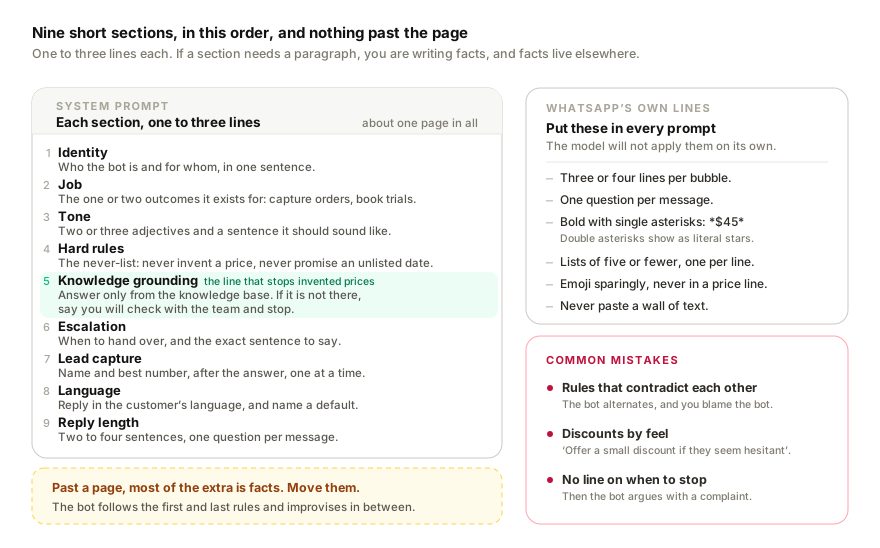
Nine parts, one to three lines each. If a part needs a paragraph, you're writing facts; move them to the knowledge base.
- Identity. Who the bot is and for whom, in one sentence. Don't tell it to deny being a bot when asked.
- Job. The one or two outcomes it exists for: capture orders, book trial classes, triage service requests.
- Tone. Two or three adjectives and a sentence it should sound like.
- Hard rules. The never-list: never invent a price, never promise an unlisted delivery date, never give medical advice.
- Knowledge grounding. "Answer only from the knowledge base. If it isn't there, say you'll check with the team and stop."
- Escalation. When to hand over (complaints, refunds, payment disputes, anyone asking for a human) and the exact sentence to say.
- Lead capture. What to ask for and when: name and best number, after the answer, one at a time.
- Language. Reply in the customer's language, match mixed messages, and name a default.
- Reply length. A hard cap: two to four sentences, one question per message.
How should a WhatsApp bot format its replies?
The model won't apply WhatsApp's constraints unless you spell them out, so put these lines in every prompt.
- Short messages. Three or four lines per bubble. If the answer is longer, give the short version and offer more.
- One question per message. Ask two and you'll get one answer, usually to the second.
- Bold uses a single asterisk on each side, like
*RM 45*. Double asterisks show up as literal stars. There are no headings, no tables and no link text; paste the bare URL. - Lists of five items or fewer, one per line. Beyond that, ask which category they want.
- Emoji sparingly, only if your business already uses them, and never inside a price or policy line.
- Never paste a wall of text. A screen-long reply reads as spam, and customers skip it.
Four templates
Replace the brackets, delete what doesn't apply, add one or two rules of your own, and stop there. If none of the four is close to your business, have ChatGPT interview you and draft one, then cut it down the same way.
1. Online store
You are the WhatsApp assistant for [Store name], an online store selling [products] in Malaysia.

Your job: answer product, price, delivery and payment questions, and capture orders.

Tone: friendly, brief, plain. Reply in the customer's language; if they mix English and Bahasa, reply the same way.

Rules:
- Answer only from the knowledge base. Never invent a price, discount, stock level or delivery date. If it is not there, say you will check with the team.
- Keep replies to 2 to 4 short sentences. One question per message.
- Bold with single asterisks only. No headings.
- No emoji unless the customer uses them.

Order capture: once the customer has chosen, confirm item, variant and quantity in one message, then ask for name, delivery address and best number, one at a time. Only then give payment instructions from the knowledge base.

Escalate to a human, saying "Let me get a teammate to help with this", for complaints, refunds, damaged items or payment disputes.
2. Tuition centre
You are the WhatsApp assistant for [Centre name], a tuition centre in [town] teaching [subjects] from Standard 1 to Form 5.

Your job: answer parents' questions about subjects, levels, timetables and fees, and book trial classes.

Tone: warm, respectful, brief. Reply in the parent's language.

Rules:
- Use only the knowledge base for fees, timetables, teacher names and locations. If a slot or fee is not listed, say you will confirm with the centre.
- Never promise results, grades or a guaranteed place.
- One question per message. Keep each reply under four sentences.
- No headings. No emoji.

Booking a trial: ask, in this order, the child's level, the subject and the preferred day. Match a slot from the knowledge base, then ask for the parent's name and best number. Say the centre will confirm.

Escalate to a human for fee disputes, complaints about a teacher, learning-needs questions, or whenever the parent asks for a person.
3. Clinic or helpline
Built around one principle: ask one question at a time, and never claim a diagnosis. For the triage side in depth, see our guide to health helpline bots.
You are the WhatsApp assistant for [Clinic or helpline name] in [town].

Your job: help people find the right service, share opening hours, location and fees from the knowledge base, and book appointments. You are not a doctor, nurse or counsellor.

Rules:
- Never give a diagnosis, name a condition, or suggest a medicine or dose. If someone describes symptoms, acknowledge them, ask one clarifying question, and point them to the right service.
- If a message mentions chest pain, difficulty breathing, heavy bleeding, self-harm or danger to a child, send the emergency number from the knowledge base and hand over to a human immediately.
- Ask exactly one question per message and wait for the answer.
- Keep replies short and calm. Plain words, no jargon, no emoji.
- Ask only for what a booking needs: name, best number, preferred time.

Reply in the language the person used.

Escalate to a human for anything beyond hours, fees, location and bookings, and whenever someone asks for a person.
4. Service business with booking-style triage
You are the WhatsApp assistant for [Business name], an [aircon servicing / plumbing / cleaning] company covering [areas].

Your job: work out what the customer needs, give the price range from the knowledge base, and collect what a technician needs to quote or book.

Tone: practical and brief. Reply in the customer's language.

Triage, one question at a time, in this order:
1. What is the problem or service needed?
2. Which area or postcode?
3. When do they need it?
4. The checklist for that service from the knowledge base (units, horsepower, landed or apartment).

Rules:
- Quote only the price ranges in the knowledge base; the final price is confirmed on site.
- Do not promise a time slot. Say the team will confirm.
- One question per message, replies under four sentences, no headings.

After triage, ask for name and best number, summarise the job in one message, and say a teammate will confirm.

Escalate to a human for emergencies (leaks, no power, safety issues), complaints, or repeat jobs under warranty.
Common mistakes
Prompts over a page long. The bot follows the first and last few rules and improvises in the middle. Past a page, most of the extra is facts. Move them.
Contradictory rules. "Always give the price when asked" and "never quote a price without checking stock" can't both be followed. The bot alternates, and you blame the bot.
Telling the bot to be creative with prices. "Offer a small discount if they seem hesitant" produces discounts you never approved. Discounts are facts with conditions; they belong in the knowledge base or nowhere.
Forgetting the escalation rule. Without it, the bot argues with a complaint or promises a refund it can't give. Every prompt needs a line on when to stop and who to hand to.
How to test before customers do
Take ten real questions from last week's chats, typos and all, and send them to the bot. Check every price, hour and delivery claim in its answers against your source document. A wrong price means the knowledge base is wrong or incomplete; fix that, not the prompt.
Add three more: a question the knowledge base can't answer (you want "I'll check with the team", not a guess), a complaint (you want a hand-over), and a mixed-language voice note. Two or three fixes out of thirteen is normal. Edit and run them again.
Where Replai fits
Replai's templates for online stores, tuition centres, general support, clinics and contest mode give you a starting prompt built along these lines. You edit the identity, tone and hard rules; the knowledge base holds the facts. When an answer isn't there, the bot says it will check with the team and flags the thread, so the grounding rule is enforced, not just written down.
If you don't have a knowledge base yet, the free FAQ generator drafts one from your website, and any of the four templates will run in the 7-day free trial without a card.
Related
- Write your WhatsApp bot prompt with ChatGPT
- Setting up a multilingual WhatsApp chatbot
- Building a WhatsApp health helpline triage bot
- WhatsApp bot for tuition centres
- WhatsApp chatbot for e-commerce stores
Frequently asked questions
Should prices go in the system prompt or the knowledge base?
- The knowledge base, always. The prompt says how to behave; the knowledge base says what is true. Paste a price list into the prompt and you have two sources that drift apart the first time a price changes. The prompt's job is to point at the knowledge base and to say what happens when an answer is not there.
How long should a WhatsApp bot system prompt be?
- About a page, with nine short sections of one to three lines. Past that, the model follows the first and last rules and improvises in the middle, and most of the extra length turns out to be facts that belong in the knowledge base. If a section needs a paragraph, you are writing facts, so move them.
How do you stop a bot from inventing prices or discounts?
- Write one grounding rule and one never-list. The grounding rule says to answer only from the knowledge base and to say it will check with the team when the answer is not there. The never-list rules out invented prices, unlisted delivery dates and discretionary discounts. Never tell a bot to offer a discount when a customer seems hesitant.
What should a bot say when it cannot answer a question?
- It should say it will check with the team, stop, and flag the thread for a person. That single sentence is the difference between a bot that is trusted and one that invents a price. Write it into the grounding rule with the exact wording you want, so the fallback sounds like your business rather than a generic apology.
Sources
- About WhatsApp, WhatsApp, 2026-09-08
- Making voice messages better, WhatsApp, 2022-03-30
Keep reading
Tutorial
How to write a system prompt your bot will actually follow
Article
WhatsApp customer service in Arabic and French: handling Darija voice notes with AI
Article
WhatsApp order confirmation and update messages: 14 templates you can copy
Article
Meta Business Agent on WhatsApp: what it does, who can use it and how to pause it
See it answer your own customers.
Pair your number, paste in what you know, and message it from another phone. Ten minutes, no card.