Quick answer
Check four things in order. A free slot: WhatsApp allows up to four linked devices, and only the main phone can link one. The phone's identity check: your face, fingerprint or unlock PIN, on an up-to-date WhatsApp. The browser: WhatsApp Web may ask for a passkey, which needs Chrome 109, Safari 16, Edge 109 or Firefox 122 or later and fails in private windows. The network: office Wi-Fi can block WhatsApp. If the QR code still fails, link with your phone number instead.
- WhatsApp allows up to four linked devices, and only the main phone can link a new one.
- The main phone asks for your face, fingerprint or unlock PIN before it links anything.
- WhatsApp Web may ask for a passkey, which private windows and some work browsers block.
- WhatsApp Web and WhatsApp for Windows can link with your phone number and an eight-character code instead of a QR code.
"Couldn't link device" is one of the least helpful messages WhatsApp shows. It does not say what went wrong, and WhatsApp's Help Center does not explain it either. What the Help Center does document is every step a link has to pass, and when a link fails, it fails at one of them.
There are four, and they are worth checking in order, because the first two take seconds.
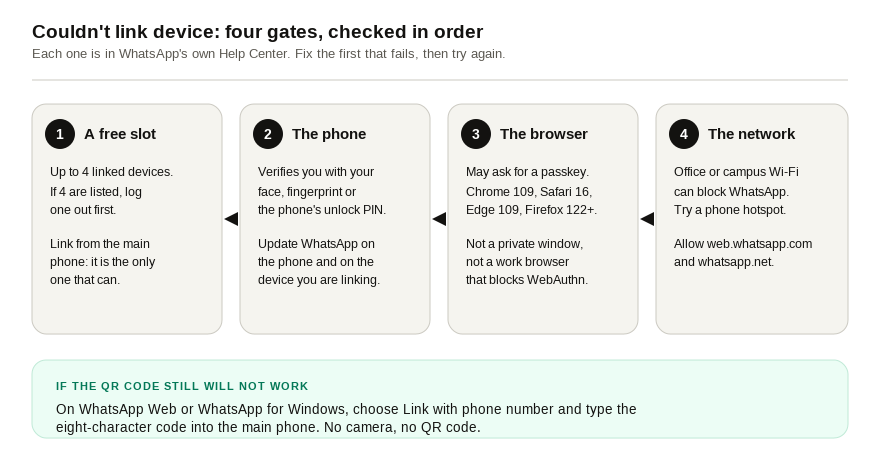
1. Is there a free slot, and are you linking from the main phone?
WhatsApp allows up to four linked devices at a time, on top of the main phone, and the main phone is the only one that can link a new device (WhatsApp Help Center). Two things follow:
- Open Linked devices on the main phone and count. If four are listed, log one out (tap it, then Log out) before linking another. Each browser that ever opened WhatsApp Web counts while it stays linked, and so does any tool that pairs by QR code. The guide to how many devices WhatsApp Business allows has the full list.
- Scan from the main phone. A tablet or a second phone that is itself linked cannot link anything else.
2. Does the main phone pass its identity check?
Before it links anything, the main phone asks you to prove it is you: your face or fingerprint if the phone has biometrics set up, or the PIN that unlocks the phone if it does not. If WhatsApp does not recognise the device you are linking, it also asks you to confirm; tap Link device, not Don't link (WhatsApp Help Center).
Then update WhatsApp on both devices. WhatsApp lists this first in its own troubleshooting, and an outdated app on either side is the quickest thing to rule out.
3. Is the browser blocking the passkey?
On WhatsApp Web, WhatsApp may ask for a passkey as an extra check. When that step fails, the link fails with it. WhatsApp's requirements:
| Works with | |
|---|---|
| Phone | iPhone on iOS 16 or later; Android 9 or later with Google Play Services |
| Browser | Chrome 109+, Safari 16+, Microsoft Edge 109+, Firefox 122+ |
| Browser settings | JavaScript and WebAuthn enabled |
And the things WhatsApp says get in the way (WhatsApp Help Center):
- A private or incognito window. Use a normal window.
- A corporate browser. Some block WebAuthn by default; try a personal browser or ask whoever manages the computer.
- Different accounts. With Chrome and an Android phone, sign in to the same Google Account on both. With a Mac and an iPhone, the same Apple account.
- Bluetooth off. Turn it on on both the phone and the computer.
- A password manager on the phone. Install its browser extension so the browser can reach the passkey.
4. Is the network letting WhatsApp through?
If WhatsApp Web shows a yellow "Computer not connected" message, or linking
keeps failing on one network, WhatsApp's connection steps apply: refresh the page, clear the browser's
cache and cookies, restart the device (off for 30 seconds), and try a
different network. WhatsApp names office and university Wi-Fi as a
common cause; a phone hotspot is the quickest test. If you run the network,
let traffic to web.whatsapp.com and .whatsapp.net through.
WhatsApp Web runs on the latest Chrome, Firefox, Edge, Opera and Safari, and not on older browsers such as Internet Explorer.
If the QR code still will not scan: link with your phone number
WhatsApp Web and WhatsApp for Windows can link without a QR code at all:
- On the computer, choose Link with phone number (or Log in with phone number), pick the country and enter the account's number.
- The screen shows an eight-character code.
- On the main phone, tap the Enter code to link new device notification, check the device name and location, and tap Confirm.
- Pass the face, fingerprint or PIN check and type the code in.
This also gets around a cracked camera, a glare-washed monitor, or a QR code the phone keeps refusing to read.
Once it is linked, keeping it linked
Linking is the first half. To stay linked, open WhatsApp on the main phone at least every 14 days, and expect WhatsApp to disconnect a device that sits unused for 30 days (WhatsApp Help Center). If your devices link fine but drop later, that is a different problem, covered in why WhatsApp linked devices keep logging out.
One warning from WhatsApp worth repeating: only link on WhatsApp's own apps and WhatsApp Web. An account can be banned, temporarily or for good, for linking to an unofficial WhatsApp app or website.
If you are linking an AI assistant
I build Replai, so read this with that in mind. Replai pairs the way WhatsApp Web does: you scan a QR code from Linked devices on the main phone, and it takes one of the four slots. Every check above applies to it the same way, the free slot most of all. If you are freeing a slot for an assistant and want to know first whether it is worth one, you can see right here what it would answer for your business:
Frequently asked questions
Why does WhatsApp say it couldn't link the device?
- WhatsApp does not publish a list of causes for that message, so work through the steps its Help Center does document: make sure fewer than four devices are linked, link from the main phone, pass the phone's face, fingerprint or PIN check, update WhatsApp on both devices, use a browser that supports passkeys outside a private window, and try a different network. If the QR code still fails, link with your phone number instead.
How many devices can I link to one WhatsApp account?
- Up to four at a time, on top of the main phone. The main phone is the only one that can register the account and link new devices. If Linked devices already lists four, log one out from the phone before linking another.
Can I link WhatsApp Web without scanning a QR code?
- Yes, on WhatsApp Web and WhatsApp for Windows. Choose Link with phone number, enter the account's number, and WhatsApp shows an eight-character code. Tap the notification on the main phone, confirm the device, pass the identity check and type the code in.
Why does WhatsApp Web ask for a passkey when I link?
- WhatsApp may ask for one as an extra security check when you link WhatsApp Web. Passkeys need an iPhone on iOS 16 or later or an Android phone on Android 9 or later with Google Play Services, and Chrome 109, Safari 16, Edge 109 or Firefox 122 or later. Private windows, and corporate browsers that block WebAuthn, can stop it working.
Does the main phone need to stay online after linking?
- No. Linked devices keep working with the phone offline, but you need to open WhatsApp on the main phone at least every 14 days to keep them connected, and WhatsApp disconnects a linked device after 30 days of inactivity.
Is it safe to link WhatsApp to a third-party website?
- Only link on WhatsApp's own apps and WhatsApp Web. WhatsApp says an account can be temporarily or permanently banned for linking to an unofficial WhatsApp app or website, even one linked in the past. Tools that connect as a linked device take one of the four slots, so check what you are linking before you scan.
Sources
- About linked devices, WhatsApp Help Center, 2026-11-23
- How to link a device, WhatsApp Help Center, 2026-11-23
- How to link a device with phone number, WhatsApp Help Center, 2026-11-23
- About passkey linking on WhatsApp Web, WhatsApp Help Center, 2026-11-23
- How to fix connection issues, WhatsApp Help Center, 2026-11-23
Keep reading
Article
How to send WhatsApp order notifications from WooCommerce, from your own number
Article
WhatsApp Business away message not working? Seven things to check
Article
WhatsApp chatbot without the Business API: how QR pairing works, what it costs and where it breaks
Tutorial
How to connect your WhatsApp number to Replai
See it answer your own customers.
Pair your number, paste in what you know, and message it from another phone. Ten minutes, no card.