Quick answer
A WhatsApp bot can take a cash-on-delivery order end to end without touching payment. It answers stock and price from your catalogue, checks the area against your delivery list, collects product, quantity, full address and phone number, reads the total including the COD fee back for a yes, then logs the confirmed order to a Google Sheet.
- Reading the total back with a delivery day removes most joke and impulse orders.
- Flag any order with no landmark or a mismatched phone number for a human call.
- The bot quotes delivery areas, charges and cut-off times only from what you wrote down.
- Starter is $19 a month for one number and 120 conversations a cycle.
Cash on delivery is how most WhatsApp orders are placed in Malaysia, Indonesia, India, Pakistan, the Gulf, Morocco and Nigeria, and it comes with a specific kind of work: confirming the order is real, the address is complete and the customer knows the total before a courier drives out. A WhatsApp chatbot can do all of that from your own product list and delivery rules, log the confirmed order to a sheet, and leave payment, which on COD happens at the door, entirely alone.
This guide is the setup for a small store. It assumes you already sell on WhatsApp and would like to stop typing "which size?" forty times a day.
What the bot should do, and what it should not
Speed is the whole reason to automate the first reply. The Lead Response Management Study run with MIT found that contacting a web lead within five minutes rather than thirty makes contact about 100 times more likely and qualification 21 times more likely, and that the odds of reaching someone fall more than ten times inside the first hour (InsideSales.com and MIT, 2007). An order enquiry at midnight follows the same curve.
It handles: product questions from your catalogue, stock and variants, price including the COD fee, whether you deliver to the customer's area, delivery days and cut-off times, collecting the order details, confirming the total, and logging the order.
It hands to a human: anything about a delivery already on the road, refunds and exchanges beyond the policy text, bulk or wholesale requests, and any order that fails the confirmation checks below.
It never does: take card details, promise a delivery time you have not written down, or invent stock.
How does a bot confirm a cash-on-delivery order?
- Answer the question. "Ada size M?" gets the stock answer from the catalogue, with the price and the COD fee in the same message.
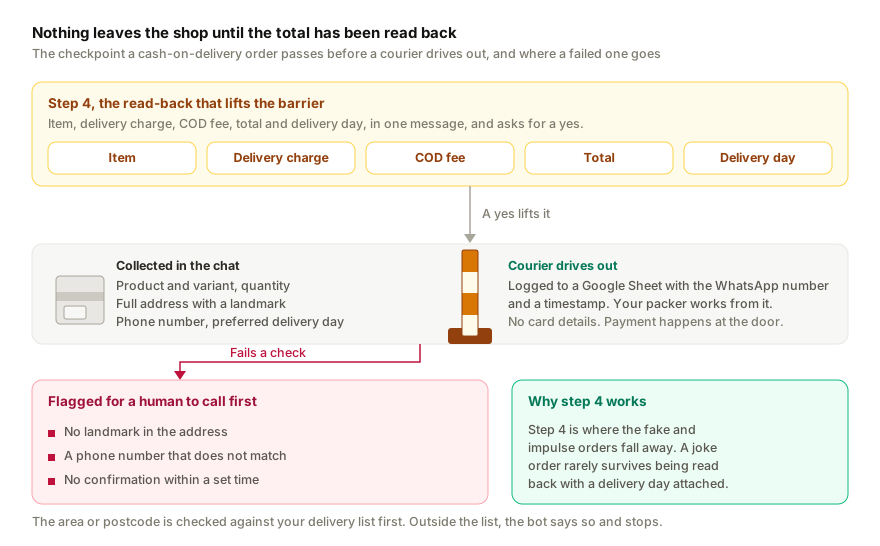
- Check eligibility. The bot asks for the area or postcode and checks it against your delivery list. Outside the list, it says so and stops.
- Collect the details. Product and variant, quantity, full address with a landmark, the phone number, and a preferred delivery day. It asks for what is missing rather than guessing.
- Read the total back. Item, delivery charge, COD fee, total, delivery day, in one message, and asks for a yes.
- Log it. On yes, the order lands in a Google Sheet with the WhatsApp number and a timestamp. Your packer works from the sheet.
- Flag the odd ones. No landmark, a phone number that does not match, or no confirmation within a set time, and the row is marked for a human to call before anything ships.
Step 4 is where the fake and impulse orders fall away. A joke order rarely survives being read back with a delivery day attached.
What does a COD bot need to know about your store?
- Catalogue: product name, variants, price, stock status. Update stock daily; the bot will quote whatever it was last given.
- Delivery rules: areas or states served, charge per area, COD fee, free-delivery threshold, cut-off time for same-day dispatch, estimated delivery days per area.
- Order policy: what happens if the customer is not home, how many delivery attempts, the returns and exchange rules.
- Payment: that COD is paid to the courier in cash or by QR, and any prepaid options you offer for customers who prefer them.
Leave out supplier prices, courier account numbers and anything you would not want quoted back.
Language and photos
Customers write in whatever they speak and send pictures instead of names. The bot should follow the language message by message, including voice notes, and read a screenshot of a product to identify it. Replai does both; our multilingual setup guide covers how to test it with mixed-language messages.
Keeping it out of existing chats
A store's number has months of live orders on it. Replai's default answers new enquiries at once and gives existing chats 5 minutes for a person to reply first. To keep the bot out of those chats entirely, choose new conversations only in Settings, so the customers you are already talking to keep talking to you, and only new enquiries go to the bot. Release an old thread to it when you want to.
What it costs
On Replai the Starter plan is $19 a month for one number and 120 conversations a cycle; Growth is $49 for up to three numbers, 300 conversations and outbound campaigns for delivery updates. A conversation is one customer thread of up to five bot replies. The AI is included, there are no per-message fees because it pairs to your existing number, and you can top up 100 conversations for $9 on Starter, $8 on Growth or $7 on Pro, in a sale week. The 7-day trial needs no card.
For the general store setup, see the e-commerce use case; for Shopify specifically, WhatsApp chatbot for Shopify stores.
Related
- WhatsApp customer service for your online store (use case)
- Running Click-to-WhatsApp ads? Here's how to answer the flood
- WhatsApp chatbot without the Business API: how QR pairing works
Frequently asked questions
Can a WhatsApp chatbot take cash-on-delivery orders?
- It can take the order details: product, variant, quantity, delivery address, phone number and preferred delivery window, check them against your COD rules, confirm the total including the COD charge, and log everything to a Google Sheet for fulfilment. It does not collect payment; on COD there is none to collect until the parcel arrives.
How does a bot reduce fake COD orders?
- By asking for the same things a good human agent asks for: a complete address with a landmark, a phone number that matches the WhatsApp number, and an explicit confirmation of the total and the delivery day. Orders that fail any of those are flagged for a human instead of shipped. That single confirmation step removes most joke orders.
Will the bot know which areas you deliver to and what COD costs?
- Only if you tell it. Paste your delivery areas, per-area charges, COD fee, cut-off times and estimated delivery days into the knowledge base and the bot quotes from that. Anything outside the list it hands to you rather than guessing.
Does it work with photos of products and voice notes?
- Yes. A customer can send a screenshot from your catalogue or a photo of an item and the bot matches it against your product list, and a voice note in Bahasa, Hindi, Arabic or French is understood and answered in the same language.
What does it cost for an online store?
- On Replai, $19 a month for one WhatsApp number and 120 conversations a cycle, where a conversation is one customer thread of up to five bot replies, or $49 for up to three numbers, 300 conversations and outbound campaigns. The AI is included, there are no per-message fees because it pairs to your existing number, and the 7-day trial needs no card.
Sources
- Lead Response Management Study, InsideSales.com and MIT, James Oldroyd, 2007
- The Short Life of Online Sales Leads, Harvard Business Review, 2011-03
Keep reading
Article
WhatsApp order confirmation and update messages: 14 templates you can copy
Article
How to send WhatsApp order notifications from WooCommerce, from your own number
Article
Meta Business Agent on WhatsApp: what it does, who can use it and how to pause it
Tutorial
Business settings explained: name, opening hours and payment QR
See it answer your own customers.
Pair your number, paste in what you know, and message it from another phone. Ten minutes, no card.